

 100% Security Verified | No Subscription Required | No Malware


 ChatGPT
 Perplexity
 Gemini
 Claude
 Grok
Grok
This TikTok Beauty Skin Tone LUTs Natural Look preset pack is built for content creators who want smooth, flattering skin without that over-filtered, plastic feel. Each filter is tuned to protect true undertones, keep details in texture, and give you a clean, glowy finish that still looks like real life.
Use these filters to quickly match different lighting situations, from soft indoor vlogs to golden hour GRWMs, while keeping your skin tones consistent across your TikTok feed. Apply them in Filmora, tweak intensity, and you are ready to post with a polished but natural aesthetic.
In this article
Soft Indoor Glow and Everyday GRWM
Warm Vanity Glow
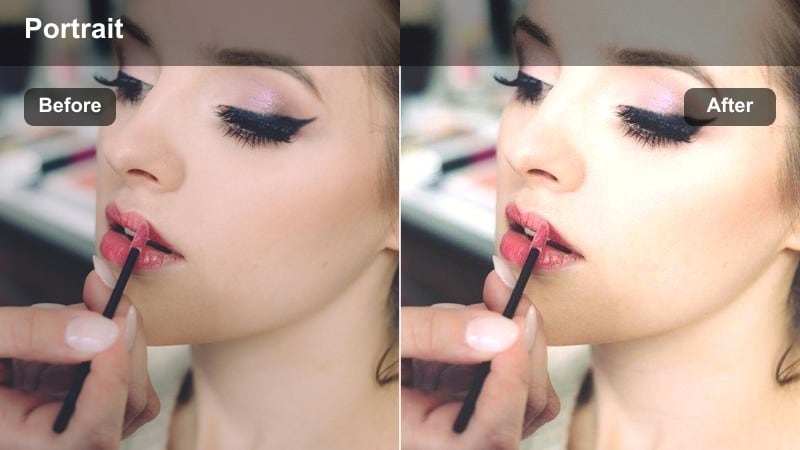
- Effect look: Subtle warm lift with gentle skin smoothing that keeps pores and features visible.
- Best for: Bathroom or vanity mirror GRWM clips with mixed warm indoor lighting.
- Editing tip: Lower intensity to around 60-70 percent if your original lighting is already very warm to avoid orange tones.
Warm Vanity Glow adds a cozy, flattering warmth that smooths skin lightly while keeping real-life detail in your pores, highlights, and contours. In Filmora, it is ideal when your bathroom or vanity lights are casting a slightly dull or uneven tone, helping your skin look softly lit instead of harsh or flat.
Apply this LUT to your GRWM clips, then dial the filter intensity slider until your undertone still looks natural, not overly tanned. If your bulbs are very yellow, adjust saturation and white balance after the preset so your face stays golden but not orange, keeping both your makeup shades and background colors believable on TikTok.
Match Every Clip with AI-Powered Skin Tone Control
Filmora uses AI-driven color tools to keep your TikTok skin tones consistent as you move between bathrooms, bedrooms, cars, and outdoor locations. Start by letting AI color balance your footage, then apply one of the TikTok Beauty Skin Tone LUTs Natural Look presets so your undertones stay protected in every scene.
This workflow cuts down on manual color grading and gives you a repeatable, on-brand look across GRWMs, storytimes, and vlogs. You get the control of pro color tools without spending hours tweaking every clip by hand.
 secure download

Preview Each Filter on Real TikTok Scenarios
Before you lock in your signature skin tone look, test these presets on the same kinds of clips you post most often, like GRWM routines, daylight vlogs, or late night chats. Watching how each filter handles motion, shadows, and close-ups will help you spot which ones feel the most natural on your face.
Use Filmora side-by-side previews to compare raw versus filtered footage and quickly see how glow, contrast, and texture shift. Once you find your favorites, save them as custom presets so you can apply your go-to look to every new TikTok in just a few clicks.
secure downloadBlend Filters and LUTs for a TikTok-Ready Finish
Filmora includes 1000 plus video filters and 3D LUTs that you can stack with these TikTok Beauty Skin Tone LUTs for more stylized aesthetics. Use a natural skin preset first to correct tone and texture, then layer a gentle creative LUT to tint your overall scene without disturbing how your face looks.
Because skin-correcting filters and creative LUTs stay separate, you can experiment with different moods for your feed while keeping your undertones stable. This makes it easy to switch from cozy indoor vibes to cinematic daylight looks without recalibrating your entire color grade each time.
secure downloadNeutral Room Soften
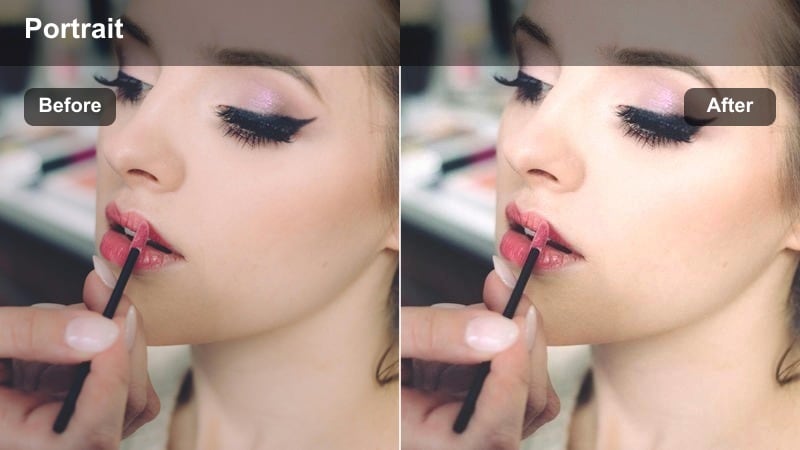
- Effect look: Clean, neutral tones with delicate contrast to smooth uneven patches while keeping color accurate.
- Best for: Bedroom or living room talking videos with soft window light or ring light.
- Editing tip: Boost midtone contrast slightly to define facial structure while leaving shadows soft for a skin-friendly finish.
Neutral Room Soften is designed for everyday bedroom or couch clips where you want your skin to look naturally polished but not obviously filtered. It neutralizes color casts from walls, bedding, and decor, gently smoothing uneven patches while leaving freckles and texture intact.
In Filmora, apply this preset to your talking clips, then fine tune midtone contrast to add subtle definition to cheekbones, jawline, and nose. If colorful decor is bouncing tints onto your face, use HSL and saturation controls to tame those background hues so the filter can keep your skin tone consistent across your entire video.
Soft Focus Desk Chat
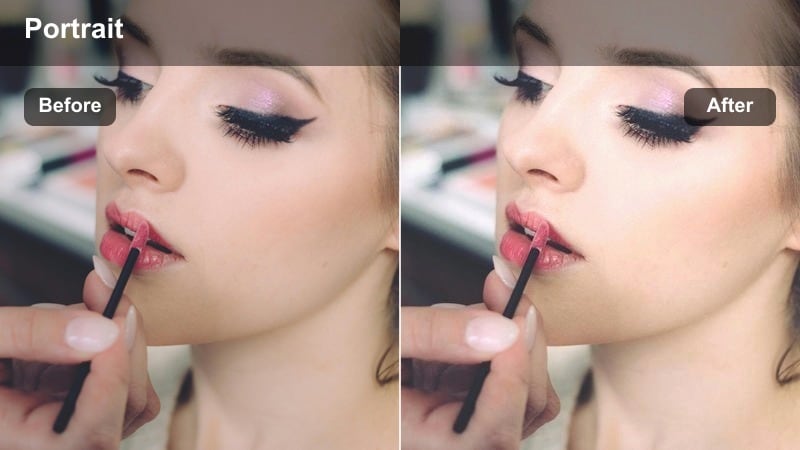
- Effect look: Gentle soft-focus on skin with slightly lifted highlights for a light, airy impression.
- Best for: Desk sit-down chats, productivity vlogs, and reaction videos in front of a laptop.
- Editing tip: Add a subtle clarity boost to eyes and brows only so the face stays sharp where it matters and smooth elsewhere.
Soft Focus Desk Chat gives your desk content a clean, airy feel by subtly blooming highlights and applying a light soft-focus to your skin. It is especially flattering for close-up talking clips filmed with a laptop, ring light, or monitor as your main light source.
After applying the LUT in Filmora, use masking tools to sharpen your eyes, brows, and mouth so viewers still feel a strong connection while the rest of your face stays softly smoothed. Avoid global blur effects and let this preset handle the glow; this keeps your video looking like it was shot on a high-quality camera rather than heavily beauty-filtered.
Daylight and Golden Hour Beauty Shots
Sunlit Window Glow
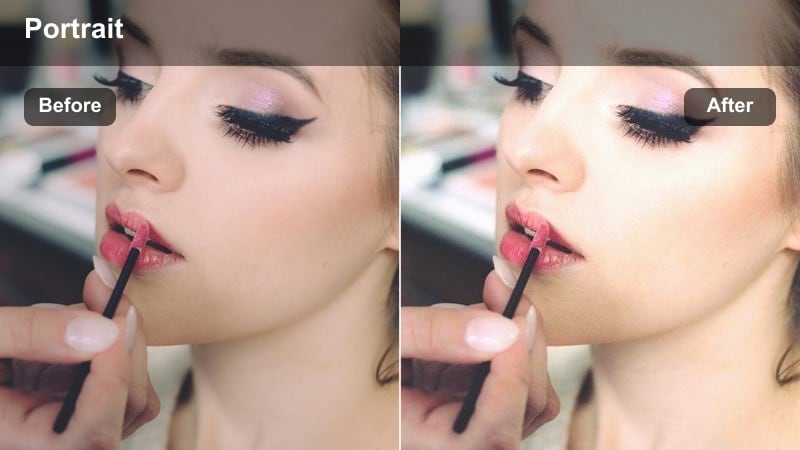
- Effect look: Bright, creamy highlights with gentle warmth to keep sunlit skin soft and flattering.
- Best for: TikToks filmed right next to a sunlit window or balcony door during the day.
- Editing tip: Pull back highlight intensity a little if your forehead or cheeks are blowing out in the brightest parts.
Sunlit Window Glow is built for those bright window clips where natural light hits your face directly. It keeps the luminous, creamy feel of daylight while protecting detail in your cheekbones, nose, and forehead so your skin does not blow out or look oily on camera.
In Filmora, apply this preset to your window-side GRWMs or outfit checks, then lower global highlights until you can see full detail in the brightest spots on your face. If the background is very bright, reduce overall exposure slightly and let the LUT bring back a soft glow, creating a clean, editorial-style daylight look perfect for TikTok.
Golden Hour Soft Amber
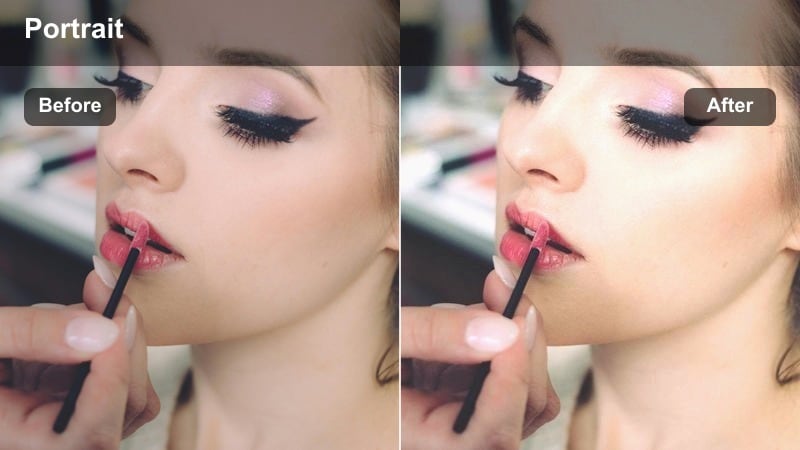
- Effect look: Warm amber tint with softened shadows that keep golden hour flattering on every skin tone.
- Best for: Outdoor TikToks filmed during sunset or sunrise with direct or side sun.
- Editing tip: If your skin leans too orange, pull the orange hue slider slightly toward yellow and reduce saturation a touch.
Golden Hour Soft Amber enhances the natural warmth of sunrise and sunset without pushing your skin into unnatural orange territory. It smooths contrast in the shadows and adds a subtle amber wash that flatters a wide range of undertones while keeping your features defined.
Once the LUT is applied in Filmora, check your skin channel in HSL and nudge the orange hue toward yellow if the sun is extra intense. Keep saturation moderate and let the real golden hour light be the star; this balance gives you cinematic, scroll-stopping TikToks that still look like your true skin tone in real life.
Soft Day Vlog Neutral
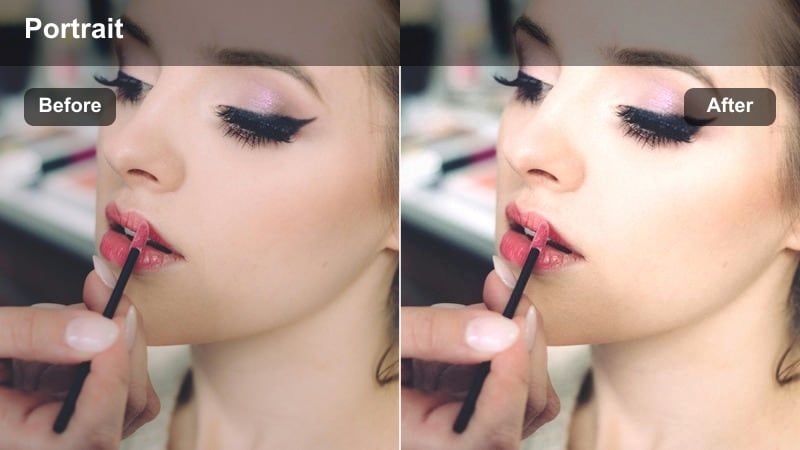
- Effect look: Neutral daylight balance with lifted mids to flatter skin in casual day-in-the-life vlogs.
- Best for: Errand vlogs, casual walking shots, and car TikToks in midday light.
- Editing tip: Add a slight vignette and subtle saturation boost only to skin tones to keep the focus on your face as you move.
Soft Day Vlog Neutral is designed for unpredictable midday lighting where you are moving between sun, shade, and car interiors. It keeps colors true and lifts midtones just enough to flatter your skin without fighting the stronger contrasts of daytime light.
In Filmora, use this LUT as a base for your day-in-the-life edits, then add a gentle vignette and selective skin saturation so your face stays the focal point even when the background is busy. If different clips vary slightly in color, use Filmora color matching first, then apply this preset for a smooth, consistent TikTok vlog aesthetic.
Cool Tones and Low-Light Night Beauty
Cool LED Soft Balance
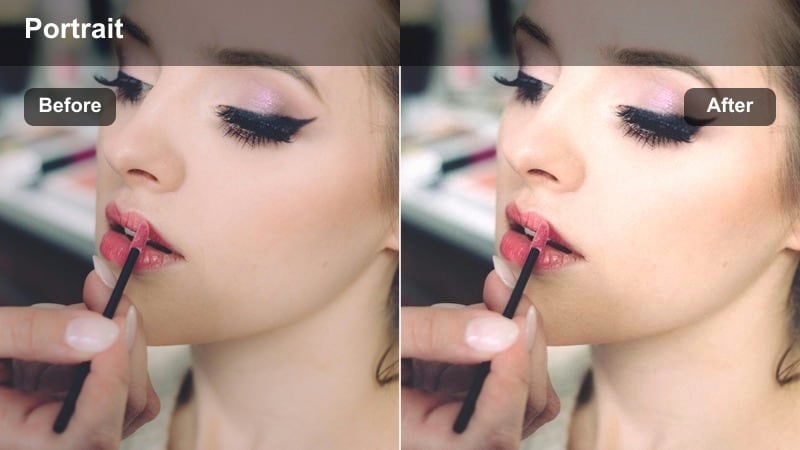
- Effect look: Soft cool cast that neutralizes harsh blue from LED lights while gently brightening skin.
- Best for: TikToks filmed under cool LED strips, monitors, or neon accents.
- Editing tip: Use a small warmth adjustment after the filter if your skin looks too pale under intense blue or purple lighting.
Cool LED Soft Balance helps your skin look calm and healthy in setups dominated by blue, purple, or cyan LED lighting. It tones down harsh blue spill on your face, lifts overall brightness slightly, and keeps background LEDs vivid so the scene still feels modern and edgy.
After applying the LUT in Filmora, add a touch of warmth and adjust HSL so most corrections stay on your skin tones and not the neon accents. This gives you a cinematic LED room vibe where your face remains flattering and readable, perfect for lip syncs, GRWMs, and gaming-style TikToks.
Night Mode Soft Glam
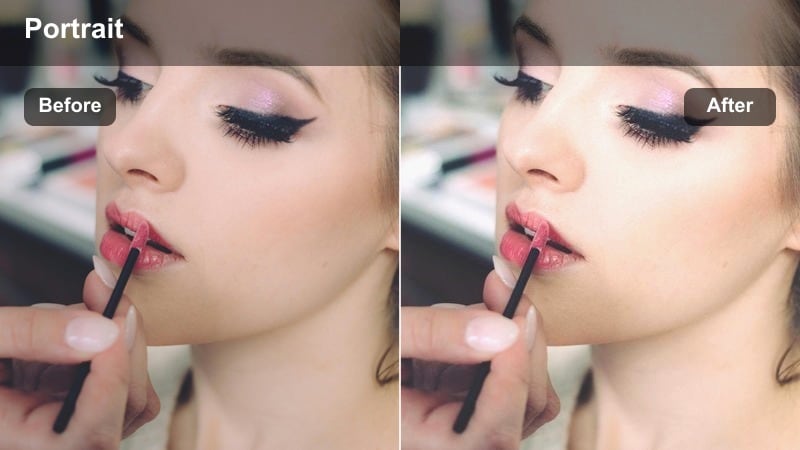
- Effect look: Lifted shadows with gentle glow on highlights to keep makeup and skin visible in dark scenes.
- Best for: Night-out GRWMs, club transitions, and low-light mirror TikToks.
- Editing tip: Increase noise reduction slightly but avoid over-smoothing so nighttime grain looks cinematic, not muddy.
Night Mode Soft Glam is made for dim rooms, night-out content, and club transitions where you want your makeup to pop without blasting the exposure. It brightens shadows just enough that your liner, contour, and highlight stay visible while preserving the moody night atmosphere.
In Filmora, raise your camera exposure so your face is correctly lit, then drop this preset on top and fine tune noise reduction to keep grain subtle but present. Adjust highlight roll-off if needed so your highlighter beams softly rather than appearing like sharp white streaks on your cheeks and nose.
Screen Light Soft Neutral
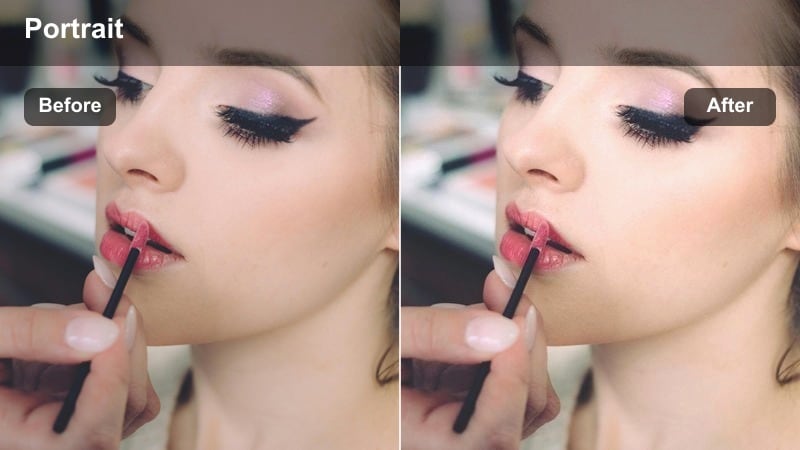
- Effect look: Balances harsh screen light and softens shadows for cozy late-night storytime clips.
- Best for: In-bed TikToks lit only by your phone or laptop screen at night.
- Editing tip: Add a minor fade in the blacks to keep shadows from crushing and maintain a soft, intimate feeling.
Screen Light Soft Neutral is perfect for late night, in-bed storytimes where your phone or laptop screen is your only light. It calms down the blue cast from your device, gently opens up shadows, and keeps your skin tone looking soft and neutral instead of patchy or ghostly.
When editing in Filmora, apply this LUT, then slightly fade your blacks and adjust exposure until your face feels cozy and readable without losing that intimate, low-light mood. If your screen is very bright, dim it during filming to avoid hotspots, then let the preset smooth out remaining contrast for a cinematic bedtime vibe.
Creator Feed Consistency and Signature Look
Signature Soft Neutral
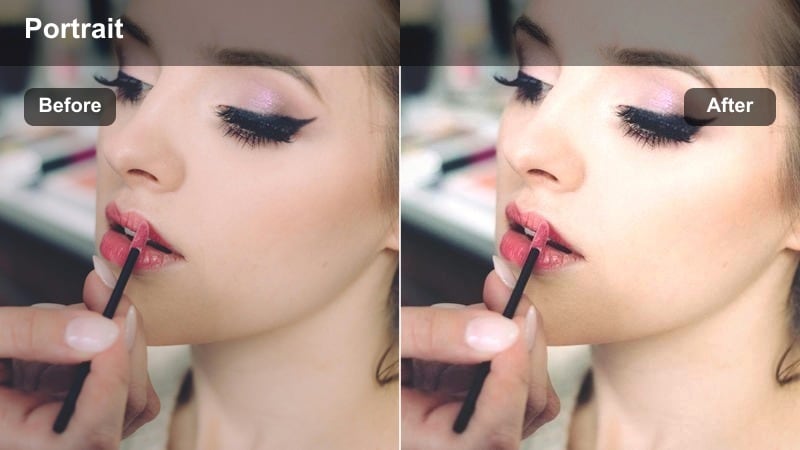
- Effect look: Gentle skin smoothing, neutral color balance, and mild contrast for a timeless everyday style.
- Best for: Creators who want one go to filter to unify all their TikTok beauty and lifestyle content.
- Editing tip: Apply this filter at a lower intensity as a base on every clip, then layer scene specific adjustments on top.
Signature Soft Neutral is your all-rounder preset for building a recognizable TikTok aesthetic. It lightly softens skin, evens color, and adds a subtle contrast curve that works across indoor, outdoor, and low-light clips without pushing your tone too warm or too cool.
Use it in Filmora as a low-intensity base on every video, then tweak exposure, white balance, or secondary LUTs depending on the scene. Over time, this gives your entire feed a cohesive, professional look where followers recognize your videos instantly, even before seeing your username.
Soft Contrast Storytime
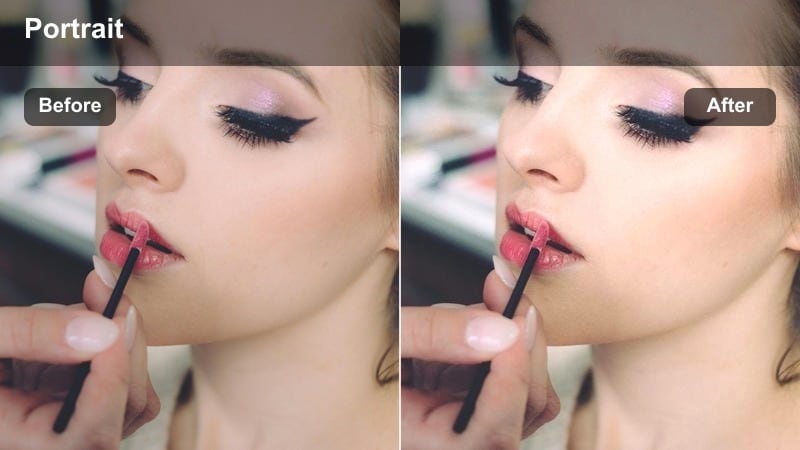
- Effect look: Lowered contrast with gentle highlight roll-off to create a calm, intimate mood for longer talks.
- Best for: Storytime TikToks, advice videos, and honest chats about beauty and skin.
- Editing tip: Keep saturation moderate and let facial expression do the work, using this filter mainly for comfort and clarity.
Soft Contrast Storytime is tuned for longer-form TikToks where viewers are watching you talk for a while. By softening contrast and rolling off highlights, it keeps your skin and overall frame easy on the eyes so audiences can focus on your story, not your lighting.
Apply this preset in Filmora to seated chats and Q and A clips, then resist the urge to push saturation or sharpness too high. Pair it with a steady framing and minimal background motion, and your voice, expressions, and real skin texture will naturally become the center of attention.
No Makeup Real Skin
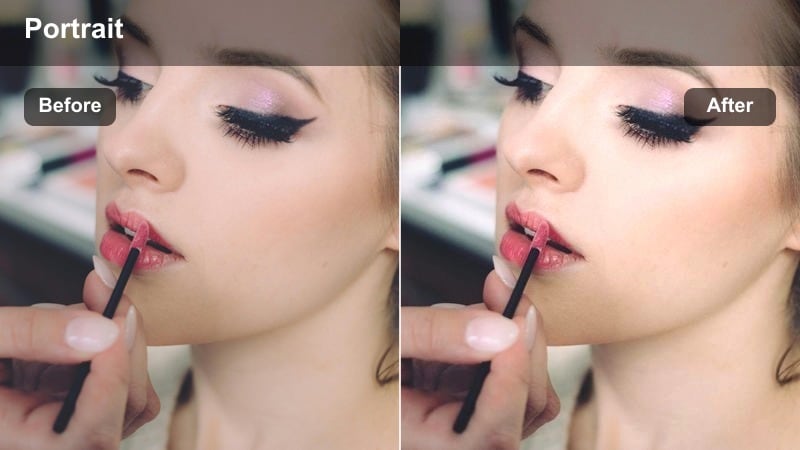
- Effect look: Very light touch filter that evens tone but keeps blemishes, freckles, and texture realistically visible.
- Best for: No-makeup days, skin journey updates, and honest skincare progress TikToks.
- Editing tip: Drop sharpening slightly on the overall image and rely on this filter to keep details soft but truthful.
No Makeup Real Skin is made for vulnerable, honest content where you still want your video to look polished. It gently evens out color and softens harsh shadows while leaving real features like freckles, acne, and texture visible so your audience can see genuine progress over time.
In Filmora, keep this LUT at low intensity, slightly reduce global sharpening, and use flattering diffused light from a window or softbox. This combination gives your clips a high-quality, cinematic feel while staying true to what your skin actually looks like, building trust with your TikTok community.
Tips for Using Tiktok Beauty Skin Tone Luts Natural Look Filters in Filmora
- Always lock white balance on your camera before applying these filters so your skin tone does not shift mid clip.
- Adjust filter intensity first before changing any other sliders; small changes often keep the most natural look.
- Use a clean, diffused light source like a window or softbox to give these skin tone filters the best starting point.
- If your skin starts to look too smooth, add a little grain or texture so it feels more like a high quality camera and less like a beauty app.
- Save different versions of the same preset for day, night, and LED lighting so you can edit fast while staying consistent.
- Check your videos on multiple devices to make sure your skin tone looks natural on both bright and dim screens.
With the TikTok Beauty Skin Tone LUTs Natural Look preset pack, you can keep your skin flattering, consistent, and true to life across every type of TikTok video you film.
Load these filters in Filmora, fine tune them to your face and lighting, and build a natural, recognizable aesthetic that supports your content instead of overpowering it.
secure download