

 100% Security Verified | No Subscription Required | No Malware


 ChatGPT
 Perplexity
 Gemini
 Claude
 Grok
Grok
These TikTok food video LUT-style filters for street food are designed to make grilled skewers, loaded fries, and sizzling woks pop right on viewers For You Pages.
Whether you film at night markets, food trucks, or busy street stalls, use these presets to enhance color, crunch, and steam so every shot feels hot, fresh, and ready to eat.
In this article
Golden Hour Street Stalls and Sunlit Bites
Crispy Glow
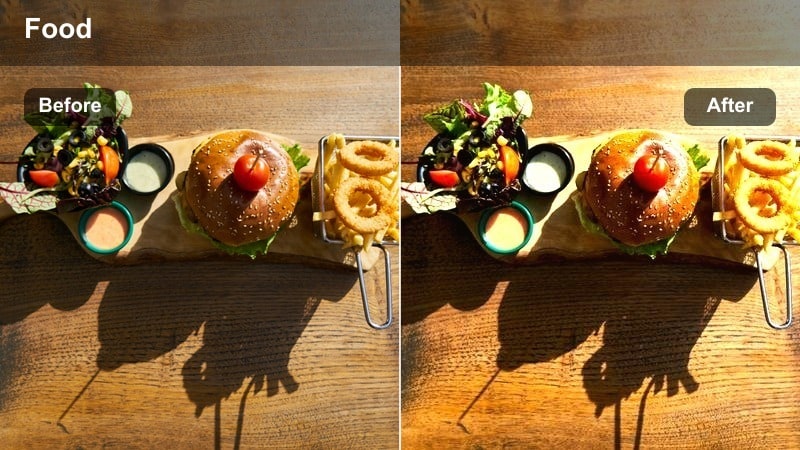
- Effect look: Warm, crunchy highlight boost with golden contrast on fried snacks
- Best for: Sunset shots of fried chicken, tempura, and crunchy street bites
- Editing tip: Lower exposure slightly after applying the filter to keep batter texture sharp and avoid blown-out highlights on glossy sauces.
Crispy Glow is built to make anything battered and fried look like it just came out of the oil. In Filmora, this filter wraps your street food clips in a subtle golden tone, lifting highlights around the crust while keeping midtones rich so crumbs, ridges, and flaky bits stay sharp. It is especially strong during golden hour, when the natural sunlight mixes with stall heat lamps and you want to keep that appetizing, just-fried impression on TikTok.
Drop Crispy Glow onto your clip, then use Filmora s exposure and highlight sliders to fine tune the look so bright sauces and reflections do not blow out on mobile screens. Add a touch of clarity and sharpen only the food area with masks to emphasize texture on fried chicken, tempura, or croquettes. Pair this with slow-motion bite shots or pulls apart to show steam breaking through the crust, and you have a scroll stopping food close up ready for the For You Page.
Match Your Street Food Vibe with AI-Powered Color
Filmora s AI color tools help you quickly match these TikTok food video LUT-style filters to your exact street food scene, from neon night markets to sunny food trucks. Instead of manually tweaking every slider, you can let AI analyze each shot and give you a clean, balanced base.
Once the AI pass is done, adjust warmth and saturation to taste so every skewer, dumpling, and drink pops, then stack your favorite food filters on top. This workflow keeps your whole street food series consistent even when you film at different stalls and times of day.
 secure download

See the Filters in Action on Real Street Food Clips
To find the perfect LUT style for your next TikTok, drop several quick market shots into a Filmora timeline and audition each preset on 3 to 5 second clips. Scrub the playhead to see how colors react to different lighting, from hot grill flames to cloudy street corners.
When you discover a combo you love, save it as a custom preset so every new street food vlog shares the same recognizable color style. This lets your followers instantly know it is your video before they even read the caption.
secure downloadBuild a Signature TikTok Street Food Look
Filmora includes 1000 plus video filters and 3D LUTs you can stack with these street food presets to create a signature TikTok look. Add light leaks for dreamy alley moments, a hint of grain for cinematic nights, or a teal-and-orange LUT for citywide tours that still keep the food in focus.
Once you dial in a combination that fits your brand, save it as a reusable preset so every new street food upload stays on theme in one click. This helps your channel feel polished and binge worthy without adding extra editing time.
secure downloadSunlit Sizzle
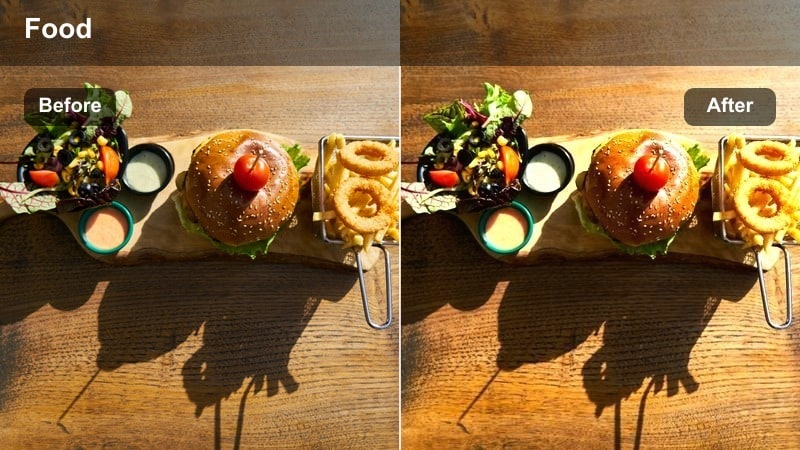
- Effect look: Bright, clean warmth with gentle saturation for colorful street dishes
- Best for: Daytime market walks, colorful plates, and overhead food shots
- Editing tip: Boost saturation in reds and yellows to make sauces and spices stand out while keeping whites neutral for clean text overlays.
Sunlit Sizzle brings a clean, daylight friendly glow to your street food content. In Filmora, it lifts exposure just enough to feel fresh while adding a soft warmth that flatters colorful spreads like curries, salads, and snack platters. Unlike harsh filters, it keeps whites close to neutral so you can add bold TikTok captions without clashing against the plate or table.
Apply Sunlit Sizzle to your overhead and flat-lay shots, then use the HSL or color adjustment tools to push reds and yellows for sauces, chilies, and fried toppings. Keep contrast moderate so details remain visible even on smaller mobile screens. This makes your walk-through market montages feel light, organized, and inviting, perfect for recipe breakdowns or price guides in the caption.
Market Breeze
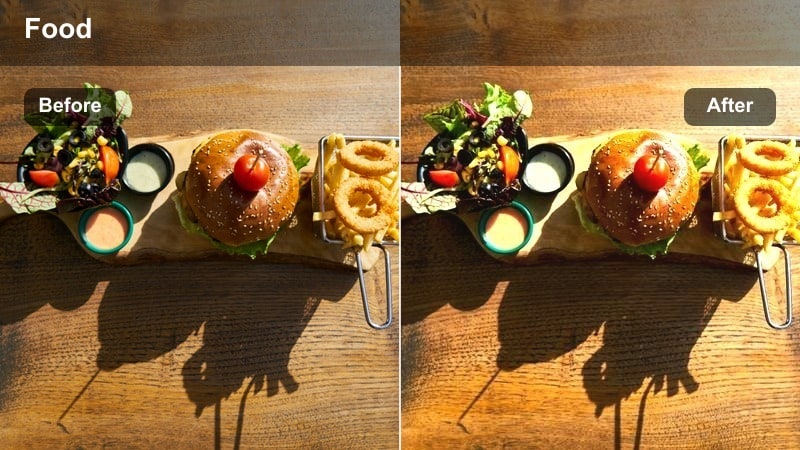
- Effect look: Soft, airy contrast that smooths harsh light while keeping food colors natural
- Best for: Busy daytime markets with mixed light and handheld vlog-style TikToks
- Editing tip: Add slight vignette to keep focus on the plate when filming crowded stalls and walkthroughs.
Market Breeze is designed for those hectic, high contrast market scenes where sunlight and shade mix in the same frame. When you apply it in Filmora, it softens the overall contrast, taming blown out spots while still preserving natural food colors. This makes your handheld POV clips feel easier on the eyes without sacrificing the real market energy.
Use Market Breeze on walking shots where you are carrying a plate or filming vendors as you move from stall to stall. Add a subtle vignette and a bit of stabilization so the viewer s attention stays locked on the food, not the background chaos. Combined with slower cuts and gentle transitions, this filter turns crowd noise and visual clutter into a relaxed, watchable street food experience on TikTok.
Neon Night Markets and Late-Night Snacks
Neon Noodles
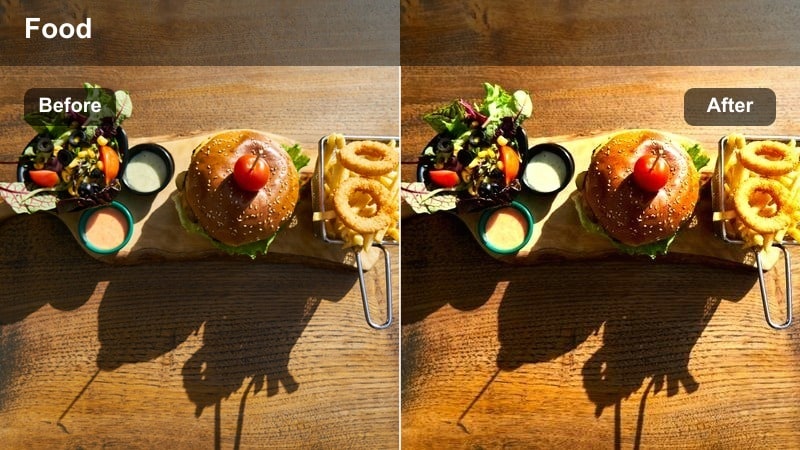
- Effect look: Punchy neon contrast with deep blacks and glowing highlights on steam and lights
- Best for: Night noodle stalls, wok flames, and moody street corners
- Editing tip: Drop shadows slightly to deepen the night mood and keep bright signage from overpowering the food in frame.
Neon Noodles gives your nighttime street food videos a bold, cyberpunk flair while keeping the noodles and toppings clearly visible. In Filmora, it deepens blacks and boosts contrast so neon signs and traffic lights glow around your subject, highlighting steam from hot bowls and sizzling woks. The result is a moody, cinematic look that still feels delicious rather than overly stylized.
Apply Neon Noodles to clips shot near strong colored lights, then gently lower the shadow slider to build a richer night atmosphere. Use masking to protect skin tones and noodle details if the signage is extremely bright. Pair the filter with slow-motion tosses, steam reveals, and quick cuts synced to trending TikTok audio to build a dramatic food story in just a few seconds.
Midnight Skewers
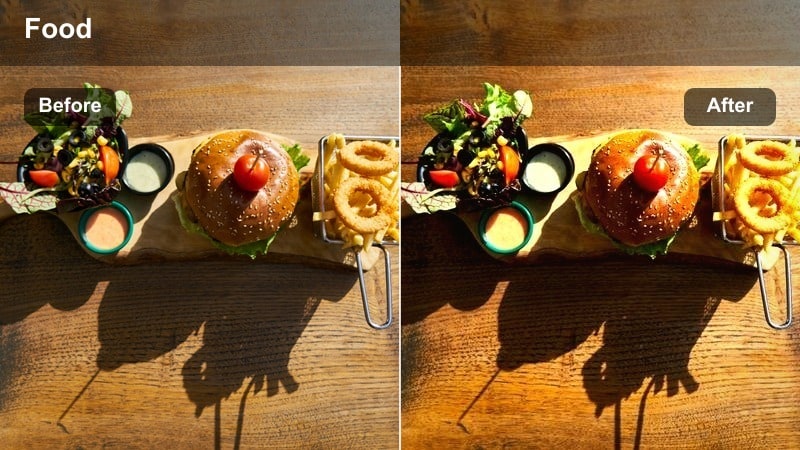
- Effect look: Moody, cinematic blue shadows with warm highlights on grilled food
- Best for: Grill stands, kebab skewers, and smoky late-night snacks
- Editing tip: Increase warmth in midtones to keep meat and glaze looking delicious while the background stays cool and cinematic.
Midnight Skewers is crafted for smoky grills, kebab stands, and any street food cooked over open flame after dark. In Filmora, it cools down shadows to a cinematic blue while allowing the flames and meat to stay warm and inviting. This color contrast naturally draws the viewer s attention to glowing skewers, drips of rendered fat, and glossy marinades.
Drop this filter onto close-ups of the grill and vendor hands, then nudge midtone warmth up so the food does not look dull against the cooler background. Use cutaways between wide establishing shots and tight macros to build a mini narrative, and consider adding a bit of Filmora s built-in vignette or lens blur to isolate the skewers. The result is a polished, film-like late night vibe perfect for TikTok street food tours.
Street Flare
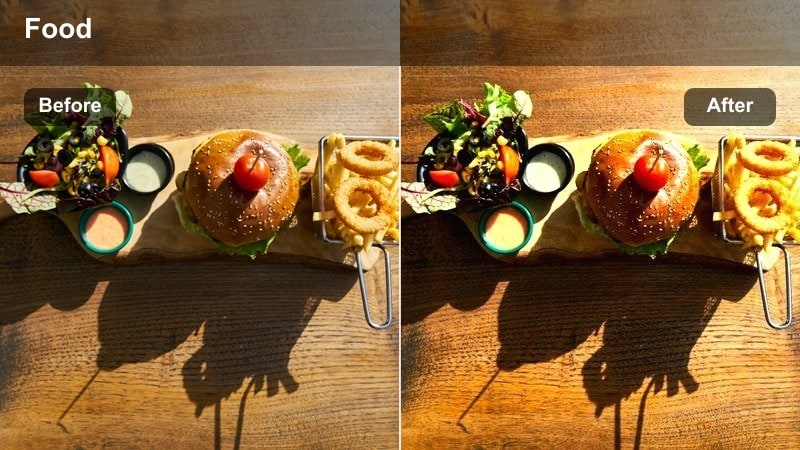
- Effect look: High-contrast night look with lifted highlights and light flares on reflective sauces
- Best for: Close-ups of glossy dishes, street burgers, and saucy snacks at night
- Editing tip: Pull down overall saturation a touch after the filter to keep neon colors from distracting from the food.
Street Flare is all about turning reflections into eye candy. When you apply it in Filmora, it raises highlights and deepens contrast so shiny sauces, burger patties, and glazed wings catch every nearby light source. Neon signs, car headlights, and stall bulbs become stylistic flares that make your close ups feel premium and cinematic.
Use Street Flare on macro food shots filmed near small point lights, like fairy lights or distant traffic. After applying the filter, gently reduce global saturation so colorful flares do not overpower the main dish. Combine this with slow drips, cheese pulls, or squeeze shots of sauce in real time or slight slow motion, and sync to music beats for a hyper satisfying TikTok loop.
Colorful Snack Corners and Handheld Bites
Grab-and-Go Pop
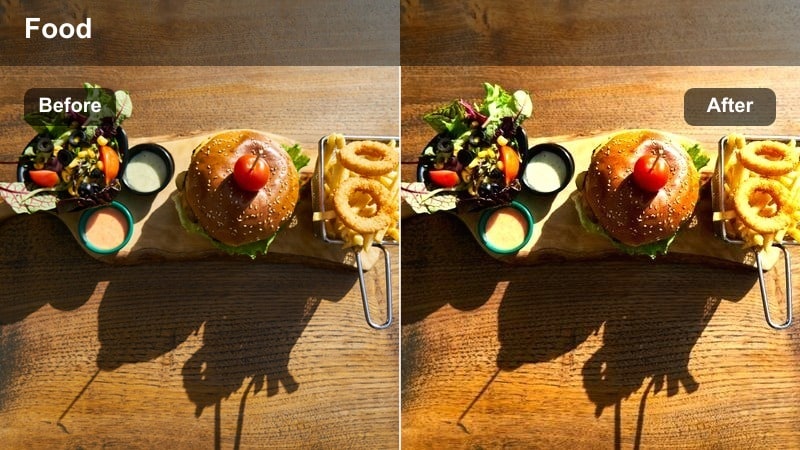
- Effect look: Bold saturation and sharp micro-contrast for handheld snack shots
- Best for: POV bites, walking shots, and quick snack reveals on TikTok
- Editing tip: Stabilize your clip slightly and crop tighter on the food so the punchy colors lead the viewer s eye.
Grab-and-Go Pop is tailored for quick snack content filmed on the move. In Filmora, it boosts color saturation and fine contrast so fries, bao, tacos, and skewers stay crisp even during fast POV movements. The background falls slightly softer while the food remains vibrant, which works well for the vertical frame and short attention spans on TikTok.
Apply this filter to walking shots and snack reveals, then use Filmora s stabilization to smooth out footsteps without making the video feel artificial. Crop or scale the clip so the snack fills more of the frame, and add quick jump cuts or match cuts to sync with beat-heavy audio. This combination keeps energy high, while the saturated look makes your snack the instant focal point of the For You Page.
Sauce Splash
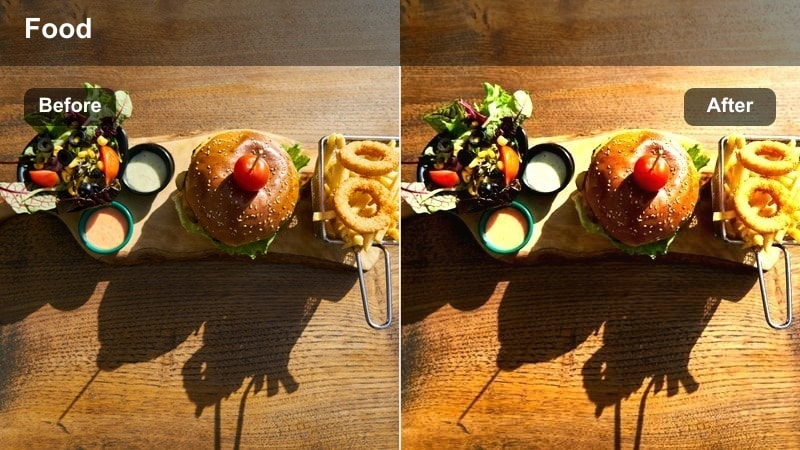
- Effect look: Rich reds and yellows with slightly softened skin tones for messy bites
- Best for: Close-up dips, sauce pours, and slow-motion dripping shots
- Editing tip: Slow clips down to 0.5x speed and apply this filter to highlight every drop without making the scene look oversaturated.
Sauce Splash is built to emphasize every dip, drizzle, and drip. In Filmora, this filter intensifies warm hues like reds, oranges, and yellows, making chili oils, ketchup, curry, and cheese look thick and irresistible. At the same time, it softens skin tones slightly so messy fingers and close-up hands stay flattering and do not distract from the food.
Use Sauce Splash on macro shots of sauces and toppings, especially when you are shooting in slow motion. Set your clip speed around 0.5x, then apply the filter and make small saturation adjustments if needed to prevent color clipping. Add tight sound design with amplified dips and squishes, and trim the clip to loop cleanly for maximum replay value on TikTok.
Street Stack
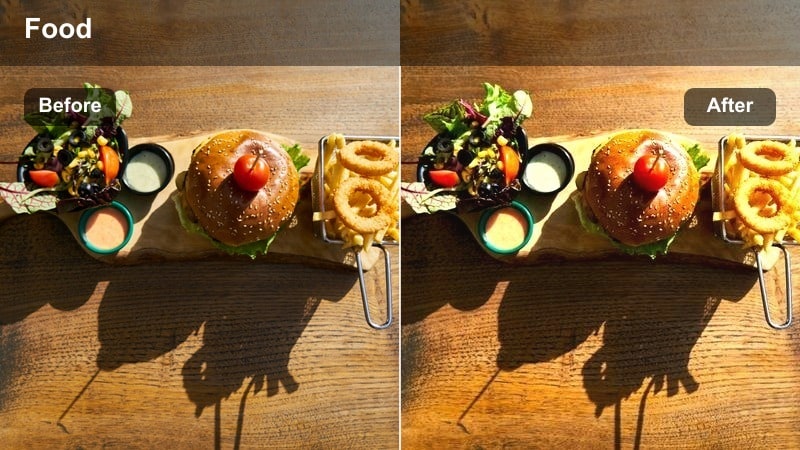
- Effect look: Balanced contrast with a slight matte finish for stacked snacks and towers
- Best for: Burger stacks, dessert towers, and tall street food creations
- Editing tip: Use a lower angle and a small amount of tilt to exaggerate height, then apply the filter to keep details clean and sharp.
Street Stack is made for towering burgers, dessert stacks, and overloaded trays that rely on height for impact. In Filmora, it adds a subtle matte finish and balanced contrast so multilayered textures stay readable without harsh shine. This aesthetic feels modern and slightly cinematic, helping your tall creations stand out in a busy TikTok feed.
Film low and slightly tilted to exaggerate the size of the stack, then apply Street Stack to the clip. Use Filmora s keyframe zoom to add a gentle push-in during a cheese pull or sauce pour, and keep the background a bit blurred with shallow depth of field if possible. The combination of angle, matte finish, and controlled motion creates a hero shot that encourages viewers to pause and analyze every layer.
Moody Alley Eats and Hidden Street Spots
Alley Ember
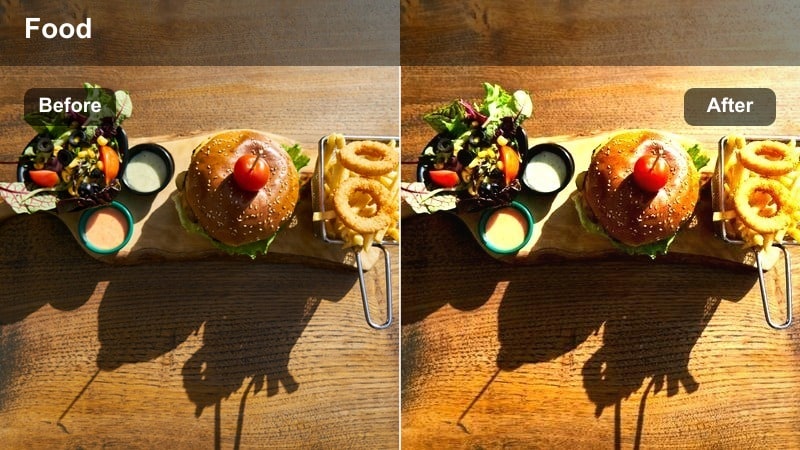
- Effect look: Warm, low-light contrast with glowing highlights on grills and lanterns
- Best for: Hidden alley stalls, charcoal grills, and lantern-lit food shots
- Editing tip: Reduce noise slightly after applying to keep shadows clean while preserving the warm glow on coals and flames.
Alley Ember brings out the cozy, intimate side of street food filmed in narrow lanes and backstreets. In Filmora, it adds warm, focused contrast to lanterns, grills, and glowing coals while keeping surrounding shadows rich and dark. This creates a pocket of warmth around the food, making each plate feel like a secret local find.
Apply Alley Ember to low light clips and then use Filmora s noise reduction carefully so texture remains intact. Frame shots so light sources sit just outside the edge of the frame, wrapping warm tones around the dish. Mix in close-ups of the grill, hands plating food, and candid reactions to build an immersive mini story that feels like a personal recommendation rather than a generic food ad.
Shadow Spice
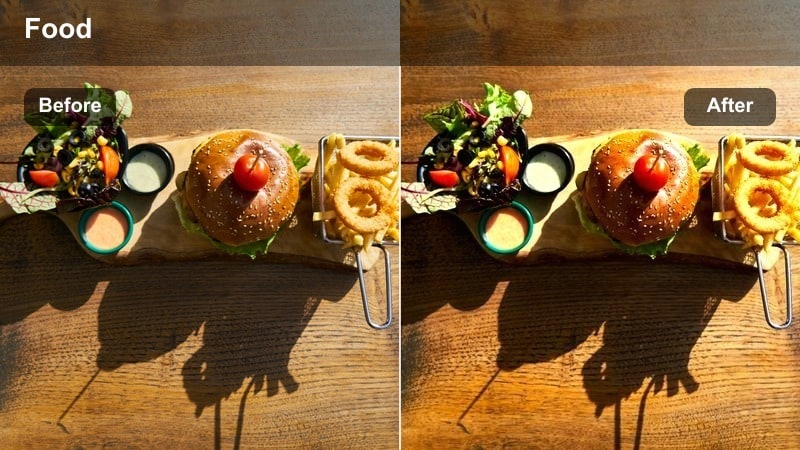
- Effect look: Deep shadows with selective saturation on spices and garnishes
- Best for: Spice-heavy dishes, chopped herbs, and low-key plating in narrow streets
- Editing tip: Mask the food area and lift exposure slightly on the plate to avoid losing detail while keeping backgrounds moody.
Shadow Spice is ideal for plates loaded with herbs, chilis, and powdered spices shot in darker environments. In Filmora, the filter deepens overall shadows while selectively boosting saturation in key colors, making garnishes and seasonings pop dramatically against a near black background. This gives your dish a tactile, flavor-forward look that plays well in quick TikTok cuts.
Use Shadow Spice on tight close-ups of spice heavy foods, then add a mask to gently brighten only the plate or bowl area. This keeps the food readable while maintaining a moody alley vibe around it. Combine the look with slow seasoning shots and lingering final frames so viewers can really study the textures before you cut to the next scene or overlay text.
Secret Spot Soft
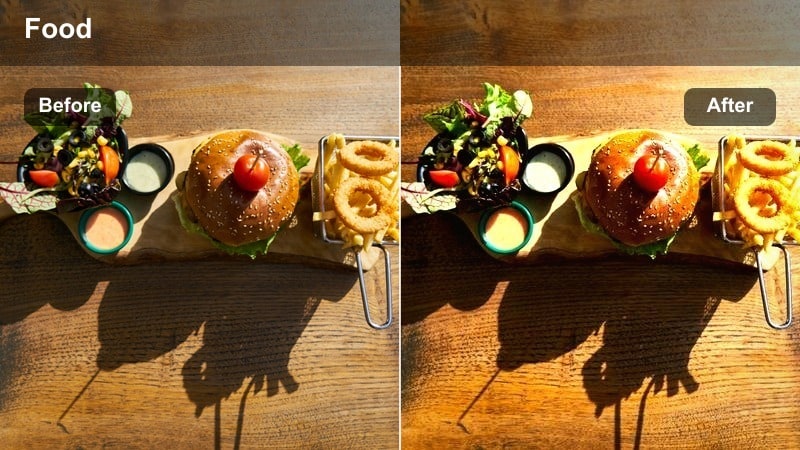
- Effect look: Soft, low-contrast look with gentle warm tones for cozy hidden spots
- Best for: Small corner tables, solo food dates, and quiet side-street snacks
- Editing tip: Lower sharpness a touch to keep faces flattering while the food remains the main detail in focus.
Secret Spot Soft adds a calm, romantic tone to quiet food moments away from the main street. In Filmora, it reduces contrast slightly and wraps scenes in gentle warmth, creating a softer look for faces and backgrounds while still keeping the dish detailed. This is perfect for story driven TikToks where you talk to the camera about a favorite stall or hidden snack bar.
Apply this filter to A-roll clips where you are seated at a small table, then reduce overall sharpness a little so skin and bokeh look smoother. Use depth of field to keep the food sharp and your surroundings gently blurred, and layer in soft background music or voiceover. The result is a cozy, personable vibe that invites viewers to feel like they are sharing a quiet meal with you in a secret corner of the city.
Tips for Using Tiktok Food Video Luts For Street Food Filters in Filmora
- Shoot a quick gray or white surface at each stall so you can do a fast white balance correction in Filmora before applying any food-focused filter.
- Keep your shutter speed high when capturing sizzles, chops, and pours, then stabilize in Filmora to make every motion feel crisp and intentional.
- Use one set of filters for A-roll talking clips and another for B-roll food shots, but match overall warmth and saturation so the TikTok feels cohesive.
- Prioritize natural sounds like grilling, chopping, steam, and crowd noise, and mix your music lower so the visuals and audio support each other.
- Plan 3 to 4 signature angles, such as overhead spreads, bite close-ups, and grill macros, and reuse them with the same filters to build a recognizable style.
- Test each LUT-style filter on 3 to 5 second chunks of footage and compare side by side in Filmora s timeline before committing to a full project look.
- Save your favorite filter, LUT, and adjustment stack as a preset in Filmora so you can apply your street food aesthetic in one click across multiple clips.
These TikTok food video LUT-style filters for street food help you turn everyday stalls, carts, and markets into scroll-stopping, cinematic clips without complicated grading. From golden hour fries to neon noodle nights, you can match each preset to the exact vibe of your location.
Experiment with a few presets, save your favorites in Filmora, and build a consistent street food aesthetic that followers recognize the moment your video appears on their For You Page. With the right mix of color, texture, and motion, every bite you film can look as irresistible as it tastes in real life.
secure download