

 100% Security Verified | No Subscription Required | No Malware

YouTube color psychology often starts with red, white, and black because those tones feel urgent, familiar, and easy to notice at a glance. In thumbnails, banners, intros, and end screens, the right YouTube palette can help a channel look sharper, more clickable, and more memorable across every platform.
This guide collects YouTube color palette combinations with HEX codes for creators and Filmora users, so you can build stronger branding, cleaner edits, and better looking video graphics. Whether you want bold energy, a minimal setup, or a cinematic finish, these palettes can help shape the visual tone of your content.
In this article
Bold And High-Energy Youtube Color Palette Ideas
Creator Red Rush

- HEX Codes: #ff0000, #c40000, #111111, #ffffff
- Mood: Bold, urgent, and attention-grabbing
- Use for: Use this palette for thumbnails, subscribe animations, and fast-paced channel branding.
Creator Red Rush captures the familiar power of YouTube red with a clean black and white structure. The result feels immediate and high contrast, which makes it a smart choice for creators who want strong visual impact.
This palette works especially well for thumbnail text, intro slates, and branded motion graphics. It also helps a channel feel consistent across edits, especially when red is used as the main call to action color.
Pro Tip: Build Instant YouTube Recognition With Filmora
Creator Red Rush is ideal when you want every frame to feel like part of the same channel identity. In Filmora, you can reuse the same red accents for titles, subscribe prompts, and lower thirds so your intros, b-roll cuts, and short-form promos all match.
That kind of consistency makes your branding easier to remember. Filmora also makes it simple to keep the red tones clean and balanced, so they stand out without overwhelming the rest of the edit.
AI Color Palette
If you have a reference thumbnail or a red, black, and white brand board, Filmora's AI Color Palette feature can pull those tones into your whole project. It is a fast way to make an edit, intro, and social cut all feel visually aligned.
Use a still frame or reference image from your channel kit, then apply the palette across clips to keep your reds consistent and your dark backgrounds smooth.
 secure download

HSL, Color Wheels & Curves
With a palette this bold, Filmora's HSL, color wheels, and curves tools can help you keep the reds punchy instead of muddy. You can deepen shadows with curves, lift the whites for cleaner contrast, and fine-tune saturation so the palette stays strong on different screens.
For a more cinematic creator look, reduce harsh highlights and push the blacks slightly cooler. That gives your thumbnails, intro cuts, and overlays a sharper finish while still keeping the YouTube red visually dominant.
secure download1000+ Video Filters & 3D LUTs
Filmora's video filters and 3D LUTs can quickly stylize Creator Red Rush into something more polished, more dramatic, or more social-first. A warm filter can make the red feel more aggressive, while a clean LUT can keep the whites bright and the blacks crisp.
That makes it easy to match the palette to gaming edits, launch videos, and channel trailers without rebuilding every look from scratch.
secure downloadThumbnail Pop Heat
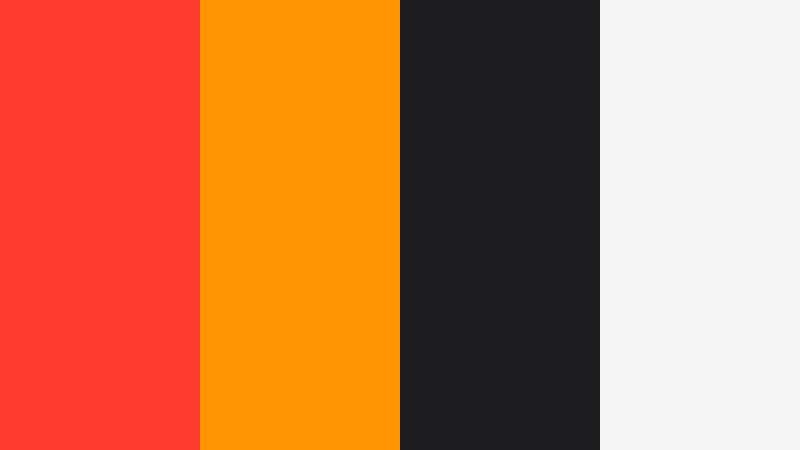
- HEX Codes: #ff3b30, #ff9500, #1d1d1f, #f5f5f5
- Mood: Vibrant, punchy, and energetic
- Use for: Use this palette for thumbnail text, motion graphics, and bold social promos.
Thumbnail Pop Heat combines bright red-orange energy with a dark base, so it feels loud without losing control. The palette is great when you want your visuals to pop on busy feeds and still look polished.
It is especially useful for creator thumbnails, reaction videos, and animated promo cards where click appeal matters. The warm highlights also make it easy to add motion without the design feeling flat.
Subscribe Signal
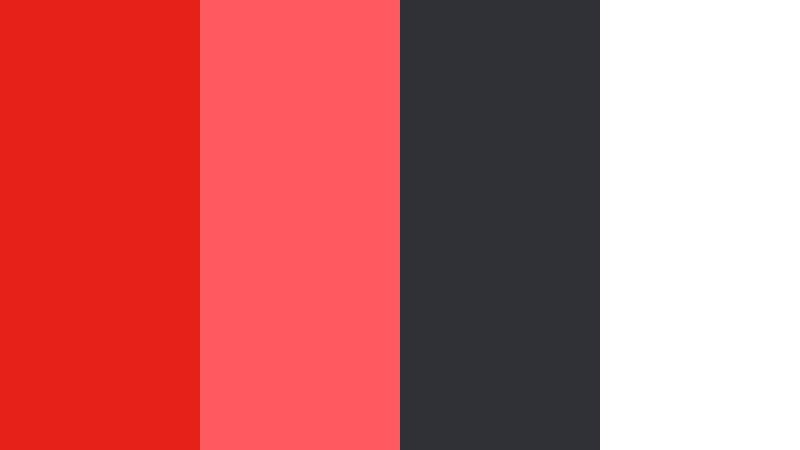
- HEX Codes: #e62117, #ff5a5f, #2f3136, #ffffff
- Mood: Direct, modern, and high visibility
- Use for: Use this palette for end screens, lower thirds, and call to action design.
Subscribe Signal feels like a modern interface palette built around a sharp red alert tone. It is clean, direct, and easy to read, which makes it a strong choice for CTA-driven layouts.
Use it for end cards, subscribe buttons, and lower thirds that need to feel immediate. The neutral gray and white balance also helps the red stand out without looking too aggressive.
Studio Flame
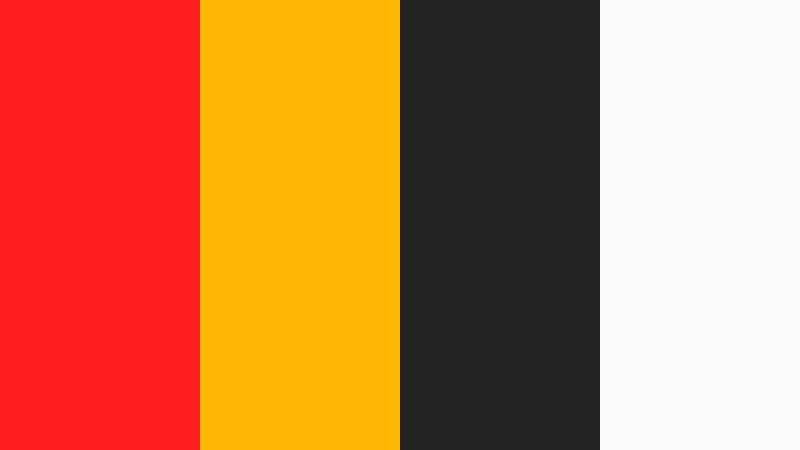
- HEX Codes: #ff1f1f, #ffb703, #232323, #fafafa
- Mood: Warm, dramatic, and confident
- Use for: Use this palette for intro cards, channel banners, and bold title sequences.
Studio Flame pairs hot red with golden accents, giving the palette a confident studio feel. It reads as energetic and premium at the same time, which makes it useful for creators who want more personality in their branding.
It works well in intro sequences, banner art, and animated titles where contrast and warmth need to work together. The palette is also easy to adapt for thumbnails that need a dramatic visual hook.
Clean And Minimal Youtube Color Palette Ideas
Modern White Frame
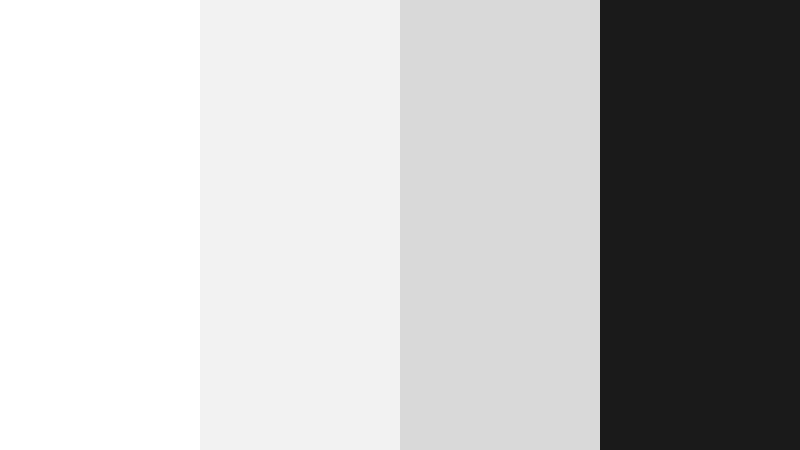
- HEX Codes: #ffffff, #f2f2f2, #d9d9d9, #1a1a1a
- Mood: Clean, balanced, and professional
- Use for: Use this palette for minimalist thumbnails, UI mockups, and branded video overlays.
Modern White Frame feels crisp and spacious, with a strong black anchor that keeps the palette from looking too soft. It is a polished choice for creators who want clarity and a clean studio look.
This palette works especially well for explainer videos, product demos, and minimalist thumbnails. It lets text and subject matter stay front and center while the design remains elegant.
Soft Studio Neutral
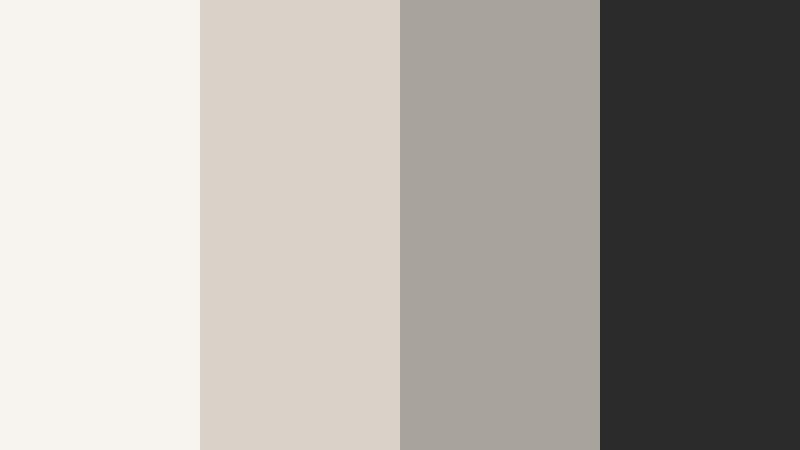
- HEX Codes: #f7f4ef, #d8d2c8, #a8a39b, #2b2b2b
- Mood: Calm, refined, and understated
- Use for: Use this palette for talking head channels, design presentations, and subtle branding systems.
Soft Studio Neutral brings an editorial, understated tone that feels calm and premium. The muted shades keep the design approachable while still giving the channel a deliberate visual style.
It is a strong fit for commentary videos, design content, and lifestyle branding where the visuals should support the story rather than compete with it. Use it when you want a quiet but confident look.
Silver Play Button

- HEX Codes: #e6e8eb, #b8c0cc, #6b7280, #111827
- Mood: Cool, sleek, and trustworthy
- Use for: Use this palette for tech explainers, channel branding, and modern video decks.
Silver Play Button feels modern and professional, with metallic grays that suggest structure and trust. The palette is cool enough for tech content but still flexible for broader creator branding.
Use it in slides, tech reviews, and interface-style edits where clean readability matters. It is especially effective when paired with sharp typography and subtle motion graphics.
Crisp Creator Canvas

- HEX Codes: #fafafa, #e5e7eb, #9ca3af, #111111
- Mood: Fresh, flexible, and clean
- Use for: Use this palette for templates, branding kits, and organized content layouts.
Crisp Creator Canvas keeps things simple with airy neutrals and a bold black anchor. The result is timeless and easy to adapt, which makes it ideal for channels that publish often.
Use it for template systems, branded captions, and organized thumbnail layouts. The palette is versatile enough to support almost any niche without losing its clean visual identity.
Playful And Creator-Friendly Youtube Color Palette Ideas
Vlog Candy Burst
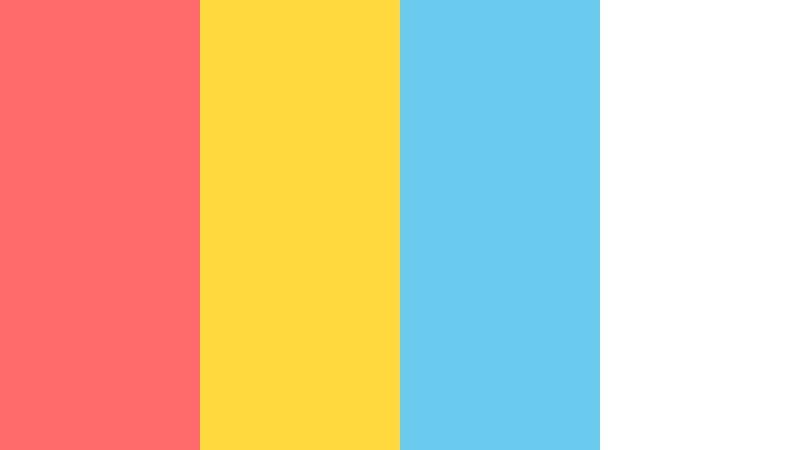
- HEX Codes: #ff6b6b, #ffd93d, #6bcBef, #ffffff
- Mood: Fun, cheerful, and lively
- Use for: Use this palette for vlog covers, challenge videos, and upbeat social content.
Vlog Candy Burst feels bright, friendly, and easy to enjoy. The candy-like mix of colors gives personal content a playful look that can make everyday moments feel more exciting.
It works well for vlog thumbnails, challenge edits, and social promos that need a cheerful, welcoming tone. The white base also keeps the palette from feeling too crowded.
Creator Confetti
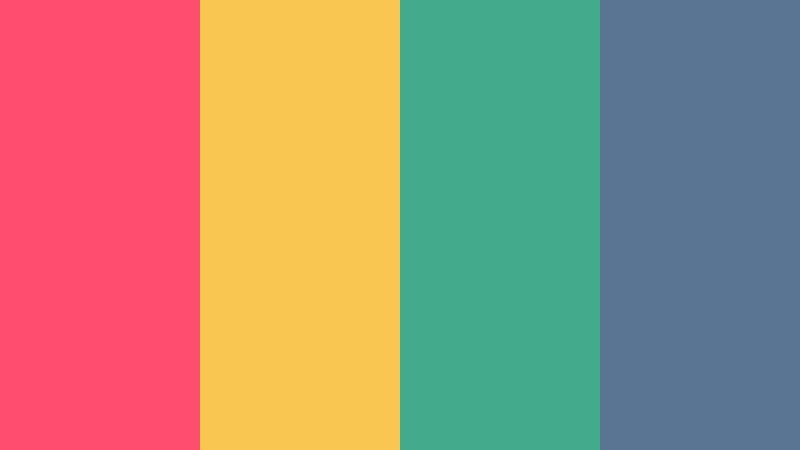
- HEX Codes: #ff4d6d, #f9c74f, #43aa8b, #577590
- Mood: Playful, dynamic, and expressive
- Use for: Use this palette for highlight reels, channel art, and upbeat motion design.
Creator Confetti mixes several bright accents for a lively, social-first look. It feels expressive without becoming chaotic, so it can support energetic branding across many types of content.
This is a good palette for reels, highlight edits, and channel banners where you want color variety with a clear visual system. It can also make motion graphics feel more dynamic and celebratory.
Pixel Party Intro
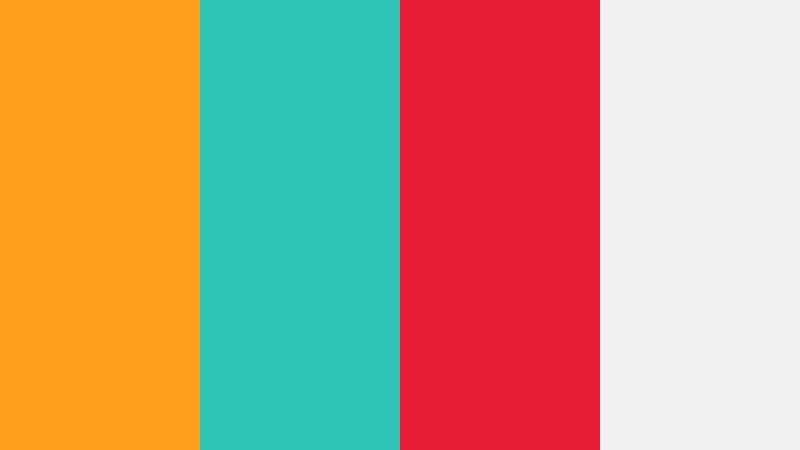
- HEX Codes: #ff9f1c, #2ec4b6, #e71d36, #f1f1f1
- Mood: Playful, bold, and retro-inspired
- Use for: Use this palette for gaming intros, animated title cards, and community posts.
Pixel Party Intro has a retro digital feel that makes it fun for gaming and community-driven content. The bright primary tones create a sense of motion, energy, and nostalgia.
Use it for animated intros, transition cards, and community graphics where a lively look is part of the brand. The light neutral base helps the bright colors stay readable.
Cinematic And Premium Youtube Color Palette Ideas
Midnight Premiere

- HEX Codes: #0b0f19, #1f2937, #7c3aed, #f5f3ff
- Mood: Cinematic, polished, and dramatic
- Use for: Use this palette for film reviews, intros, and premium channel branding.
Midnight Premiere uses dark night tones with a refined purple accent, so the palette feels dramatic and cinematic. It has enough contrast to stay clear while still carrying a premium mood.
This palette is a strong fit for movie commentary, trailers, and polished branding where depth matters. It also helps titles and overlays feel more elevated.
Creator Noir

- HEX Codes: #121212, #2d2d2d, #d4af37, #f7f1e1
- Mood: Elegant, moody, and luxe
- Use for: Use this palette for luxury branding, channel trailers, and high-end visual identities.
Creator Noir combines rich black tones with gold accents to create a premium, moody appearance. It feels refined and deliberate, which can help a channel stand out as more cinematic.
Use it for luxury content, channel trailers, or title systems that need a sense of prestige. The gold detail is especially effective when paired with slow motion and elegant typography.
Velvet Edit
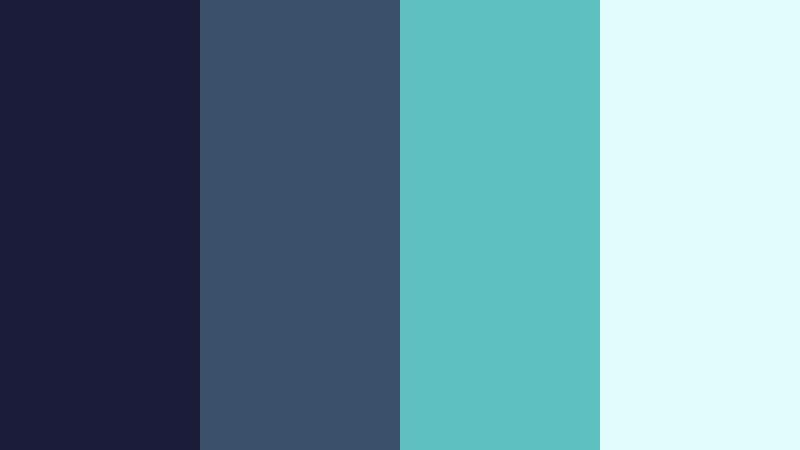
- HEX Codes: #1b1b3a, #3a506b, #5bc0be, #e0fbfc
- Mood: Smooth, modern, and cinematic
- Use for: Use this palette for storytelling videos, portfolio reels, and polished channel graphics.
Velvet Edit pairs deep blue with cool teal tones for a sleek film-inspired look. It feels smooth and modern, which makes it a natural match for narrative edits and portfolio pieces.
This palette adds depth to storytelling videos, branded reels, and sophisticated motion graphics. It can also make interview content and creative portfolios feel more cohesive.
Tips for Creating Youtube Color Palette Color Palettes
The best YouTube palettes are not just attractive, they also support readability, brand consistency, and the tone of your footage. When you combine YouTube colors with neutrals, accents, and strong contrast, your thumbnails and edits can look more intentional across every platform.
- Keep text readable by pairing bright YouTube red with dark or light neutral backgrounds.
- Use one main brand color and one accent color instead of filling every frame with too many tones.
- Match the palette to your content style, such as bold reds for fast edits or muted grays for tutorials.
- Check contrast on both desktop and mobile so thumbnails stay clear at smaller sizes.
- Reuse the same colors in intros, lower thirds, and end screens for a stronger brand system.
- Balance warm reds with black, white, or gray to avoid visual overload.
- Use filters and color grading to align footage with your chosen palette.
- Test several combinations on a sample thumbnail before committing to a channel-wide design.
YouTube color palette choices can shape how your channel feels before anyone even presses play. A bold palette can create urgency, a minimal palette can suggest clarity, and a cinematic palette can make your content feel more polished and premium.
If you want to keep that look consistent, Filmora gives you a practical way to apply the same colors across intros, edits, and branded graphics. Try a few of these YouTube color palette combinations and see which one fits your content style best.
secure download