

 100% Security Verified | No Subscription Required | No Malware


 ChatGPT
 Perplexity
 Gemini
 Claude
 Grok
Grok
Cyber colors sit at the intersection of neon light and digital night. Think electric cyan, laser magenta, and deep midnight blues that feel straight out of a sci fi interface. Psychologically, this family of hues signals speed, technology, innovation, and high energy, which is why you see it across gaming, streaming, crypto brands, and futuristic UI designs.
For video creators and designers, a well built cyber color palette can instantly turn a simple thumbnail, intro, or YouTube banner into a bold, recognizable identity. Below you will find hand picked Cyber color palettes with HEX codes you can plug directly into your thumbnails, overlays, titles, and color grading in Filmora so every edit feels consistently futuristic and on brand.
In this article
Neon Cyber Glow Color Palettes
Neon Grid Overdrive
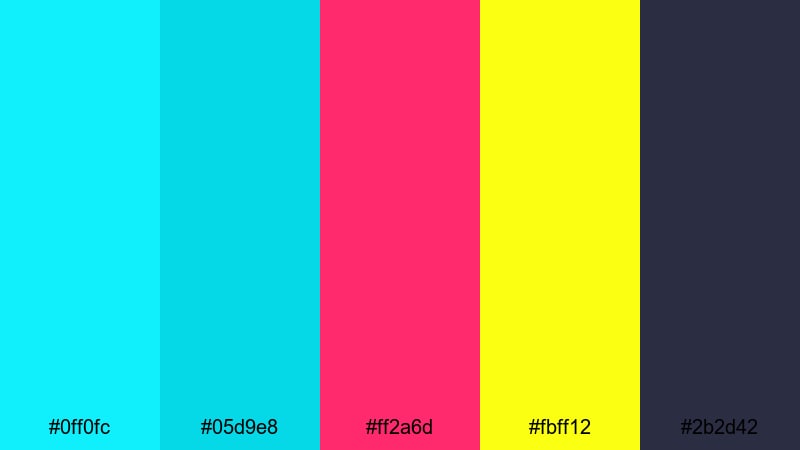
- HEX Codes: #0ff0fc, #05d9e8, #ff2a6d, #fbff12, #2b2d42
- Mood: High-energy, electric, and hyper-digital.
- Use for: Ideal for gaming thumbnails, glitch transitions, and EDM-style intro sequences that need to grab attention instantly.
Neon Grid Overdrive is all about maximum impact: sharp cyan and teal light beams collide with hot magenta and acid yellow against a muted dark blue base. The palette feels like a racing game HUD or a cyberpunk city street drenched in neon signs, perfect when you want your visuals to shout energy and speed.
Use this combination to make YouTube gaming thumbnails pop, highlight lower thirds in esports streams, or build glitchy intro sequences in Filmora. The bright accents (#ff2a6d and #fbff12) are excellent for buttons, call to action text, and important UI elements, while the deeper #2b2d42 gives you a clean background for legible titles and overlays.
Pro Tip: Lock In Electric Cyber Glow Across Your Edit in Filmora
When working with a bold cyber palette like Neon Grid Overdrive, consistency is everything. In Filmora, you can build a custom color look that keeps your cyan and magenta tones identical from intro to end screen, whether you are cutting gameplay, webcam footage, or animated graphics.
Create a test frame with your titles, overlays, and background, then save your color adjustments or LUT inside Filmora. Apply that look to your B-roll, transitions, and social cutdowns so every asset feels like it belongs to the same neon universe.
AI Color Palette
If you already have a reference image using this cyber palette, you can turn it into a full video look in a few clicks. Filmora's AI Color Palette feature analyzes your source frame and transfers its tones, contrast, and vibrancy to all selected clips.
Import a still of your favorite neon city, synthwave artwork, or the thumbnail you designed with these HEX codes. Then use AI Color Palette to match the rest of your footage, so your intros, overlays, and B-roll all carry the same electric cyan and magenta glow automatically.
 secure download

HSL, Color Wheels & Curves
To really fine tune a cyber look, jump into Filmora's advanced color correction tools. Use HSL to push cyans a bit more towards green or blue, adjust saturation to avoid neon clipping, and use color wheels to give shadows a cool tint while keeping highlights bright and punchy. Filmora's color grading controls let you balance your glowing accents with deep, cinematic blacks.
Curves are ideal for controlling contrast in dark, neon heavy scenes. You can lift the shadows slightly to keep details in dark areas, while adding a gentle S curve for more punch. This keeps your #0ff0fc and #ff2a6d highlights glowing without crushing midtones or losing face detail in talking head shots.
secure download1000+ Video Filters & 3D LUTs
Once your HEX codes and basic grading are set, you can push the style even further using Filmora's presets. Filmora's video filters and 3D LUTs make it easy to give your cyber palette a cinematic, retro, or glitchy twist without rebuilding everything from scratch.
Try combining your custom Neon Grid Overdrive colors with glow, chromatic aberration, or VHS style filters to get unique intros, music video visuals, or sci fi overlays. Save your favorite combinations as presets so every future project can reuse the same cyber identity in seconds.
secure downloadHolographic City Pulse

- HEX Codes: #00f5ff, #7b2cff, #ff4ecd, #0b1020, #1a1c40
- Mood: Futuristic, clubby, and nightlife inspired.
- Use for: Use this palette for city vlogs, festival recaps, and cyberpunk title cards with neon reflections and nightlife vibes.
Holographic City Pulse mixes cool cyan with rich violet and pink, all glowing against deep navy night tones. It feels like standing on a rooftop above a futuristic city, where LED billboards and club lights flicker off glass and metal.
Apply this palette to travel vlogs set in big cities, nightlife reels, or motion graphics for DJ sets and live streams. Use the darker hues (#0b1020 and #1a1c40) as safe backgrounds for text, and let #00f5ff and #ff4ecd drive highlights on titles, animated equalizers, and logo reveals.
Laser Arcade Nights
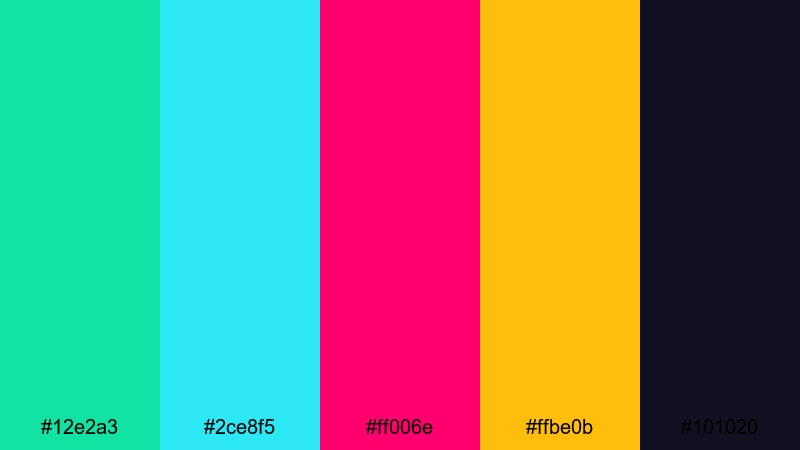
- HEX Codes: #12e2a3, #2ce8f5, #ff006e, #ffbe0b, #101020
- Mood: Playful, arcade-inspired, and nostalgic yet modern.
- Use for: Best for retro gaming intros, esports overlays, and nostalgic tech reviews with a modern twist.
Laser Arcade Nights feels like a neon arcade cabinet brought back to life in 4K. Vivid teal and cyan create a cool digital base, while hot pink and golden yellow add playful hits of energy over a deep midnight backdrop.
Use this palette for retro gaming intros, nostalgic tech reviews, or esports overlays that should feel fun rather than too serious. The bright #ff006e is perfect for score counters, leaderboards, and subscribe buttons, while #101020 keeps menus and lower thirds readable even with lots of glowing accents around them.
Electric Synthwave Horizon
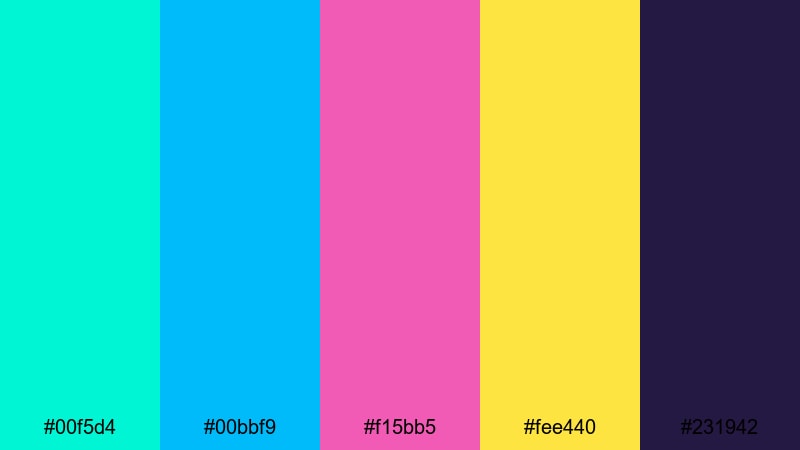
- HEX Codes: #00f5d4, #00bbf9, #f15bb5, #fee440, #231942
- Mood: Retro-futuristic, bold, and cinematic.
- Use for: Great for synthwave lyric videos, animated background, and cinematic trailers with 80s-inspired cyber aesthetics.
Electric Synthwave Horizon blends turquoise, royal blue, and neon pink with a golden accent over a deep violet night sky. It channels 80s grids, sunsets, and outrun vibes while still feeling crisp enough for modern motion graphics.
Drop these colors into lyric videos, animated title sequences, or looping backgrounds behind your talking head footage. Let #231942 act as your cinematic base color, then layer gradients from #00bbf9 to #f15bb5 for glowing skies, grids, or waveforms that scream synthwave and sci fi.
Quantum Neon Circuit
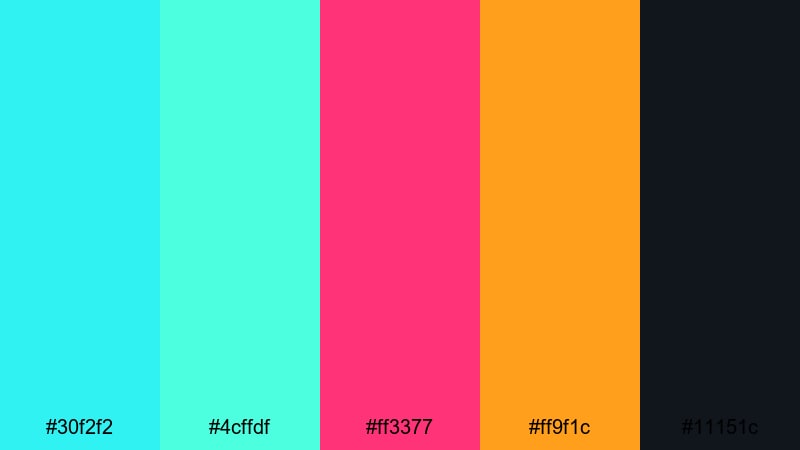
- HEX Codes: #30f2f2, #4cffdf, #ff3377, #ff9f1c, #11151c
- Mood: Techy, sharp, and fast-paced.
- Use for: Use for motion graphics, HUD overlays, and glitch transitions in high-tech product promos or app teasers.
Quantum Neon Circuit is a crisp, high speed mix of crystalline cyans, neon magenta, and tangerine sparks over a near black base. It feels like high frequency data racing through fiber optics or circuitry lit for a product launch keynote.
Use it for HUD overlays, kinetic typography, and glitch transitions in app teasers, fintech explainers, or high tech product promos. The controlled contrast between #30f2f2 and #11151c allows you to keep UI elements sharp and easy to read while still feeling extremely futuristic.
Futuristic Cyber Tech Color Palettes
Data Stream Matrix
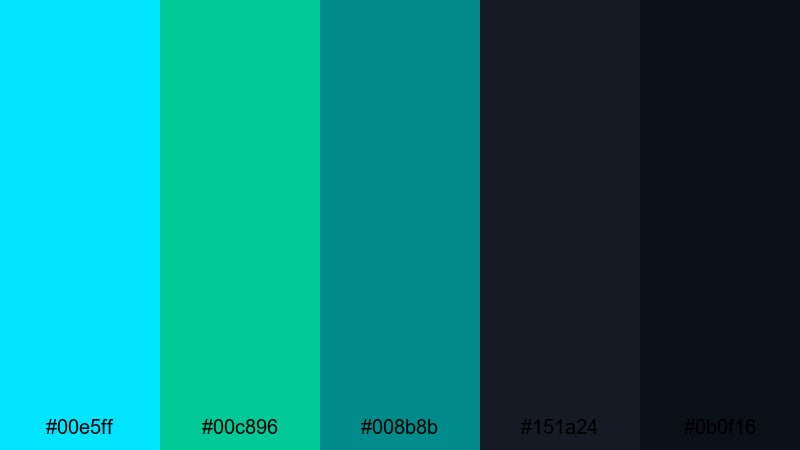
- HEX Codes: #00e5ff, #00c896, #008b8b, #151a24, #0b0f16
- Mood: Cool, analytical, and sci fi professional.
- Use for: Ideal for explainer videos, AI demos, and dashboard UI designs that need a clean, futuristic edge.
Data Stream Matrix leans into cooler, more restrained cyber tones. Icy cyan and teal glide over deep slate blues and blacks, giving you a professional sci fi look that feels controlled and trustworthy instead of chaotic.
This palette is ideal for SaaS explainers, AI product demos, and dashboard UI mockups shown inside your videos. Use #151a24 and #0b0f16 as your main dark mode background, while #00e5ff and #00c896 highlight key metrics, charts, and callouts without overwhelming your audience.
Neon Circuit Board
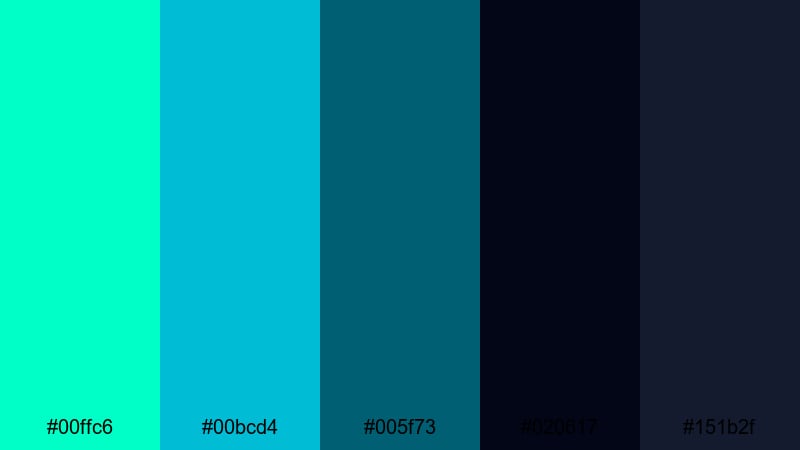
- HEX Codes: #00ffc6, #00bcd4, #005f73, #020617, #151b2f
- Mood: Technical, innovative, and sleek.
- Use for: Works well for tech brand intros, product launch reels, and UI mockups that want a clean but high-tech look.
Neon Circuit Board combines glowing mint and aqua with deep navy and graphite, echoing PCB traces and microchips. It feels sleek and precise, with just enough glow to read as cyber without becoming too playful.
Use it for tech company intros, B2B product videos, or minimal UI showcases. #020617 and #151b2f are strong dark bases for intros and end screens, while #00ffc6 can be reserved for logotypes, timeline highlights, and interactive elements in your overlays.
Titanium Cyber Core
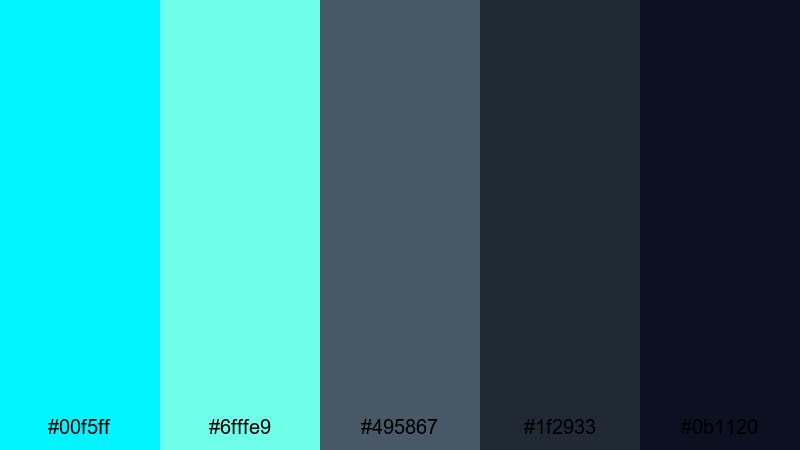
- HEX Codes: #00f5ff, #6fffe9, #495867, #1f2933, #0b1120
- Mood: Strong, minimalist, and industrial.
- Use for: Perfect for hardware reviews, robotics demos, and cinematic B-roll where you need a polished, engineered feel.
Titanium Cyber Core blends frosty cyans with steel grays and charcoal blacks, building a metallic, engineered atmosphere. It feels like hardware labs, robotics workshops, and high precision manufacturing spaces.
Apply this palette to product close ups, macro B-roll of devices, and minimalist title screens. The gray tones (#495867 and #1f2933) keep things neutral and serious, while #00f5ff and #6fffe9 add just enough cyber energy for power indicators, UI overlays, and technical diagrams in your videos.
Infrared Security Grid
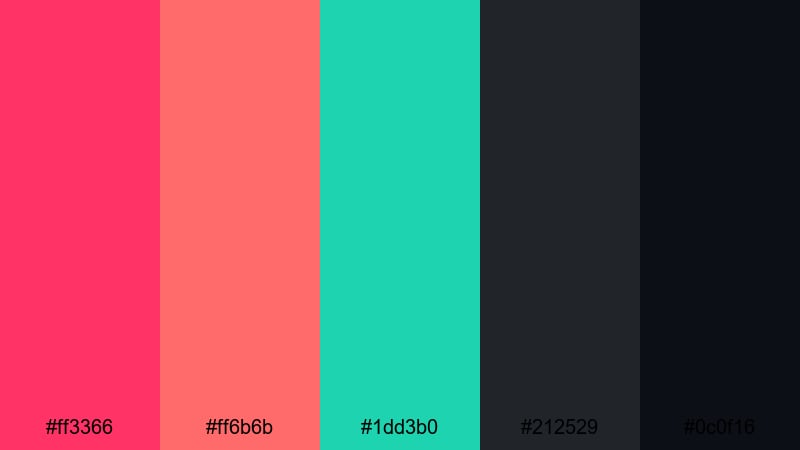
- HEX Codes: #ff3366, #ff6b6b, #1dd3b0, #212529, #0c0f16
- Mood: High-stakes, cinematic, and edgy.
- Use for: Use in cyber security explainers, hacking sequences, and thriller-style title cards for a dramatic digital tension.
Infrared Security Grid pits burning reds and pinks against cool teal and dark charcoal. The result is intense, cinematic tension, perfect for storytelling around hacking, breaches, or security monitoring.
Use #ff3366 and #ff6b6b for warning labels, breach alerts, and animated overlays, while #1dd3b0 represents safe or authorized zones. The dark neutrals (#212529 and #0c0f16) keep your interface grounded and readable, making this palette strong for cybersecurity explainers, tech thrillers, or dramatic channel branding.
Aurora Server Room
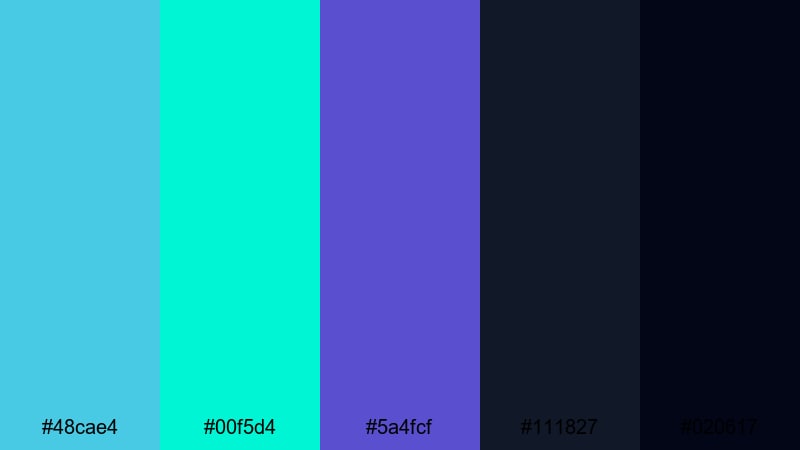
- HEX Codes: #48cae4, #00f5d4, #5a4fcf, #111827, #020617
- Mood: Calm, futuristic, and quietly powerful.
- Use for: Great for cloud computing promos, SaaS dashboard walkthroughs, and calm tech backgrounds behind on-screen text.
Aurora Server Room uses soft turquoise, aqua, and indigo over near black to suggest server LEDs in a dark data center. It keeps the cyber feel but dials back the aggression, resulting in a calm, confident atmosphere.
This palette is ideal for cloud computing promos, tech education content, and dashboard walkthroughs where clarity matters. Use #111827 and #020617 for dark mode UIs and backgrounds, while #48cae4 and #00f5d4 provide gentle highlights on charts, icons, and labels without distracting from spoken explanations.
Soft Pastel Cyber Color Palettes
Pastel Neon Interface
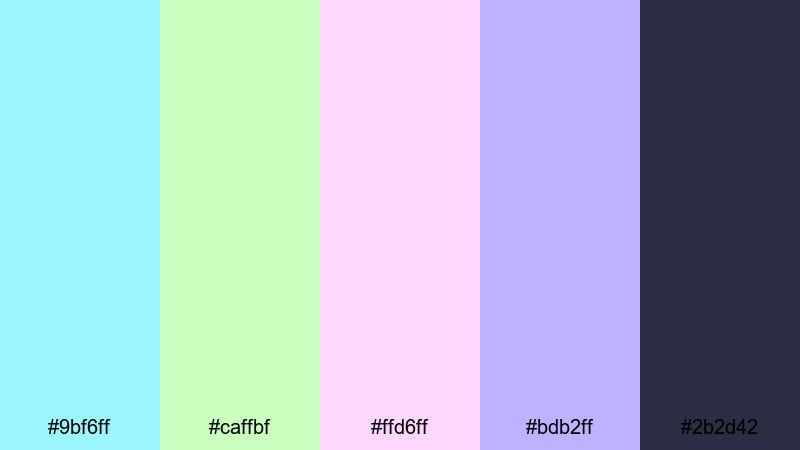
- HEX Codes: #9bf6ff, #caffbf, #ffd6ff, #bdb2ff, #2b2d42
- Mood: Playful, dreamy, and tech-cute.
- Use for: Ideal for cozy vlogs, creator intros, and UI mockups targeting younger or kawaii-inspired audiences.
Pastel Neon Interface softens traditional cyber brightness into sugar toned mints, lavenders, and blush pinks. It feels dreamy and friendly while still hinting at futuristic interfaces.
Use this palette for cozy vlogs, VTuber overlays, or app mockups aimed at younger audiences. The deep #2b2d42 keeps your text grounded and readable, while the pastels add warmth to titles, notification badges, and animated widgets without overwhelming the screen.
Cloud Console Dream
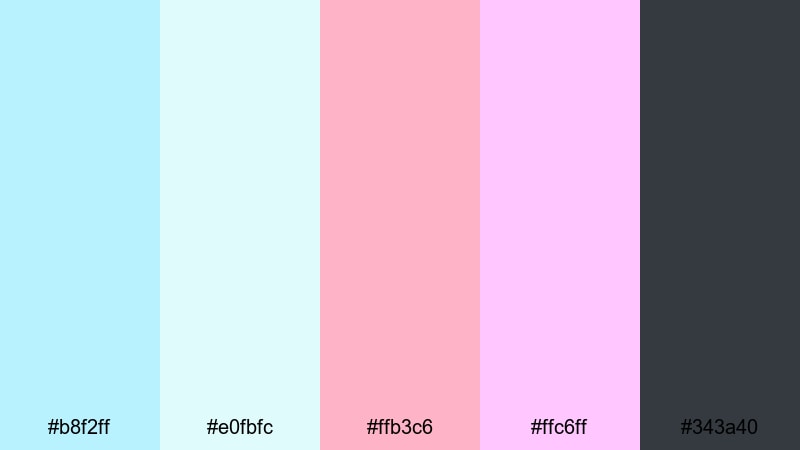
- HEX Codes: #b8f2ff, #e0fbfc, #ffb3c6, #ffc6ff, #343a40
- Mood: Gentle, airy, and futuristic yet calming.
- Use for: Use for productivity app promos, channel art, or motion graphics where you want a light, modern tech mood without harsh contrast.
Cloud Console Dream floats pale blues and soft pinks over a muted charcoal accent. It captures the feel of clean, cloud based tools but with a softer, more human touch.
Apply it to productivity app promos, how to videos, and minimalist channel banners. Let #343a40 handle body text and UI outlines, while #b8f2ff and #e0fbfc wash your backgrounds in gentle light that will not distract from screen recordings or tutorials.
Digital Cotton Candy
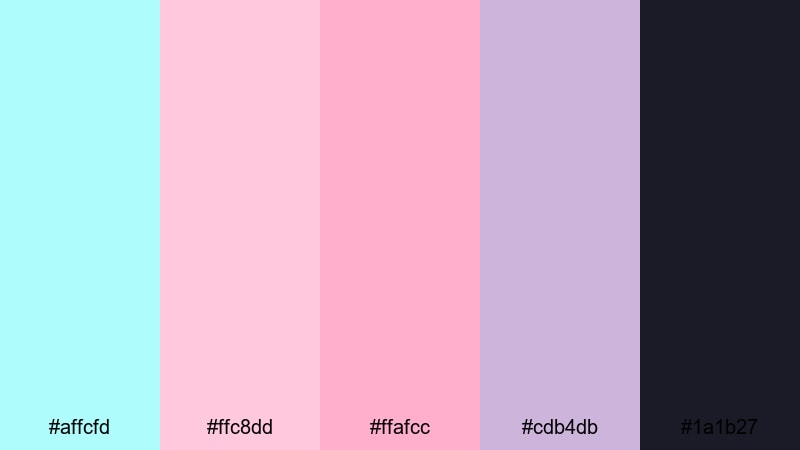
- HEX Codes: #affcfd, #ffc8dd, #ffafcc, #cdb4db, #1a1b27
- Mood: Sweet, lighthearted, and streamer friendly.
- Use for: Perfect for streaming overlays, VTuber branding, and lifestyle tech videos that lean into a soft, pastel cyber vibe.
Digital Cotton Candy combines baby blues, soft pinks, and lavender over an inky yet gentle base. It feels playful and approachable, ideal for content where personality matters as much as tech.
Use #1a1b27 for chat boxes, webcams, and panels, while #ffc8dd and #ffafcc brighten follower alerts, donation popups, and subscribe animations. This palette keeps the cyber aesthetic but replaces harsh edges with a more welcoming atmosphere.
Glitchy Bubble UI
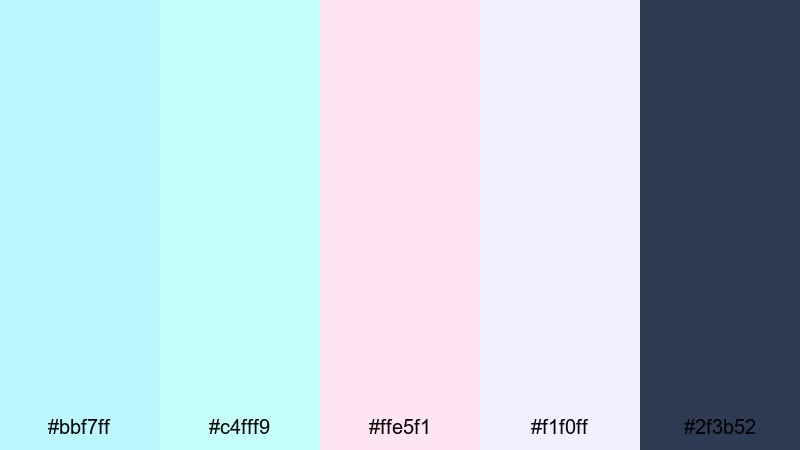
- HEX Codes: #bbf7ff, #c4fff9, #ffe5f1, #f1f0ff, #2f3b52
- Mood: Soft, minimal, and bubbly futuristic.
- Use for: Great for app walkthroughs, SaaS marketing videos, and minimalist channel branding looking for a gentle cyber edge.
Glitchy Bubble UI uses feather light aquas and blush whites accented by a deep slate hero color. It suggests floating bubbles and glitch free interfaces, ideal when you want futuristic design that still feels calm.
Use the bright neutrals for cards, popups, and background blocks, with #2f3b52 anchoring text, icons, or navigation bars. This palette is especially strong for clean UI walkthroughs, landing page animations, and brand kits where you want cyber polish without a harsh dark mode.
Dark Mode Cyber Color Palettes
Dark Net Neon
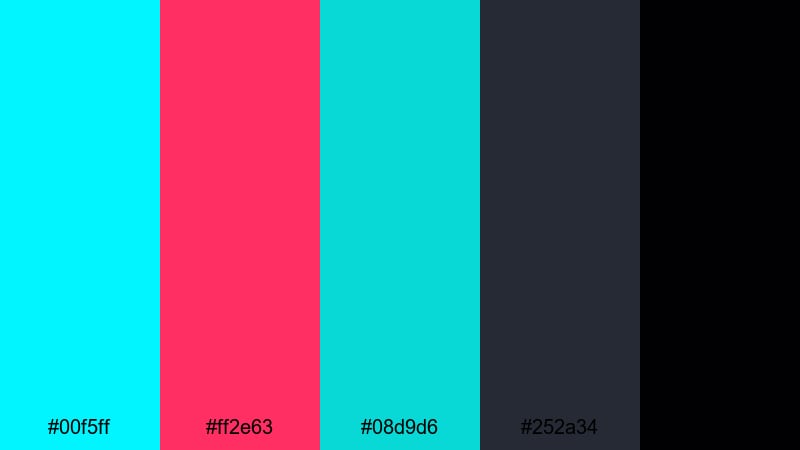
- HEX Codes: #00f5ff, #ff2e63, #08d9d6, #252a34, #010103
- Mood: Edgy, mysterious, and high-contrast.
- Use for: Ideal for dark mode UIs, hacker montages, and thriller openings where neon highlights slice through deep shadows.
Dark Net Neon sets piercing cyan and magenta against matte charcoal and near black. It immediately feels like code scrolling in hidden terminals, underground forums, and high tension cyber stories.
Use #010103 and #252a34 for backgrounds in your dark mode overlays, then reserve #00f5ff and #ff2e63 for key UI lines, cursor trails, and animated glitches. This palette works perfectly for coding tutorials, hacking montages, or suspenseful channel intros.
Midnight Hologram Fade
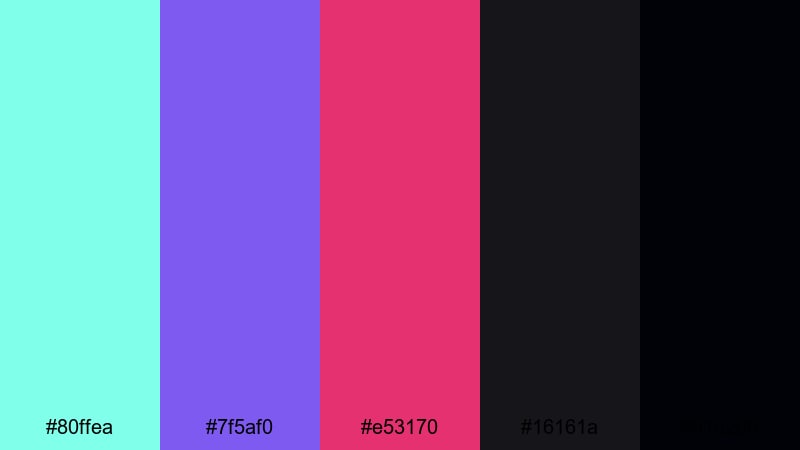
- HEX Codes: #80ffea, #7f5af0, #e53170, #16161a, #010208
- Mood: Moody, cinematic, and immersive.
- Use for: Use in title cards, outro slates, and dramatic B-roll where you want text and UI elements to glow against deep night tones.
Midnight Hologram Fade leans into teal, violet, and magenta gradients over rich black. It feels like holograms hovering in the dark, ideal for dramatic sci fi visuals and immersive storytelling.
Blend #80ffea, #7f5af0, and #e53170 in gradients or glow effects around logos, while #16161a and #010208 form your base. This palette is great for intros, outros, and cinematic B-roll sequences where you want text to glow but remain readable against a deep night background.
Terminal Green Echo
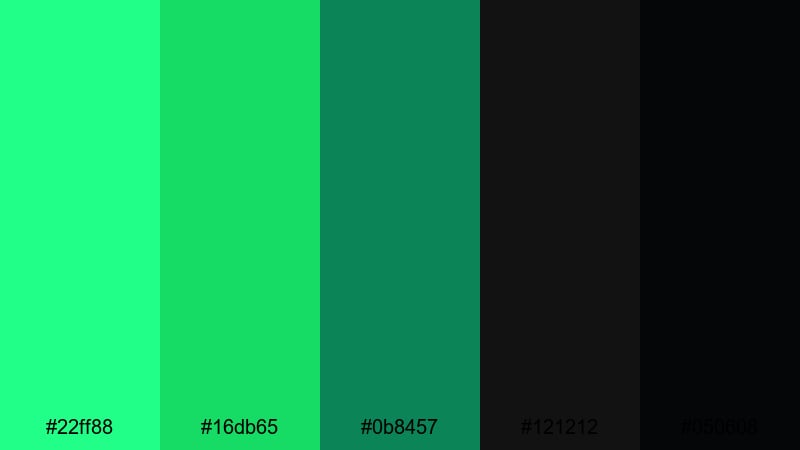
- HEX Codes: #22ff88, #16db65, #0b8457, #121212, #050608
- Mood: Retro, focused, and code-driven.
- Use for: Great for coding tutorials, cybersecurity explainers, and retro console animations with a modern dark theme.
Terminal Green Echo modernizes the classic green on black terminal look. A monochrome family of glowing greens sits on pure blacks, giving you retro computer vibes with a clean, updated edge.
Use this palette for programming tutorials, legal hacking content, or any sequence where streams of code are on screen. #121212 and #050608 form your deep dark base, while #22ff88 and #16db65 highlight active lines, cursors, and callouts. The limited color range keeps your visuals focused and highly legible.
Tips for Creating Cyber Color Palettes
Cyber colors are powerful, but they work best when balanced with readability, branding, and footage. Here are practical tips to combine neon and tech tones effectively in your videos and designs.
- Pair bright cyber accents with at least one dark neutral (charcoal, navy, near black) so text and UI elements stay readable.
- Limit yourself to 2–3 strong accent colors and use the others as support tones to avoid a messy, over saturated look.
- Use your boldest color for calls to action (subscribe buttons, download prompts) and apply it consistently across thumbnails, intros, and end screens.
- Check contrast on mobile by previewing your thumbnails and overlays at small sizes; adjust brightness or saturation if text becomes hard to read.
- Match your color palette to your content type: sharper neon contrasts for gaming and EDM, softer pastels for lifestyle tech and productivity.
- In Filmora, keep your cyber palette consistent by saving presets or LUTs and applying them across all scenes, B-roll, and motion graphics.
- When mixing cyber tones with live action footage, subtly cool down shadows and add a hint of your main accent color in highlights so the scene feels unified.
- Test a few background options (solid, gradient, or blurred footage) with the same palette to see which best supports your titles and overlays.
Cyber color palettes can completely transform how your channel, brand, or project feels. From high voltage neon to soft pastel tech and serious dark mode cyber, the right combination of HEX codes shapes mood, story, and audience expectations before a single word is spoken.
Take these palettes into Filmora and experiment with them in your intros, lower thirds, transitions, and color grading. By pairing consistent cyber tones with Filmora's editing tools, you can build a distinctive visual identity that carries across every video, from long form content to short social clips.
Whether you are designing a sci fi YouTube banner, a glitchy stream overlay, or a sleek app promo, start with a clear palette, then refine it inside Filmora until it feels uniquely yours.
secure download