

 100% Security Verified | No Subscription Required | No Malware


 ChatGPT
 Perplexity
 Gemini
 Claude
 Grok
Grok
Soft, dreamy tones can instantly turn an ordinary YouTube clip into an aesthetic mood board. With the right filters, your lifestyle vlogs and aesthetic YouTube content feel cohesive, calm, and beautifully curated.
This guide breaks down 12 aesthetic YouTube video filters you can recreate in Filmora, from airy pastels to moody cinematic vibes, so aesthetic YouTubers and lifestyle creators can build a recognizable visual style with just a few clicks.
In this article
Soft Pastel Glow Filters
Cotton Candy Soft Glow
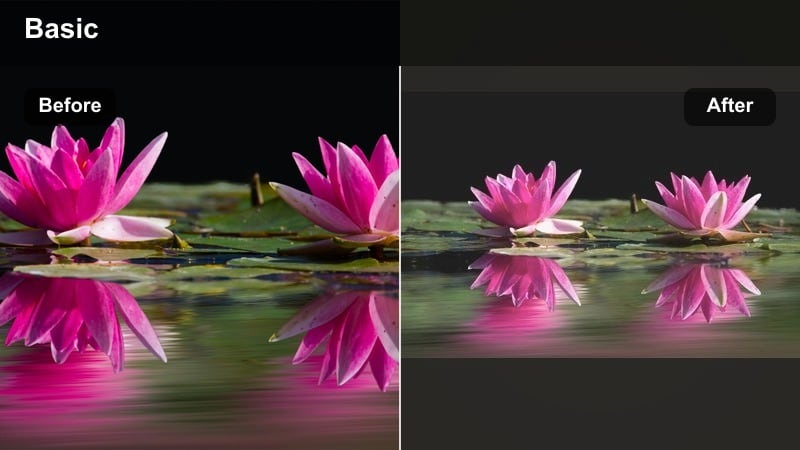
- Effect look: Light, pastel-washed image with gentle highlight bloom and softened contrast for a dreamy, floaty feel.
- Best for: Morning routines, desk setups, gentle lifestyle B-roll, stationary and study-with-me scenes.
- Editing tip: Lower contrast slightly, add a touch of blur or glow around highlights, and nudge saturation toward soft pinks and baby blues while keeping skin tones natural.
This pastel glow filter softens edges and bathes your YouTube video in cotton candy tones, perfect for creators who want their routines and desk vlogs to feel like a calm visual reset. In Filmora, you can combine reduced contrast, a gentle blur, and soft highlight bloom to create that floaty look while preserving the details in your workspace and props.
Use Filmoras color tools to bias your saturation toward pinks and baby blues, then fine-tune oranges so skin stays believable instead of overly stylized. Once you have a look that fits your brand, save it as a custom preset so every morning vlog or study-with-me opens with the same recognizable cotton candy aesthetic.
Build an Aesthetic Palette with Filmoras AI Tools
Instead of manually matching every clip, use Filmoras AI-driven color features to keep your aesthetic YouTube video filters consistent from intro to outro. AI color tools help you quickly harmonize soft, dreamy tones even when you shoot across different rooms, cameras, or days.
Analyze one hero clip you love, then use it as a reference to color-match other scenes so your cotton-candy pastels and soft whites stay stable across your entire video. This is especially useful for lifestyle channels where lighting conditions change as you move through your day.
 secure download

Try Dreamy Filters in Real Time
Filmoras built-in filters and effects give you instant previews, so you can test soft-tone and dreamy YouTube filters on your footage before committing. This makes it easy to see how pastel glows, hazy blooms, or milky fades will actually look on your room, outfit, or desk shots.
Stack filters with subtle blur, glow, and color tweaks until you have a custom aesthetic, then save it as a preset for future uploads. Over time, this helps you build a library of favorite looks for different series like morning vlogs, study content, or travel diaries.
secure downloadTurn Your Look into an Aesthetic LUT
Once you dial in a dreamy YouTube filter you love, export it as an aesthetic LUT YouTube preset to reuse across projects. LUTs lock in your signature soft-tone look so you can apply it in one click to new footage and then just tweak exposure or contrast.
This workflow is ideal for creators who want a cohesive channel grid and consistent branding without spending hours color grading every upload from scratch. You can build separate LUTs for pastels, vintage vibes, or moody tones and switch between them by series.
secure downloadMilky Daylight Wash
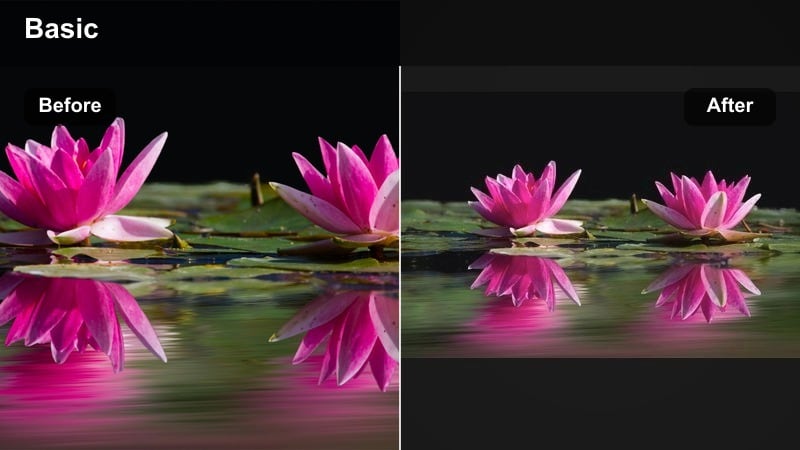
- Effect look: Bright, milky whites with reduced contrast, slightly faded blacks, and a soft cool tint in the shadows.
- Best for: Clean lifestyle spaces, minimal room tours, clothing try-on hauls, and airy aesthetic YouTube content.
- Editing tip: Lift the blacks a touch to create a filmic fade, increase exposure slightly, then add a subtle teal or blue tone in the shadows while protecting skin tones using HSL tools.
The Milky Daylight Wash filter makes your room and outfit shots feel light, airy, and editorial, ideal for minimal lifestyle and fashion creators. In Filmora, you can raise exposure, reduce contrast, and slightly fade the blacks to get a magazine-style, low-stress look.
Add a cool tint in the shadows while keeping highlights clean and neutral so whites stay crisp instead of turning gray. Use HSL controls to protect skin and important wardrobe colors, giving you a wash of gentle daylight without losing the details of fabrics or décor.
Peachy Skin Softener
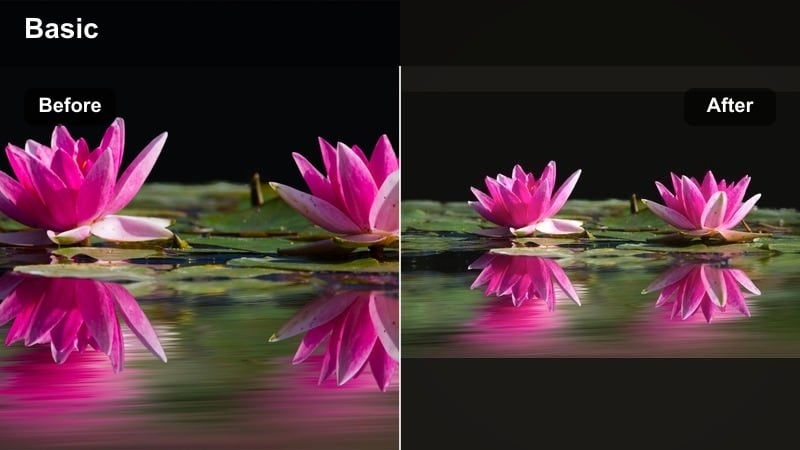
- Effect look: Warm peach undertones, subtly smoothed skin, and gentle contrast that flatters close-up shots.
- Best for: Sit-down chats, GRWM videos, makeup and skincare routines, and personal storytelling content.
- Editing tip: Increase warmth slightly, lower clarity or sharpness just a bit, and push oranges toward a soft peach while reducing saturation in reds to keep skin calm.
Peachy Skin Softener is designed to flatter faces in close-up frames without making your footage look overly airbrushed or fake. In Filmora, you can combine a touch of warmth, gentle softening, and targeted HSL tweaks on oranges to land on a natural yet dreamy peach complexion.
This filter works especially well for GRWM and talking-head content shot in front of neutral or blush-toned backgrounds. Keep contrast moderate and pair the grade with a subtle vignette so viewers focus on your expression and storytelling, not on minor skin texture or distractions in the background.
Dreamy Vintage Aesthetic Filters
Faded Film Dream
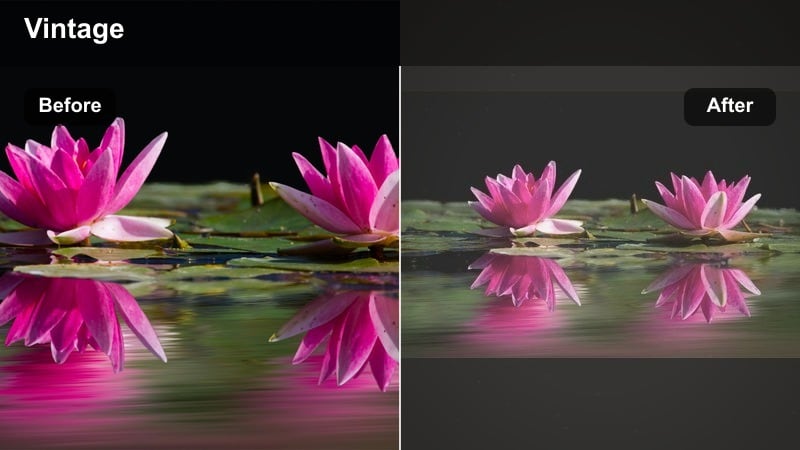
- Effect look: Muted colors, soft grain, and slightly washed-out shadows that mimic old film stock.
- Best for: Nostalgic montages, travel B-roll, slow morning vlogs, and dreamy memory-style edits.
- Editing tip: Drop saturation slightly, lift the blacks to create a gentle fade, and add a touch of film grain plus a warm highlight tint for that vintage feel.
Faded Film Dream turns simple clips into soft, memory-like scenes that feel pulled from an old photo album. In Filmora, you can lower saturation, lift shadows, and sprinkle in light grain to recreate the texture and tonality of classic film.
Use a warm tint in the highlights to keep the mood cozy and nostalgic rather than flat. This look is perfect for travel diaries, slow morning routines, or recap montages where you want viewers to feel like they are looking back on gentle, imperfect memories.
Sepia Soft Memories
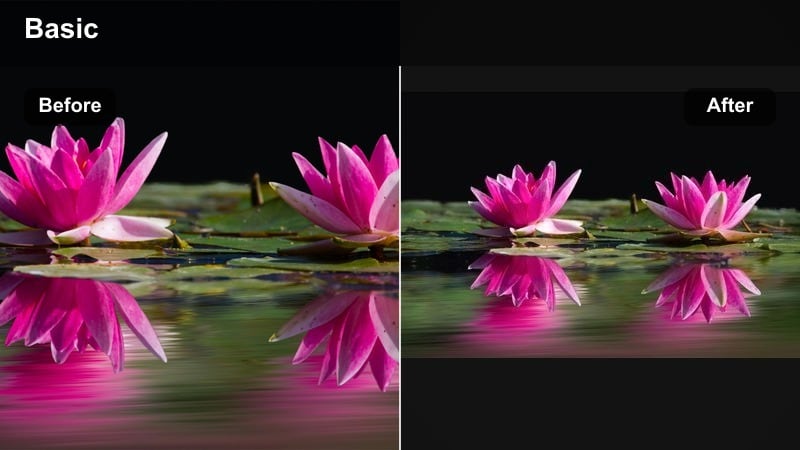
- Effect look: Brownish sepia tint with warm highlights and gently desaturated colors for old-photo vibes.
- Best for: Storytime overlays, journal writing shots, cozy reading nooks, and scrapbook-style edits.
- Editing tip: Shift midtones and highlights toward warm browns and golds, reduce overall saturation, and apply a slight vignette to frame the subject.
Sepia Soft Memories gives your YouTube scenes the feel of pages from an old diary, ideal for reflective, cozy, or storytelling content. In Filmora, move your color balance toward browns and golds while taming saturation so modern settings still feel vintage and intimate.
Add a mild vignette and a bit of blur or reduced clarity at the edges of the frame to draw eyes into your book, journal, or hands. This filter pairs beautifully with lo-fi soundtracks, voiceover narrations, and slower pacing that lets each shot linger on screen.
Polaroid Daydream
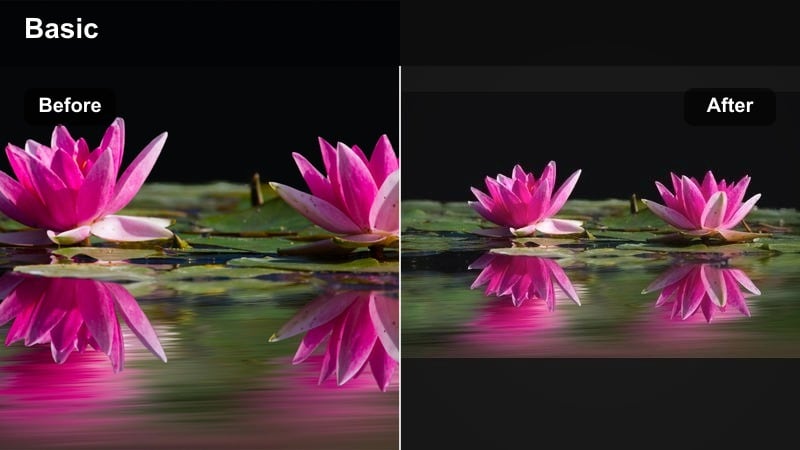
- Effect look: High contrast highlights, slightly cool shadows, and a playful pop of pastel colors reminiscent of instant film.
- Best for: Snapshots of friends, cafe hopping vlogs, outfit-of-the-day shots, and quick aesthetic cuts.
- Editing tip: Boost contrast and highlight brightness, cool down the shadows, and push specific hues like teal and pink to stand out without over-saturating the whole frame.
Polaroid Daydream adds that instant-film charm to casual hangouts, coffee runs, and OOTD clips, making everyday moments feel like captured Polaroid memories. In Filmora, increase contrast and highlight intensity, chill the shadows slightly, and target teals and pinks for a playful color pop.
Try centering your subjects and leaving negative space around them to mimic how instant photos are often framed. You can even add a subtle border overlay so the final edit visually nods to Polaroid prints while still feeling modern and scroll-stopping on YouTube.
Soft Neutral Lifestyle Filters
Beige Room Aesthetic
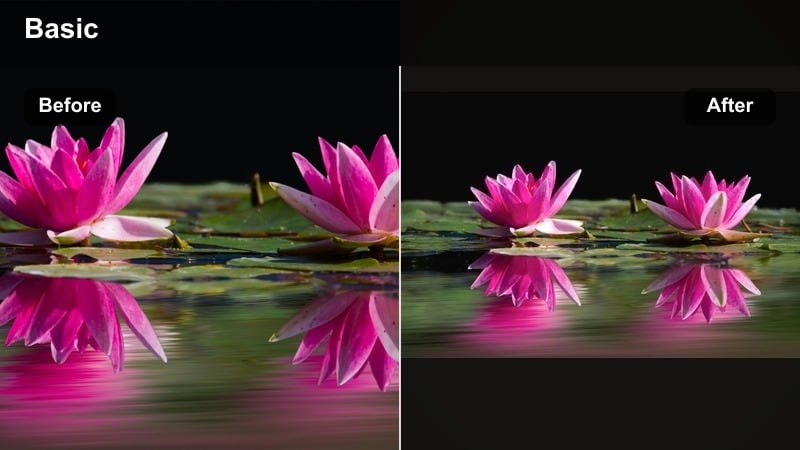
- Effect look: Muted tans and creams, balanced exposure, and soft contrast with a slightly warm overall tone.
- Best for: Room makeovers, wardrobe tours, organization videos, and neutral lifestyle content.
- Editing tip: Pull saturation back a little on strong colors, warm up midtones, and push greens toward olive so colorful clutter does not break the neutral mood.
Beige Room Aesthetic keeps your space minimal, calm, and Pinterest-ready by emphasizing creams, tans, and warm neutrals. In Filmora, gently warm the midtones, soften the contrast, and control saturation so bright objects do not fight with your neutral palette.
Use HSL controls to desaturate loud blues, reds, and greens while nudging greens toward olive for a more curated look. This filter is ideal for makeovers, closet tours, and home resets where viewers expect a soothing, cohesive visual experience.
Soft Matte Lifestyle
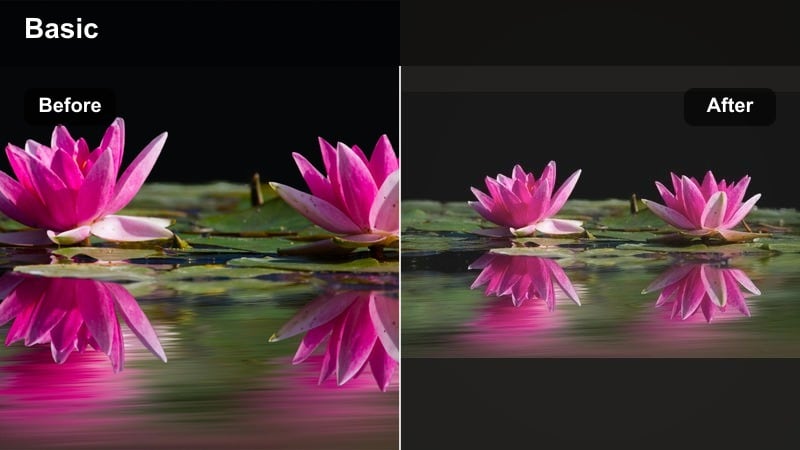
- Effect look: Low contrast, matte blacks, and subtle desaturation for a calm editorial lifestyle feel.
- Best for: Daily vlog sequences, coffee shots, study sessions, and B-roll between talking clips.
- Editing tip: Lift the black point for a matte finish, gently reduce clarity, and keep saturation moderate so your frame feels effortless and not over-edited.
Soft Matte Lifestyle adds a polished yet relaxed tone to everyday clips, making your B-roll feel like smooth transitions between more detailed talking segments. In Filmora, raise the black point, ease off contrast, and lightly desaturate colors to get an editorial, matte finish.
This filter works especially well on coffee pours, keyboard close-ups, and slow pans of your space. Keep sharpening low and motion calm so the matte look feels intentional and soothing, not dull, and apply it consistently across B-roll for a recognizable channel identity.
Cloudy Window Soft Tone
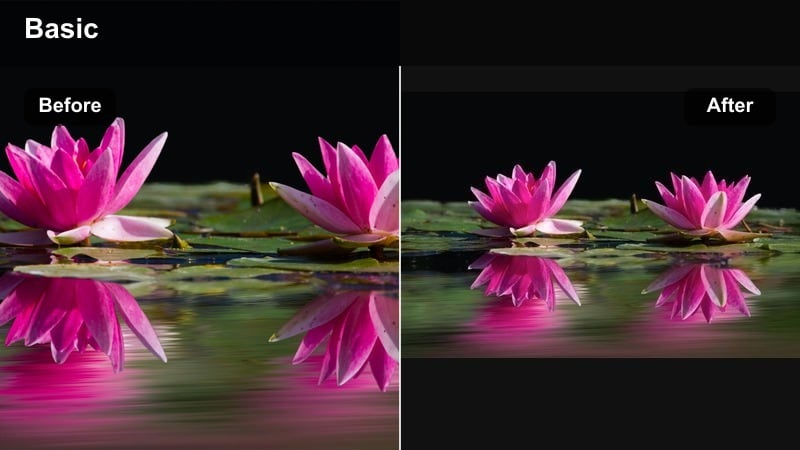
- Effect look: Cool, diffused highlights with slightly bluish neutrals, low clarity, and a gentle haze effect.
- Best for: Rainy day vlogs, window shots, reading clips, and introspective aesthetic YouTube moments.
- Editing tip: Lower clarity a bit, cool your white balance slightly, and add a tiny amount of bloom or glow to bright areas to mimic soft cloudy light.
Cloudy Window Soft Tone turns overcast days into cinematic, introspective scenes by leaning into cool, diffused light and a mild haze. In Filmora, slightly cool the white balance, reduce clarity, and add gentle glow to highlights to recreate the softness of a rainy window.
This filter is great for quiet voiceovers, reading sessions, or reflective walks shot near windows or doorways. If the scene drifts too blue, warm up only the midtones and skin tones while keeping the highlights cool, preserving that unmistakable cloudy-day atmosphere.
Moody Yet Dreamy YouTube Filters
Moody Soft Cinematic
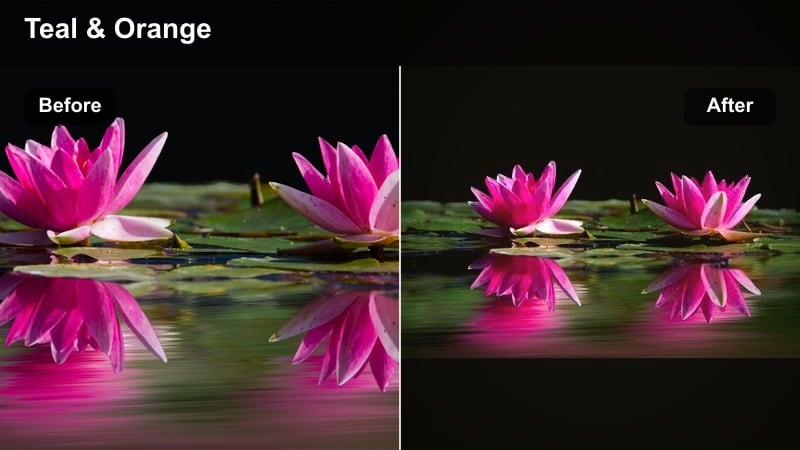
- Effect look: Deeper shadows, slightly teal-tinted darks, and warm skin tones with a gentle cinematic curve.
- Best for: Night city walks, cozy evening routines, and cinematic lifestyle storytelling videos.
- Editing tip: Lower exposure a little, add contrast in the midtones, cool the shadows while warming highlights, and use a soft vignette to keep attention in the center.
Moody Soft Cinematic adds depth and drama to your evenings while staying watchable and soft, perfect for city lights, bedroom lamp scenes, or late-night editing sessions. In Filmora, slightly underexpose, deepen the midtones, and tilt shadows toward teal while protecting warm skin.
Apply a soft vignette and reduce harsh highlights so bright signs or bulbs do not overwhelm the frame. Saving this look as an aesthetic LUT YouTube preset means every night vlog in a series can share the same cinematic mood with almost no extra effort.
Dusky Lavender Dream
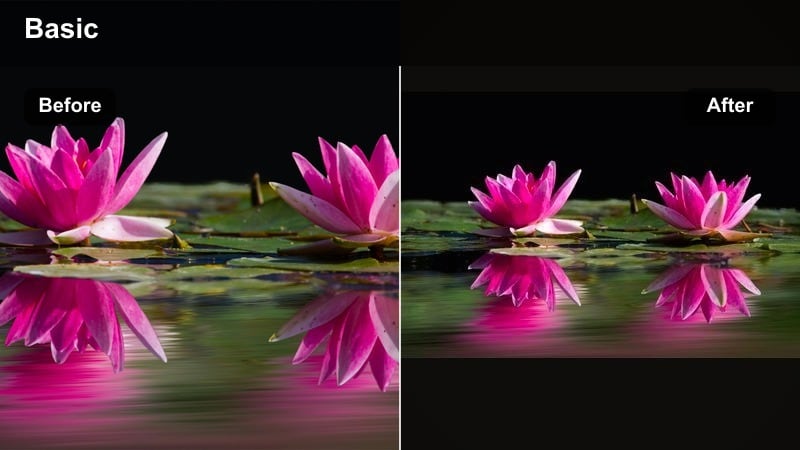
- Effect look: Soft purple and pink undertones in the shadows with slightly muted highlights for dusk-like ambiance.
- Best for: Golden hour shots, sunset rooftops, dreamy room lighting with LEDs, and romantic B-roll.
- Editing tip: Use color wheels to introduce lavender tones into shadows, keep highlights warm, and reduce saturation a bit to avoid neon-looking purples.
Dusky Lavender Dream makes every frame feel like the last few minutes of sunset, emphasizing purples and pinks in a gentle, cinematic way. In Filmora, add lavender into the shadows and keep highlights warm to preserve the natural golden-hour glow.
Dial back overall saturation slightly so LED lights or sky tones do not go neon. This filter is ideal for rooftop scenes, cozy bedrooms with RGB lights, or romantic cutaways in vlogs, especially when paired with soft, ambient music and slower cuts.
Forest Mood Soft Fade
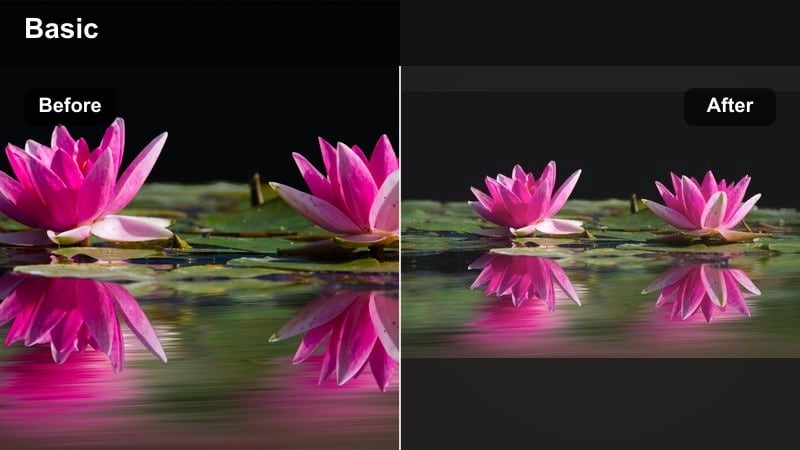
- Effect look: Deep greens, softened highlights, and a slight fade in shadows to keep the mood calm instead of harsh.
- Best for: Nature walks, cottagecore content, hiking vlogs, and quiet outdoor aesthetic shots.
- Editing tip: Push greens toward deeper forest tones, reduce their saturation slightly, add a gentle fade, and cool the overall white balance to bring out the mood.
Forest Mood Soft Fade transforms parks and trails into tranquil, cinematic hideaways with deep greens and mellow contrast. In Filmora, shift greens toward darker forest hues, cool the white balance, and lift the shadows a little so the frame feels soft instead of crunchy.
Keep movement slow and avoid heavy sharpening so leaves, paths, and sky blend into a calm visual experience. This filter works especially well for cottagecore, nature journaling, or hiking vlogs where you want viewers to feel like they are wandering quietly through the same space.
Tips for Using Youtube Video Aesthetic Filters in Filmora
- Shoot in consistent lighting so your aesthetic filters and LUTs are easier to apply and adjust.
- Keep at least one neutral reference object in frame, like white paper, to help balance your color grading.
- Work non-destructively by duplicating your clip on the timeline before testing bold dreamy filters.
- Save multiple versions of your favorite aesthetic YouTube video filters at different strengths for flexibility.
- Use masks to apply soft-tone filters only to backgrounds while keeping faces clean and natural.
- Mix subtle motion blur with soft glow for smoother, dreamier transitions between clips.
- Batch-apply your preset or LUT to all clips first, then fine-tune exposure shot by shot.
- Match your thumbnails to the same filter style so your channel grid looks cohesive.
Aesthetic YouTube video filters are less about perfection and more about consistency; when your soft dreamy tones carry through every upload, your channel starts to feel like its own visual world.
Experiment with these filter ideas in Filmora, save the looks that feel most like you, and turn them into presets or LUTs so your aesthetic stays effortless from the first clip to your next big series.
secure downloadNext: Explore Moody YouTube Video Filters for Deeper, Cinematic Vibes
