
Think Bigger From Filmora User Guide
-
Introduction of Filmora for Mobile
-
Get Started for Mobile
-
AI Features for Mobile
- AI Denoise
- Speech-To-Text
- Text-To-Speech | Filmora App Guide
- AI Captions
- AI Highlight
- Filmora VideoGen Feature Guide
- AI Enhancer | Filmora App Guide
- AI Remover | Filmora App Guide
- AI Auto Cut for Filmora Mobile
- AI Music
- AI Text to Video | Filmora App Guide
- Speaker Detection
- AI Emoji
- AI Beats - Filmora App
- AI Camera
- Edit Speech
- Image to Video for Android and iPhone
- Instant Mode
- AI Audio | Filmora App Guide
- AI Voice Cloning - Filmora App
- AI Voice Changer - Filmora App
- Smart Cutout | Filmora App Guide
-
Recording for Mobile
-
Video Editing for Mobile
- Trim Video
- Duplicate Video | Filmora App Guide
- Spilt Video on Android and iPhone
- Delete Video
- Crop Video
- Replace Video
- Rotate Video
- Reverse Video
- Speed Up Video
- Adjust the Sequence of Clips
- Adjust the Volume of Clips on Android and iPhone
- Adjust the Opacity of Clip | Filmora App Guide
- Adjust the Color of Clips on iPhone and Android
- Add Mask on Android and iPhone
- Add Mosaic on Android and iPhone
- Add Freeze for Android and iPhone
- Green Screen | Filmora App Guide
- Thumbnail Editing | Filmora App Guide
- Track Switching for Android and iPhone
- Color Palette - Filmora App
-
Audio Editing for Mobile
-
Text Editing for Mobile
-
Stickers & Effects & Filters for Mobile
-
Advanced Editing for Mobile
-
Exporting & Cloud Backup for Mobile
Color Palette - Filmora App
Filmora's Color Palette feature allows you to transform your video's aesthetic with professionally crafted color styles. It provides ready-made palettes that instantly shift the mood, whether you want warm, cinematic tones or cool, modern vibes. Each palette applies consistent color harmony across your footage, eliminating manual adjustments.
By selecting a palette, you can enhance storytelling, match a theme, or create a signature look with ease. This tool streamlines creative color grading for both beginners and experienced editors. Follow the steps below to learn how to use the color palette in the Filmora App:
Index
Filmora for Mobile
Edit Videos on Your Mobile Phone with 1-Click!
- • Powerful Brand New AI Features.
- • User-friendly video editing for beginners.
- • Full-featured video editing for professional.


Step 1. Open Adjust Settings
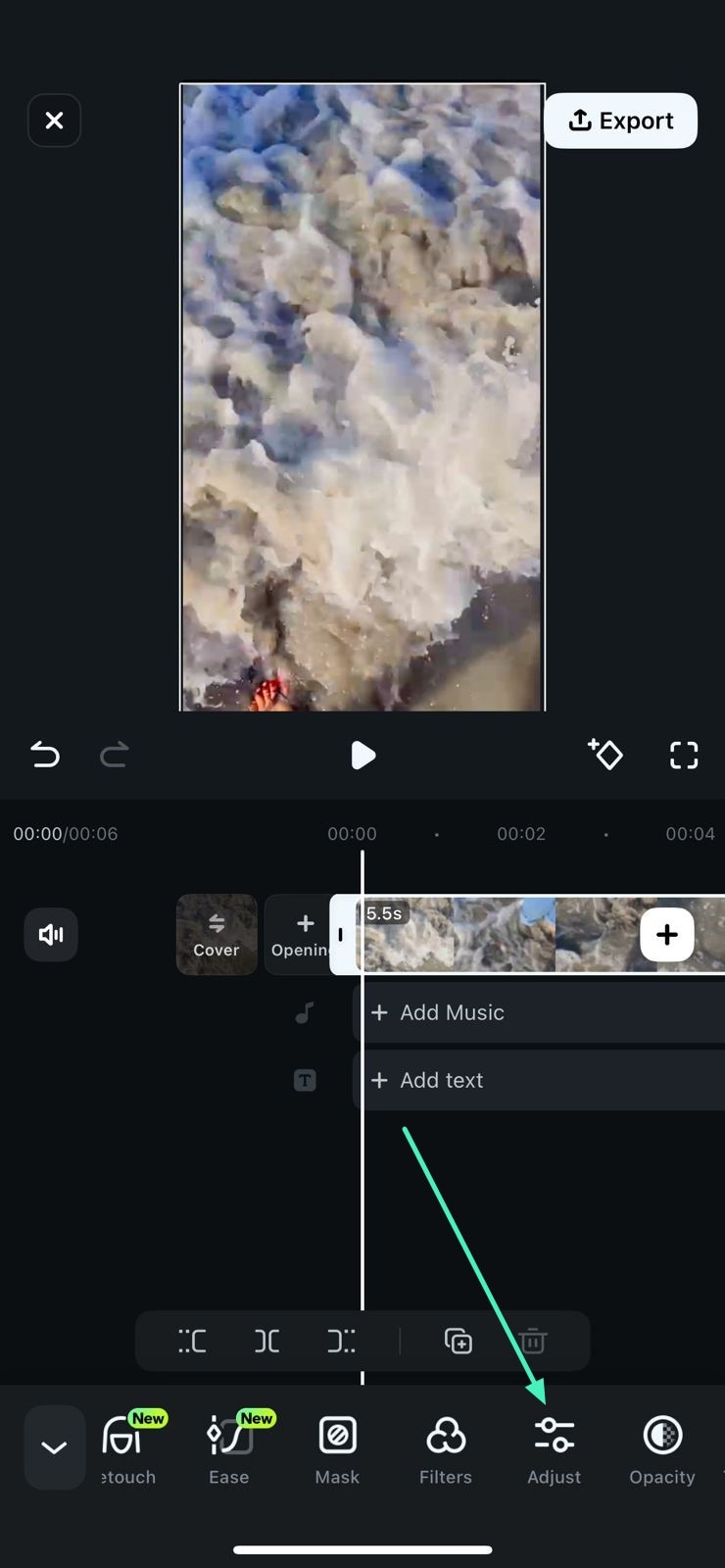
After creating a new project and importing the video to the Filmora App's interface, tap on the video track below the preview window. Next, locate the Adjust option and tap on it.
Step 2. Select Color Palette
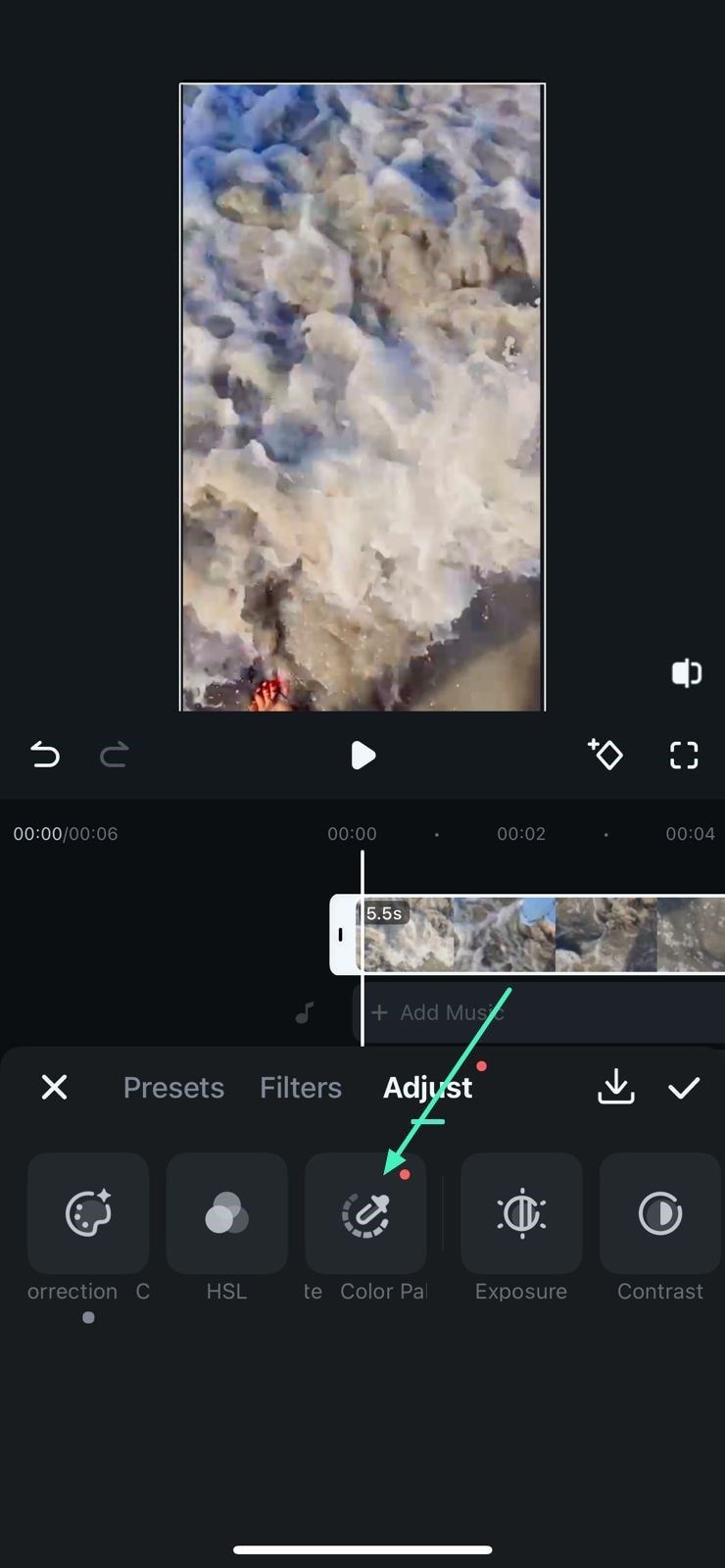
In the following screen, tap on the Color Palette option located on the toolbar at the bottom.
Step 3. Choose Color Reference
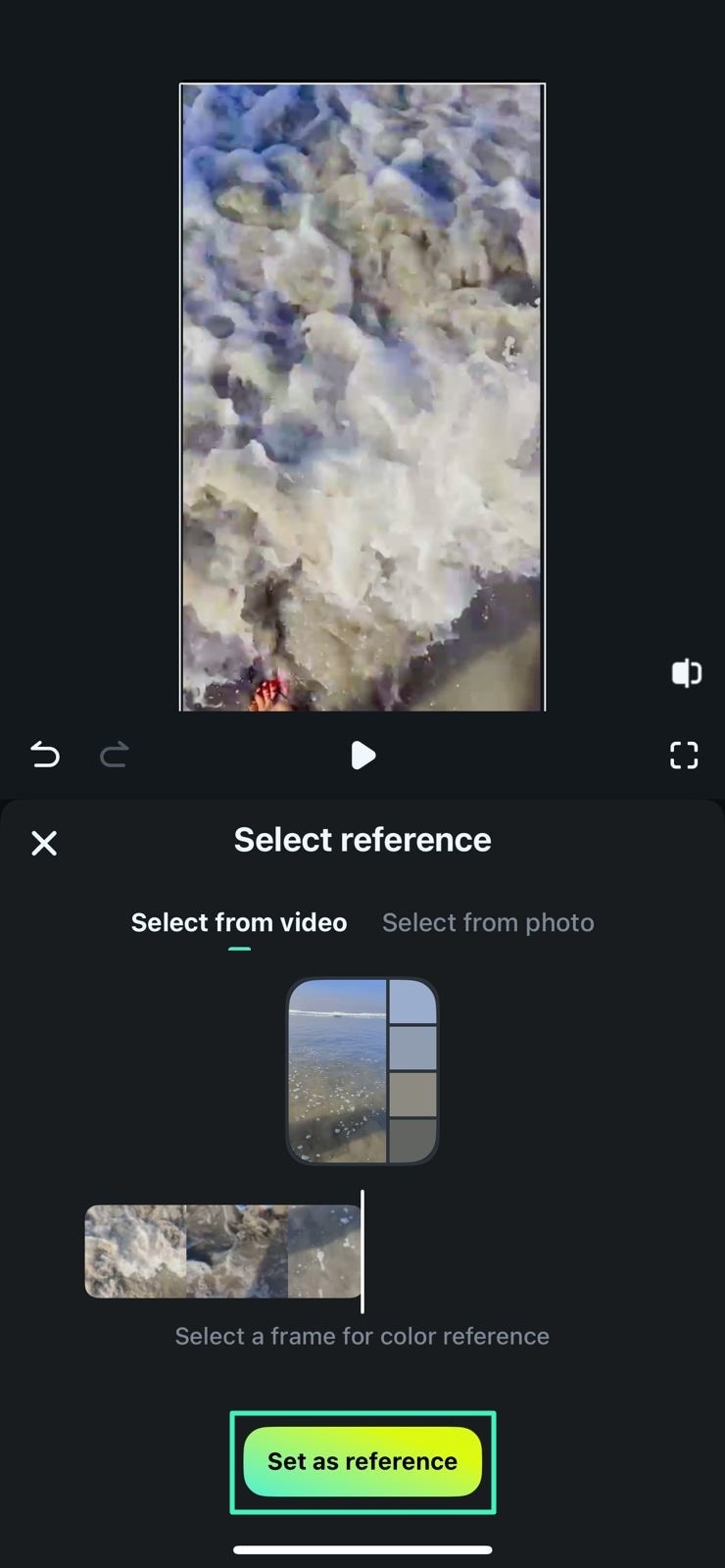
Next, select the reference palette from any frame on the video and press the Set as reference button. You can also select a color reference by uploading a picture, too.
Step 4. Adjust Palette Intensity
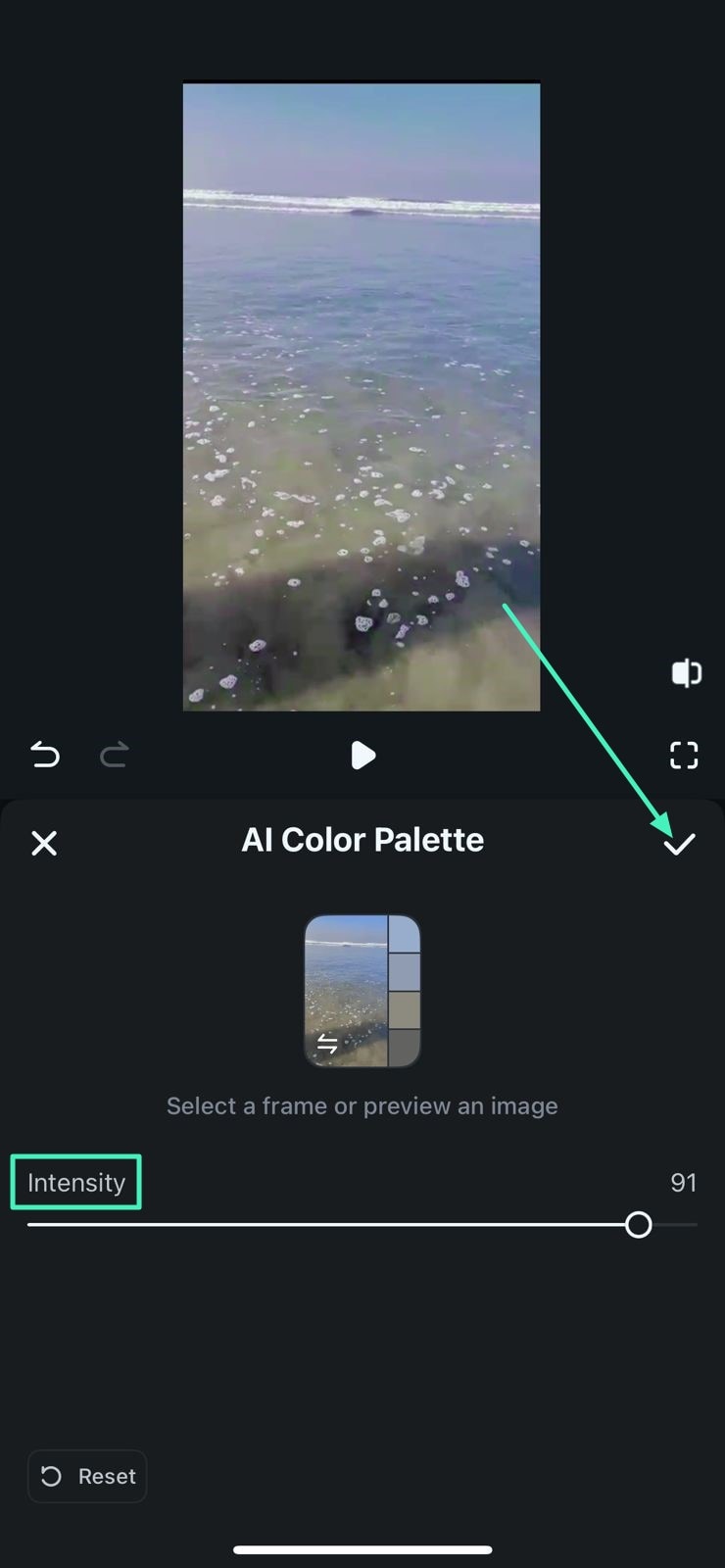
In the following interface, adjust the Intensity by dragging the slider and hit the Tick icon to save the results.
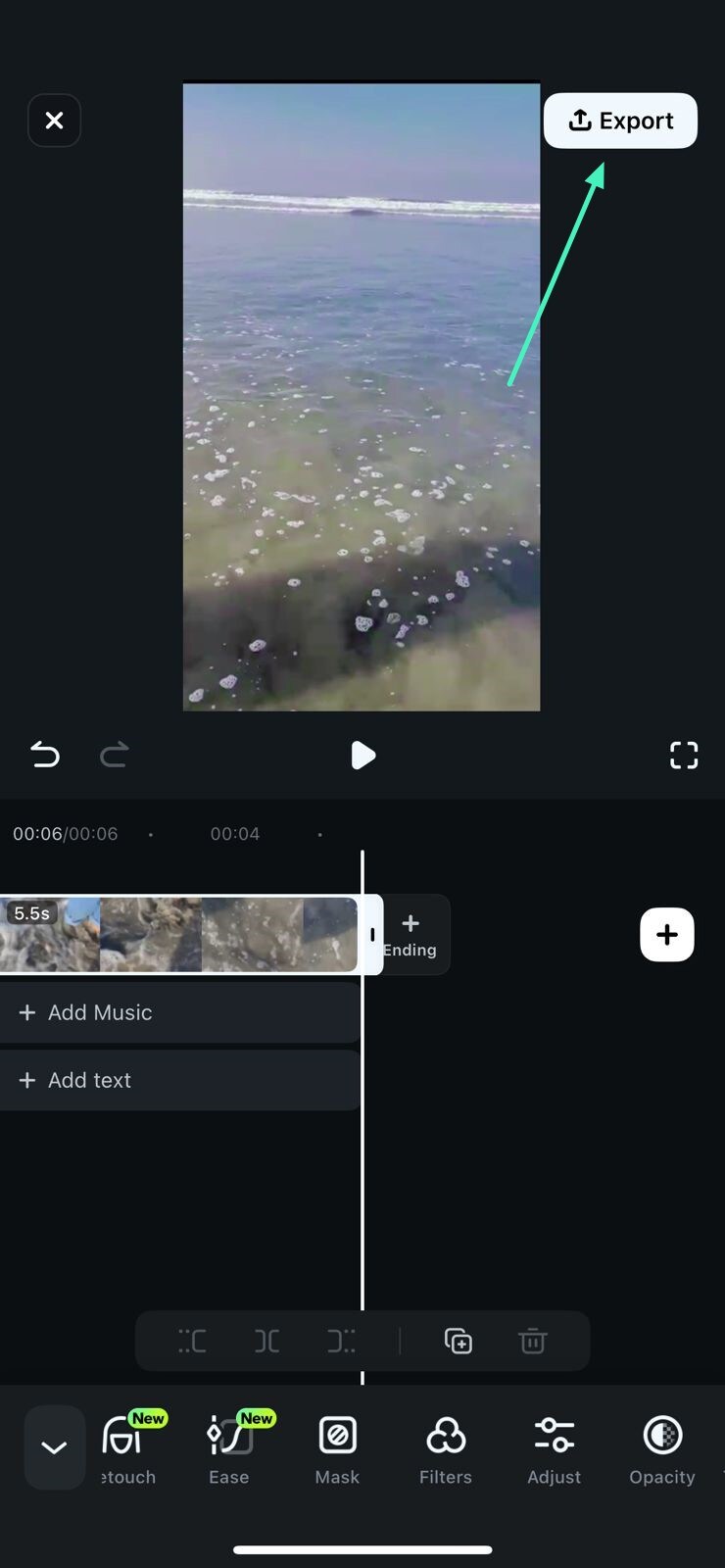
Step 5. Export the Edited Video
Once you are satisfied with the modified color, save the video by pressing the Export button located at the top-right corner.
Filmora for Mobile
Edit Videos on Your Mobile Phone with 1-Click!
- • Powerful Brand New AI Features.
- • User-friendly video editing for beginners.
- • Full-featured video editing for professional.
Related Posts
Featured Articles
How to Create a Shooting Star Effect Easily (No After Effects Needed)
The shooting star effect adds a visual value to your nighttime videos. This article explores 2 tools for making the perfect dynamic effect in your films.
How Does Changing YouTube Title Affect Views – Detailed Guide
Looking for ways to add YouTube meta tags in the description? In this article, you will learn strategies to optimize engaging and keyword-rich descriptions.
How To Blur Objects/Faces in Vegas Pro[2026]
Vegas Pro with its specialized tools will help in achieving the perfect blur/pixelate in just few clicks. Here is how you can get started.
Recommended User Guide
Adjust the Volume of Clips on Android and iPhone
Creating a well-balanced and professional video requires more than editing the clips; it also requires adjusting the audio. In Filmora for Mobile, editors can do that with Volume, a handy tool that allows them to control the audio levels effortlessly. With it, editors can emphasize certain video parts or reduce background noise in a few taps.
Adjust the Opacity of Clip | Filmora App Guide
Whether you want to prepare the terrain for overlays, blend multiple video clips, create unique visual effects, or add depth to your videos, the Opacity tool in Filmora for Mobile is the way to go. With it, you can seamlessly control the clip’s transparency, allowing you to unleash your full creativity during editing.
Add Freeze for Android and iPhone
Whether you want to add a dramatic pause effect or emphasize a crucial moment in your video, Filmora for Mobile's freeze-frame effect is the perfect solution. At its core, a freeze-frame effect during editing splits the video and freezes your chosen frame, inserting it as a few-second-lasting image. So, let's learn how to add and adjust a freeze frame.
