
For the Best Results, Use the Latest Version.
-
Preparations for Mac
-
Account (Mac)
-
Get Started & Basic Settings (Mac)
- Release notes for Mac
- Latest Versions and Features for Mac
- Get Started on Mac - Full Guide
- Download/register/uninstall on Mac
- Panel Layout on Mac
- Keyboard shortcuts on Mac
- Touchbar on Mac
- Change playback quality on Mac
- Render preview files on Mac
- Manage Timeline on Mac
- Media for use on Mac
- Logo Reveal For Mac
- Marked Favorites for Mac
-
Compatibility & Tech Specs (Mac)
-
Performance Settings (Mac)
-
-
Creating Projects - Mac
-
Creating New Projects (Mac)
-
-
Importing & Recording - Mac
-
Importing (Mac)
-
Recording (Mac)
-
-
Video Editing for Mac
-
Basic Video Editing for Mac
- Edit Live Photos on Mac
- Enable/Disable Clip for Mac
- Magnetic Timeline For Mac
- Dual Monitor Setup for Video Editing on Mac
- Select All Clips on Timeline for Mac
- Auto Ripple for Mac
- Split & cut videos on Mac
- Compositing on Mac
- Crop and zoom on Mac
- Playback Zoom Level for Mac
- Change speed on Mac
- Play video in reverse on Mac
- Mark In and Mark Out for Mac
- Markers for Mac
- Group clips on Mac
- Customized Backgrounds for Videos and Images in Mac
- Video snapshot on Mac
- Freeze frame on Mac
- Auto enhance on Mac
- Applying Drop Shadow for Mac
- Adjustment Layer for Mac
- Mark clip on Mac
- Video Editing Ruler – Mac
- Apply Transforming for Mac
-
Advanced Video Editing for Mac
- Text Animation Path for Mac
- Create Multi-Camera Clip for Mac
- Drawing Tools for Mac | Filmora Guide
- Compound Clips for Mac
- AI Video Enhancer for Mac
- Filmora Flicker Removal Guide | Mac
- Multi-Clip Editing for Mac
- Keyframe Graph Editor for Mac
- Animation keyframing on Mac
- Mask on Mac
- PIP (picture in picture) on Mac
-
AI-Powered Video Editing for Mac
- Smart Scene Cut for Mac
- Smart Short Clips for Mac
- Filmora AI Eye Contact - Mac
- Filmora Image to Video for Mac
- AI Idea to Video for Mac
- AI Text-to-Video for Mac
- Instant Cutter Tool on Mac
- AI Face Mosaic for Mac
- Filmora Image to Prompt for Mac
- Keyframe Path Curve for Mac
- Filmora AI Image Enhancer Guide – macOS
- Planar Tracking for Mac
- Filmora AI Relight - Mac
- AI Extend For Mac
- AI Script-to-Video for Mac
- AI Text-Based Editing in Mac
- Create With Instant Mode on Mac
- ChatGPT Plugin - AI Copywriting on Mac
- AI Smart Cutout for Mac
- Auto reframe on Mac
- Lens correction on Mac
- AI Portrait Cutout on Mac
- Scene detection on Mac
- AI Smart Masking for Mac
- AI Mate Editing for Mac
- Motion Tracking on Mac
- Video Stabilization for Mac
- AI Object Remover For Mac
- AI Smart Search for Mac
- AI Skin Tone Protection for Mac
- Green screen on Mac
- Super Slow Motion with Optical Flow for Mac
- AI stylizer on Mac
- Video Denoise for Mac
-
-
Audio Editing for Mac
-
Basic Audio Editing for Mac
-
Advanced Audio Editing for Mac
-
AI-Powered Audio Editing for Mac
- Audio To Video for Mac
- AI Sound Effect for Mac
- Smart BGM Generation for Mac
- AI Voice Enhancer for Mac
- Audio Stretch for Mac
- AI Audio Denoise for Mac
- Auto synchronization for Mac
- AI Vocal Remover for Mac
- Auto Beat Sync on Mac
- AI Music Generator for Mac
- How to Perform AI Voice Cloning in Wondershare Filmora?
- Silence detection on Mac
-
-
Text Editing for Mac
-
Basic Text Editing for Mac
-
Advanced Text Editing for Mac
-
AI-Powered Text Editing for Mac
-
-
Video Customizations for Mac
-
Video Effects (Mac)
-
Audio Effects (Mac)
-
Transitions (Mac)
-
Stickers (Mac)
-
Filters (Mac)
-
Color Editing (Mac)
-
Animations (Mac)
-
Templates (Mac)
-
Asset Center (Mac)
-
-
Exporting & Share & Cloud Backup - Mac
AI Motion Blur for Mac
Filmora for Mac includes the AI Motion Blur feature to help creators produce smoother and more immersive motion effects in high-speed footage. Instead of showing abrupt or stiff movement, the feature intelligently adds realistic motion trails that create a more fluid and cinematic appearance. It is especially useful for gaming clips, sports recordings, action sequences, and videos with rapid camera movement.
With customizable controls for blur strength, motion range, and directional flow, users can easily fine-tune the effect to match different editing styles and visual moods.
Steps to Use AI Motion Blur in Filmora
Filmora offers an intuitive workflow for applying motion blur effects on Mac devices. Follow the instructions below to learn how to improve fast-moving footage using AI Motion Blur:
Index
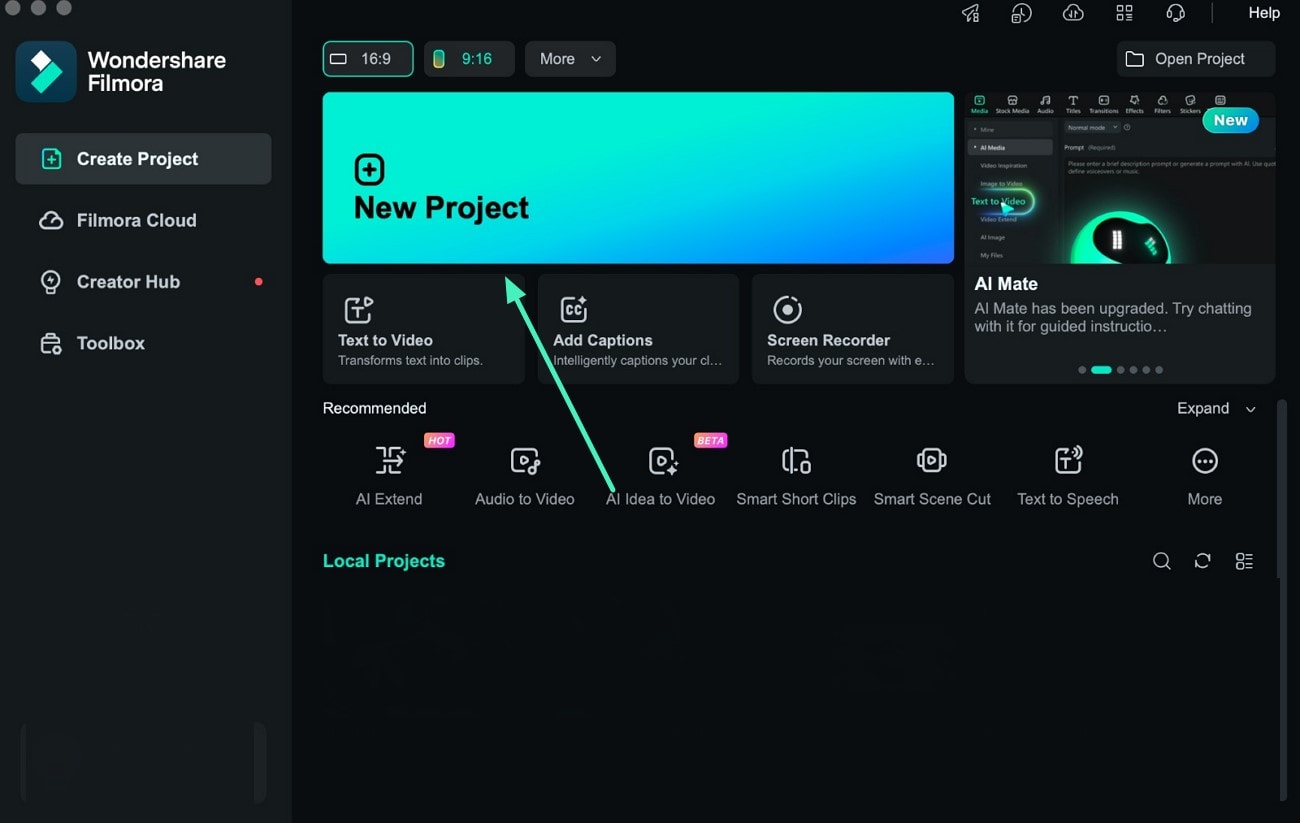
Step 1. Create a Project and Add Footage
Open Filmora on your Mac and click the New Project option from the home screen. Import the preferred video into the media library and place it on the editing timeline to begin editing.
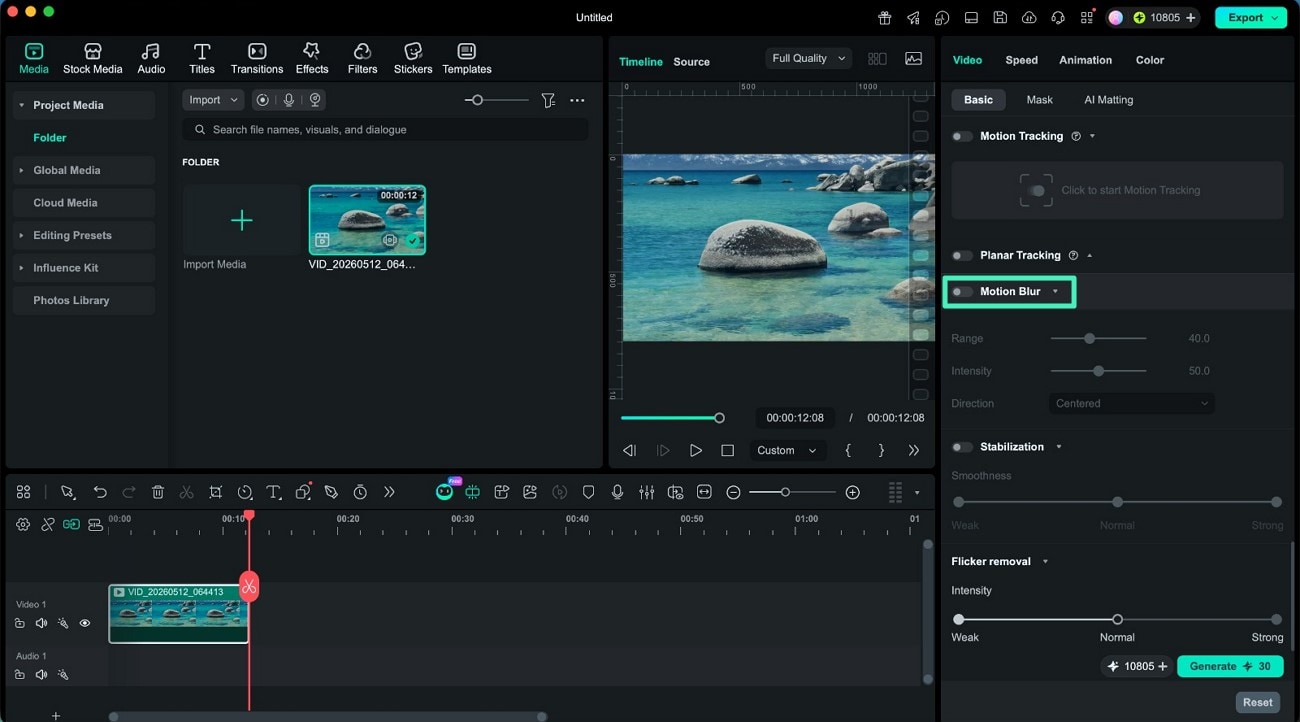
Step 2. Activate AI Motion Blur
Navigate to the video editing panel and locate the AI Motion Blur feature. Enable the toggle to allow Filmora to automatically detect and smooth motion within the selected clip.
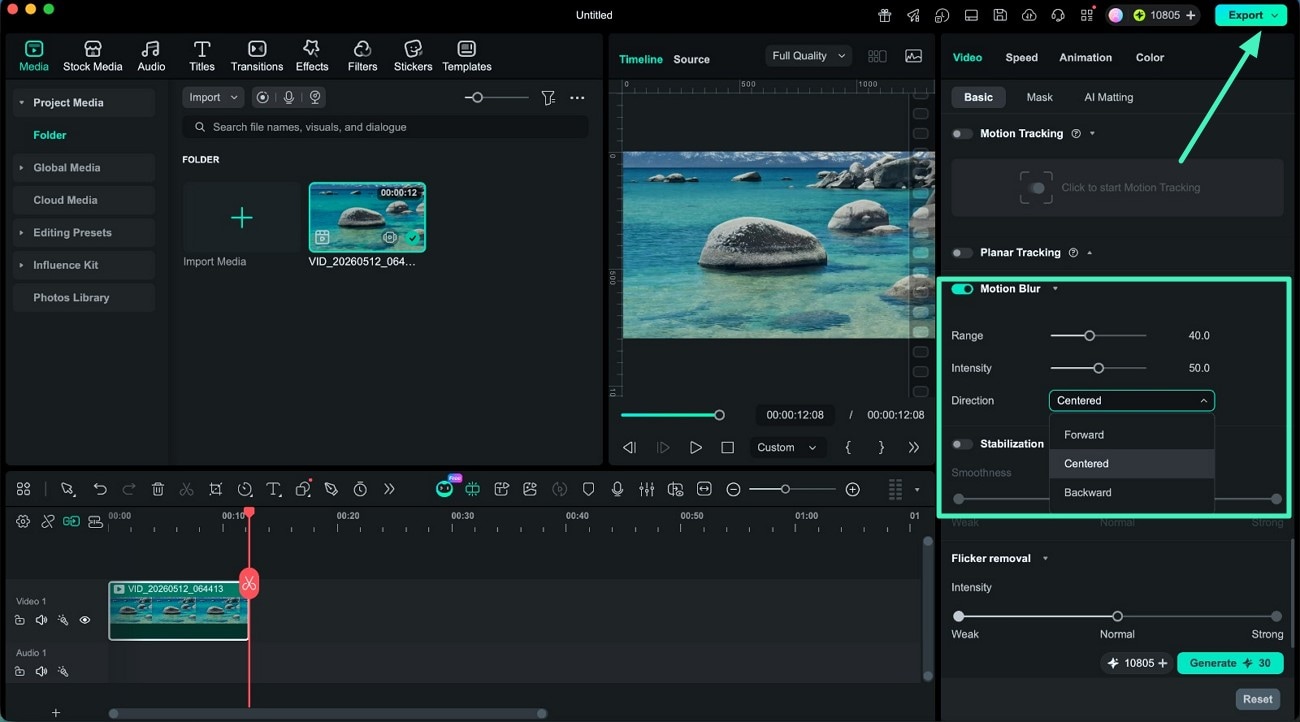
Step 3. Customize Blur Settings and Export
Adjust the Range and Intensity sliders to control the spread and strength of the motion blur effect. Next, choose the preferred motion direction from the available options to achieve the desired visual style. After reviewing the preview results, click the Export button to save the enhanced video to your device.
Related Posts
Featured Articles
A Guide to Epic and Memorable Green Screen Birthday Videos
Make their birthday extra special with a green screen happy birthday video! Find out where to find the best backgrounds and how to create one with this easy-to-follow guide.
Twitch Video Banner Size: Maintaining the Right Limits
Learn about Twitch video banner size, profile dimensions, and expert tips to optimize banners. Discover how to simplify resizing for perfect banner media.
Step by Step: Best Ways to Create an Instagram Photo Collage
If you want to make your Instagram content stand out and attract the desired audience, try these Instagram collage methods and master your skills in no time.
Recommended User Guide
Create With Instant Mode on Mac
This is a guide on filmora's instant mode.
Keyframe Path Curve for Mac
Are you frustrated with not being able to create smooth animation paths? Filmora has recently introduced the keyframe path curve feature. When you adjust the transition effects between keyframes, you can change keyframe type to control the speed and pacing of the animation, making it look smoother and more natural, and helping you create high-quality video clips. Now Let us know how to use it.
Filmora Image to Prompt for Mac
Here is the guide on how to use the image to prompt feature in Filmora on Mac.
