



 100% Security Verified | No Subscription Required | No Malware

With over 1.1 billion users and 1 million content creators, TikTok is the number one platform to get your name out there. Whether you’re trying to make it as an independent influencer or are working on expanding your overall brand awareness, TikTok has everything you need to make your content stand out.
There are fun filters and effects, collaboration tools, attention-grabbing sound effects, and, most notably, excellent voice effects that will get you instantly recognizable.
The TikTok voice generator lets you quickly and easily convert text to speech and enrich your content with a single click. Learn more about the TikTok text-to-speech voice generator, what it is, and how to use it.
In this article
What Is TikTok’s AI Voice Function (TikTok Voice Generator)
Until a couple of years ago, if you wanted to add voiceovers to your TikToks (or other content), you had to record them. As in, you either had to record a video of yourself speaking or sit down, prep your microphone, come up with a script, and then narrate the voiceover and add it to your video later.
The TikTok AI voice generator changed the game. It popularized text-to-speech technology and enabled users to automatically add voiceovers using only textual input. So, to have video narration in your TikTok content, all you have to do now is add your text and let the platform do the rest.
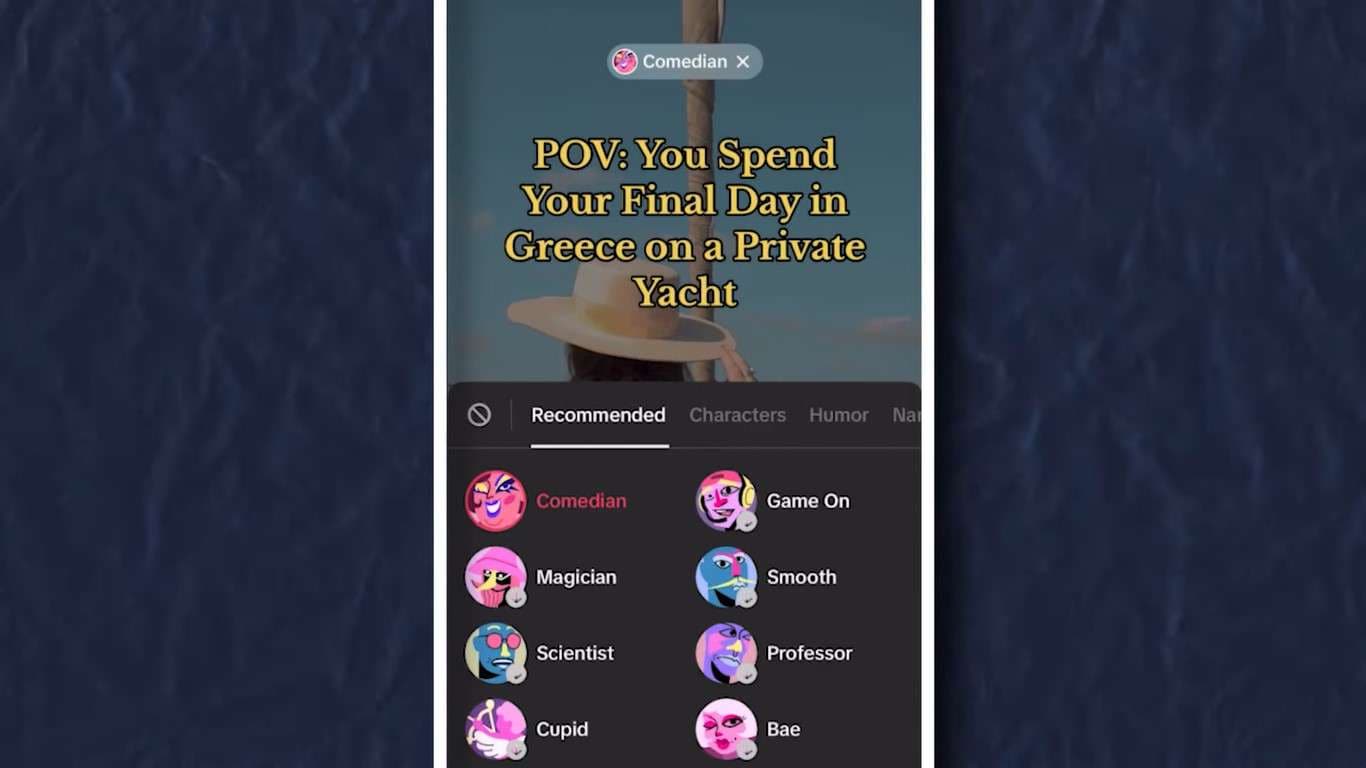
TikTok offers an excellent selection of voices to choose from – you can always opt for the default female voice or one of the available characters, narrator voices, and more.
Though most available options deliver good sound quality, remember that they all tend to sound a bit robotic.
Benefits of Using TikTok’s Voice Generator
Grabbing attention on an overly saturated platform like TikTok requires you to create fully immersive content, and that involves using all features at your disposal – including TTS.
With TikTok’s text-to-speech generator, you can enrich your content and enjoy numerous unique benefits.
- Stay on top of trends – the most popular TikTok videos all include voiceovers and video narration. Jumping on the bandwagon and using TTS can help you stay relevant and engaging on the platform;
- Make your content more accessible – with video voiceovers, you can ensure that your content is accessible to those with visual impairments, learning disabilities, or simply non-native speakers who can’t keep up with text in a foreign language;
- Make your content more engaging – voiceovers can add a touch of humor to your videos and help keep your audience immersed and engaged;
- Keep your branding consistent – using the same TTS effects in all your videos can help you keep your branding uniform and consistent and, thus, more easily recognizable;
- Connect with a broader audience – using multilingual TTS allows you to connect with a much wider audience, even if you’re not speaking the same language.
All things considered, TikTok’s TTS comes with many benefits and no significant downfalls. So, it’s generally in your best interest to take full advantage of it.
How to Use TikTok’s AI Voice Feature (Voice Generator)
If you’re interested in giving TikTok voice generator text-to-speech a try, you’d be happy to know that the process is quite simple:
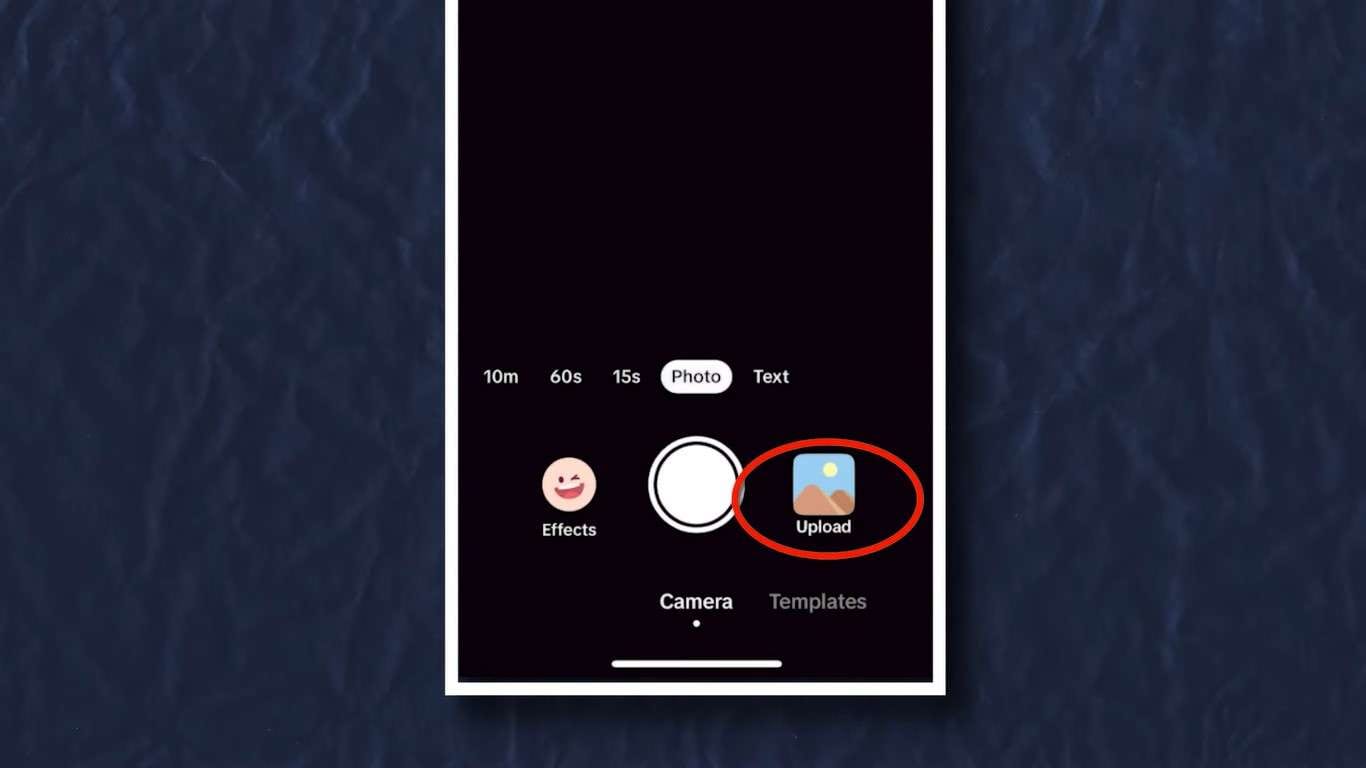
Step 1: Launch the TikTok app and tap the + icon to create a new post;
Step 2: Upload an existing video or use the app to record a new one by tapping the Record button;
Step 3: Tap the Aa icon to add text;
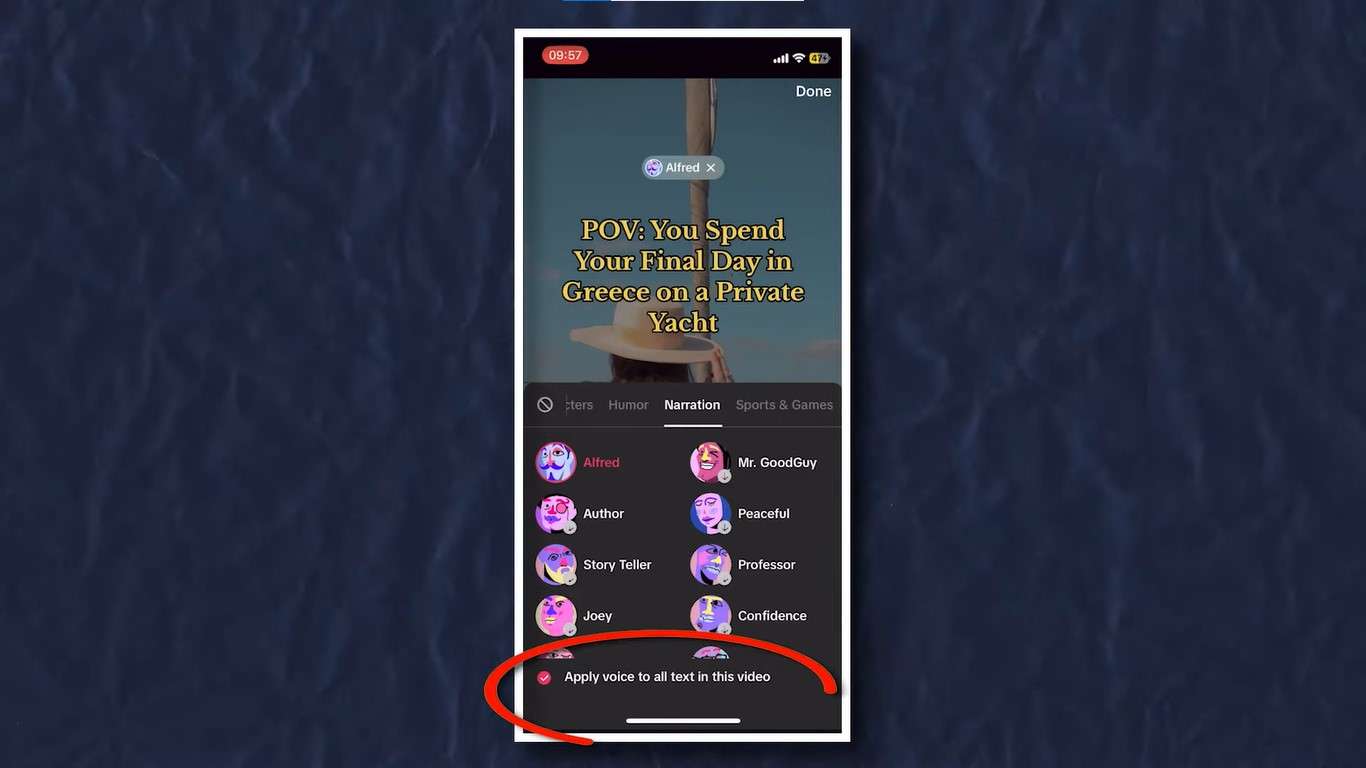
Step 4: If needed, customize text size, font, color, and background, then tap and hold your text and select Text to Speech;
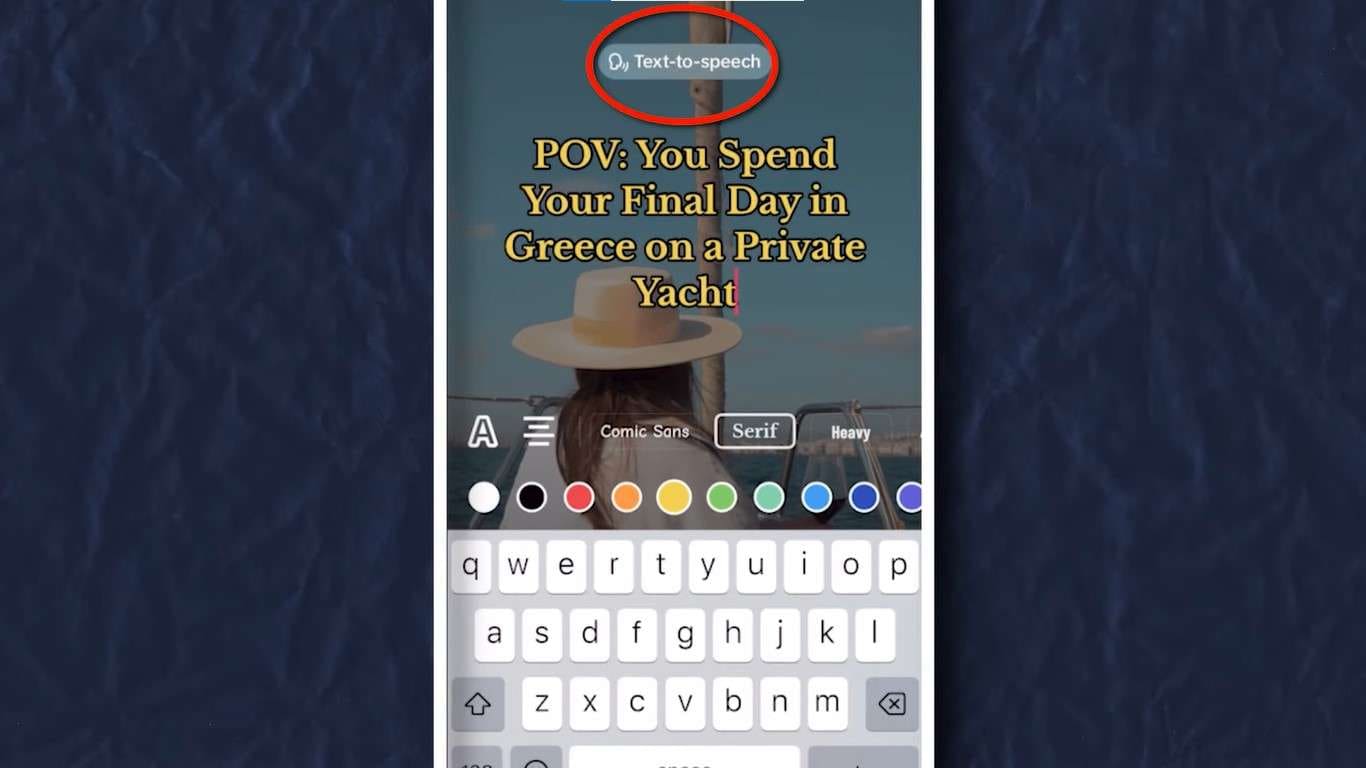
Step 5: Select your preferred voice;
Step 6: Tap Apply voice to all text in this video and publish your post.
Third-Party TikTok Voice Generators
Although using the native TikTok narrator voice generator is certainly both easy and beneficial, there are a couple of things you’ll want to keep in mind.
Primarily, there aren’t all that many different voices you could use, and, as mentioned, they all sound a bit robotic. Secondly, you can only use one voice effect per video. So, if you’d like to create a dialogue, for instance, and use two or more AI voices, you’ll be out of luck.
If you’d like more versatility with your TikTok robot voice generator, you’ll need to use a third-party tool. Here are some of your best options.
Wondershare Filmora
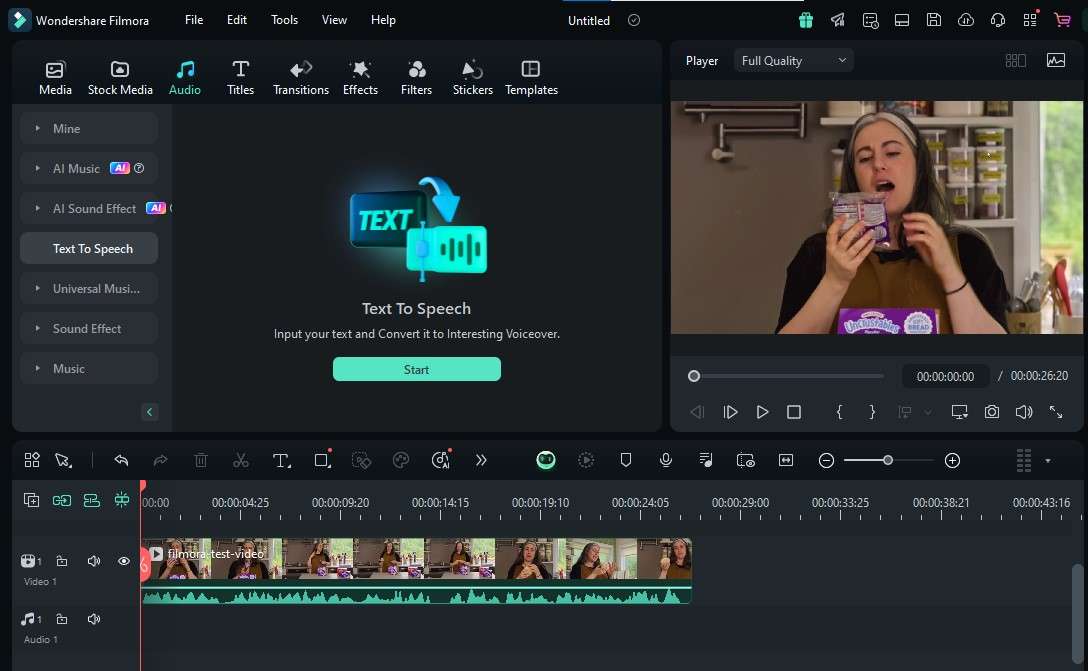
An all-around video editing software suite, Wondershare Filmora is an exceptional tool to have in your arsenal if you want to make a name for yourself on platforms like TikTok. It offers no less than 40 unique, natural-sounding AI voices you can use for all your TTS purposes.
With powerful AI capabilities, Filmora can even remove the hassle of coming up with fun captions! If you ever encounter a creative block, use its features to automatically generate text for your videos, then transform the text into human-sounding voiceovers. If needed, you can then use its AI text-based editing to perfect and edit your videos simply by adjusting the generated text.
What’s more, its TTS services are available in 33 languages, so if you have different TikTok accounts for different target audiences, you can seamlessly repurpose content in any language necessary and maintain brand consistency.
To further customize voiceovers, you can use Filmora to clone your own voice and add a personal touch to your videos.
In addition to its advanced AI capabilities, this tool also has a full-blown recorder and professional video editor with hundreds of editing features designed to enhance your content.
Speechify
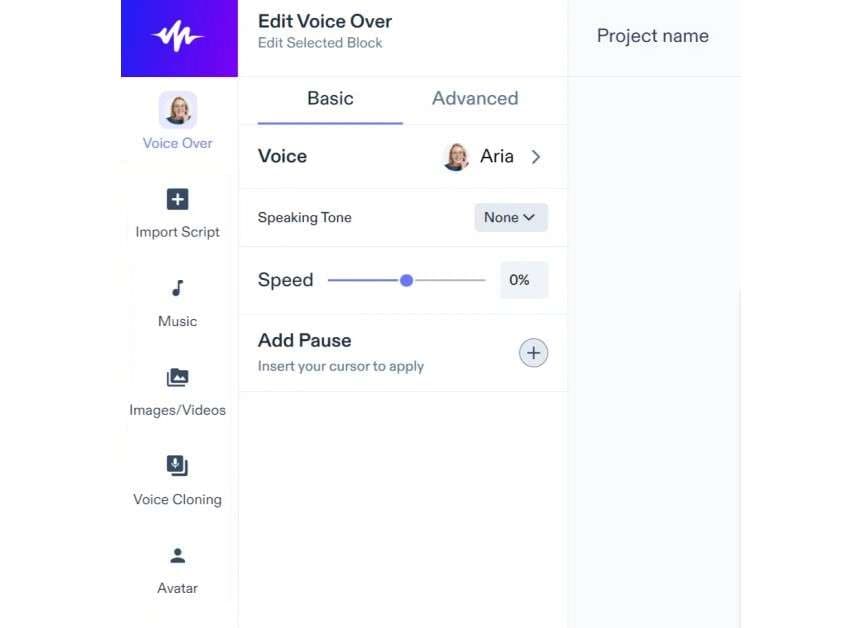
Speechify is a popular read-aloud app. It’s designed as a piece of assistive tech that aims to help users turn virtually anything into an audiobook.
Although its primary purpose is to help individuals with dyslexia, visual impairments, and other learning, physical, and mental disabilities make written content more accessible to them, it can also be a fantastic tool for enriching your TikTook content with voiceovers.
It gives you access to hundreds of unique, natural-sounding voices. You can even turn text to speech using celebrity voices, including Gwyneth Paltrow, Snoop Dog, MrBeast, and others.
Speechify offers AI voiceovers in 20 languages and accents, and like Filmora, it also allows you to clone your own voice and create new content.
PlayHT
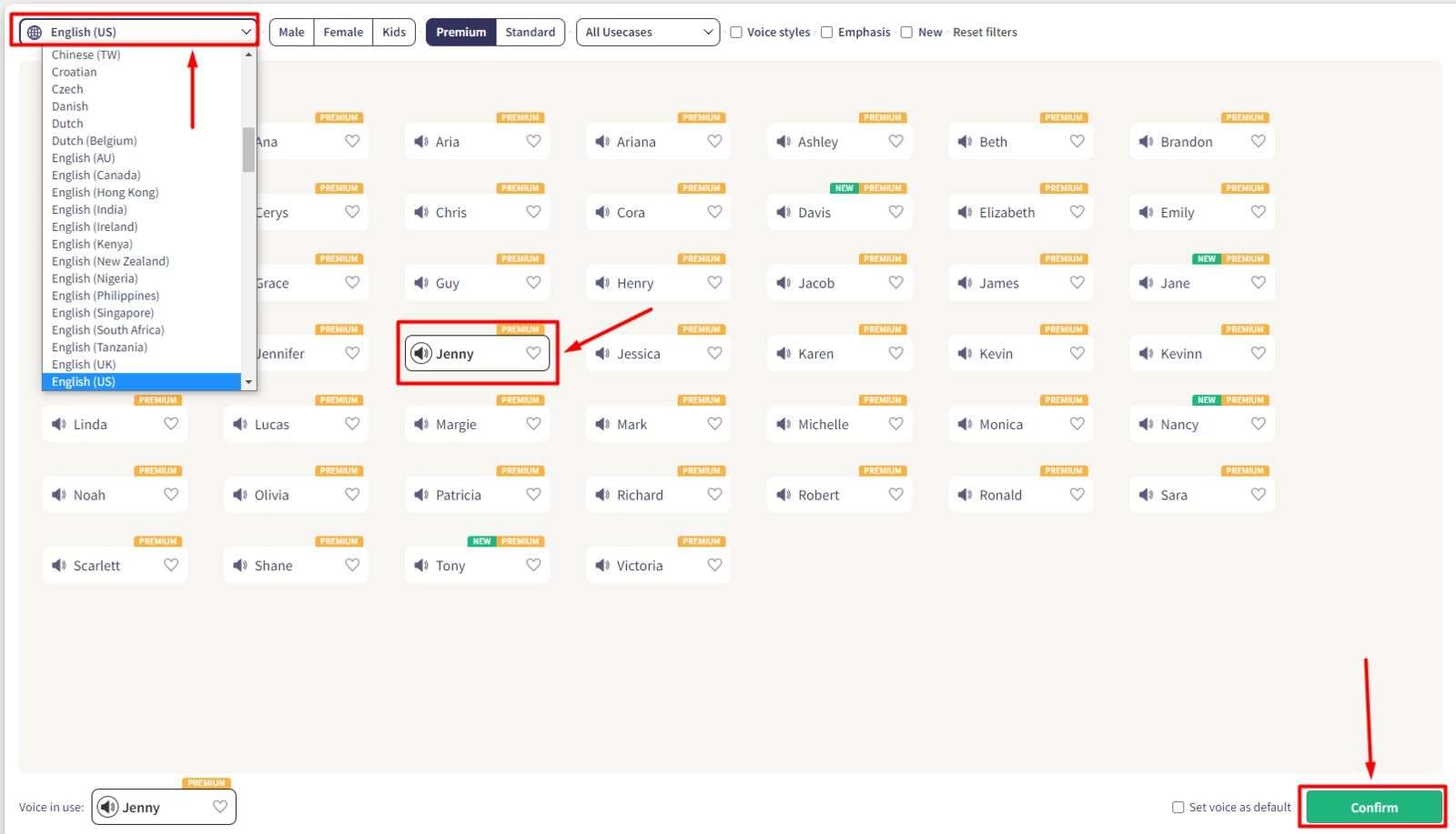
Another third-party app that gives you more versatility than the native TikTok voice generator online is PlayHT. Established in 2016, it’s become one of the go-to tools for influencers and content creators who need access to TTS tech.
It offers over 800 ultra-realistic AI voices in 142 different languages and accents. It even offers voices in specific styles, including narrator, tutorial, and character voices, etc. You can fully customize virtually any aspect of these AI voices and make them truly your own – or simply clone your voice!
What’s especially interesting about PlayHT is its generous free version, making it ideal for influencers-to-be who are still on strict budgetary restrictions. While the AI voices available in the free version aren’t quite as natural-sounding as those available with paid plans, they still give you more versatility than TikTok.
How to Use a Third-Party TikTok Voice Generator
Although native and third-party TikTok AI voice generators use sophisticated technology to convert text to speech (AI, machine learning, natural language processing, and more), they typically remain fairly easy to use.
Here’s how you can use Wondershare Filmora, for instance, to create TikTok voiceovers:
Step 1: Install Filmora, launch it, and click the Login button to register your account;
Step 2: Go to New Project > File > Import Media and upload the video/images you want to use for your TikTok;
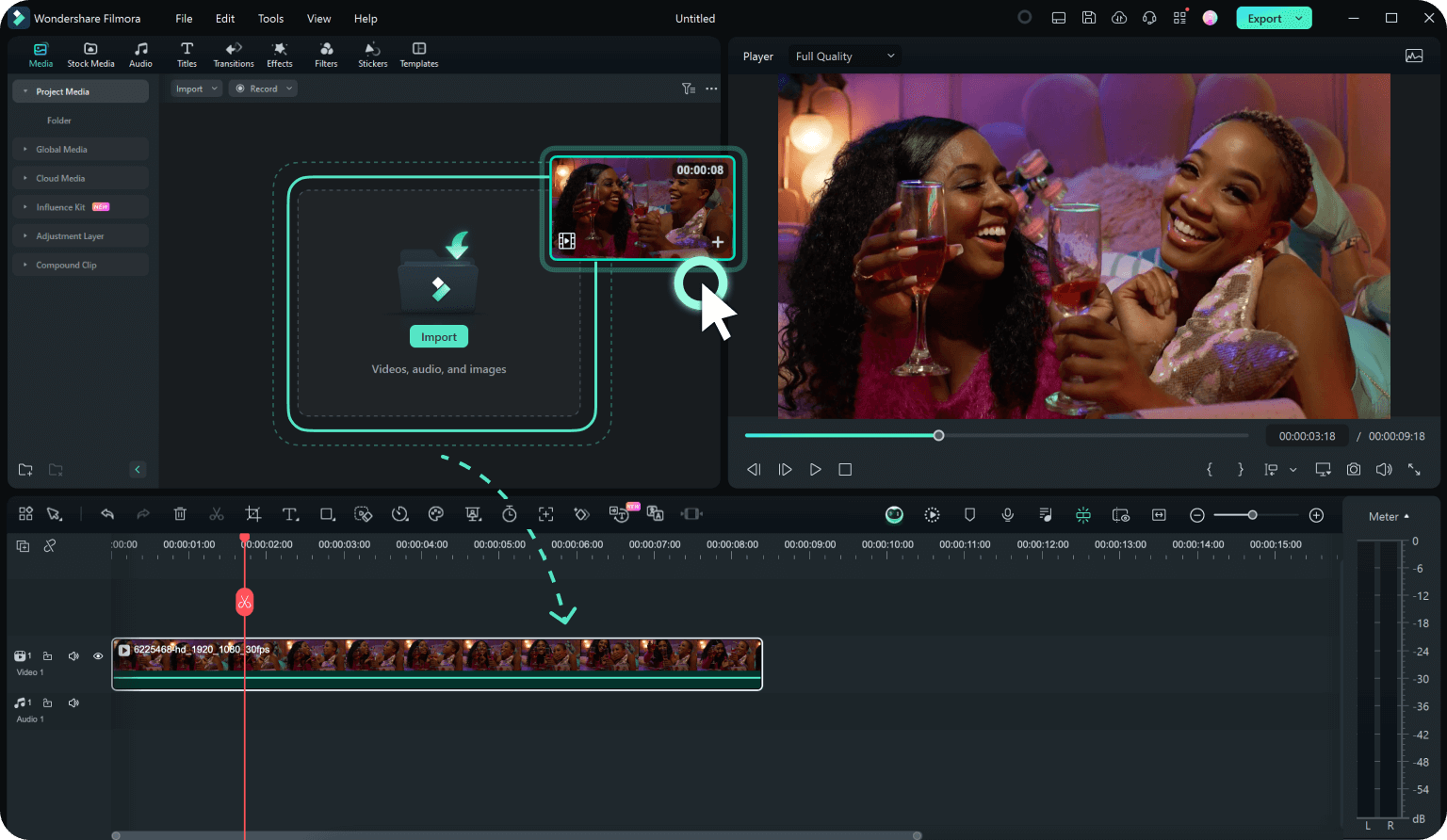
Step 3: Go to the Audio section and select Text to Speech;
Step 4: In the new pop-up, input your text. Alternatively, select AI generator, provide a theme, and let AI generate the text for you;
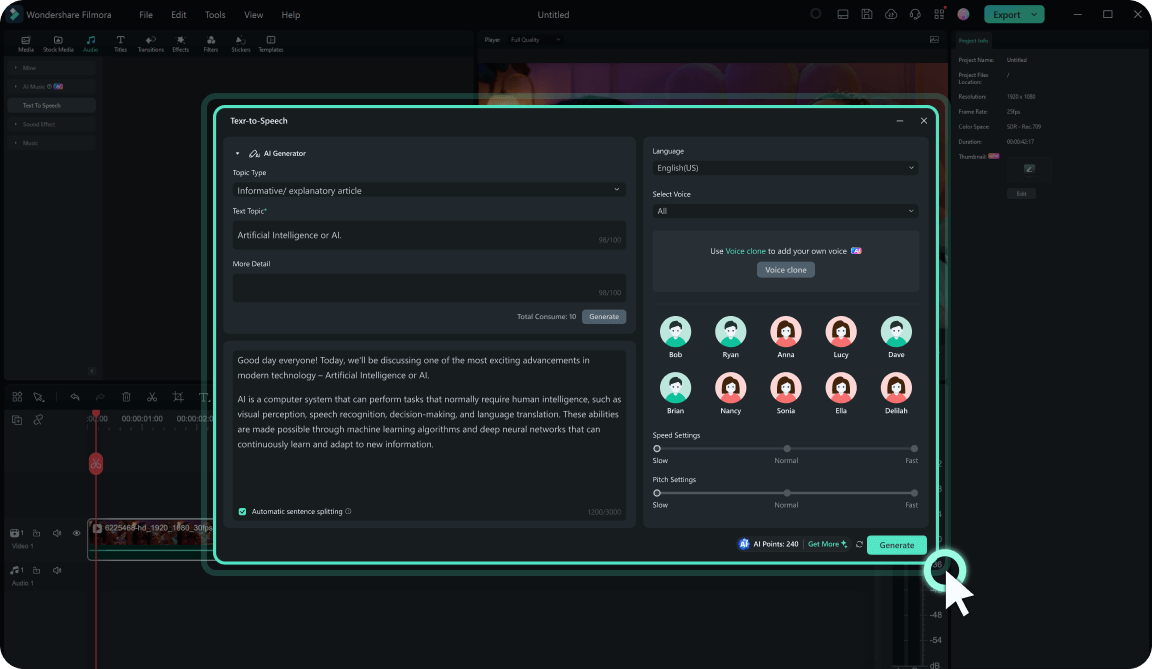
Step 5: Select your preferred language and adjust the voice characteristics – select voice, pitch, speed, etc.;
Step 6: Click Generate to create a voiceover.
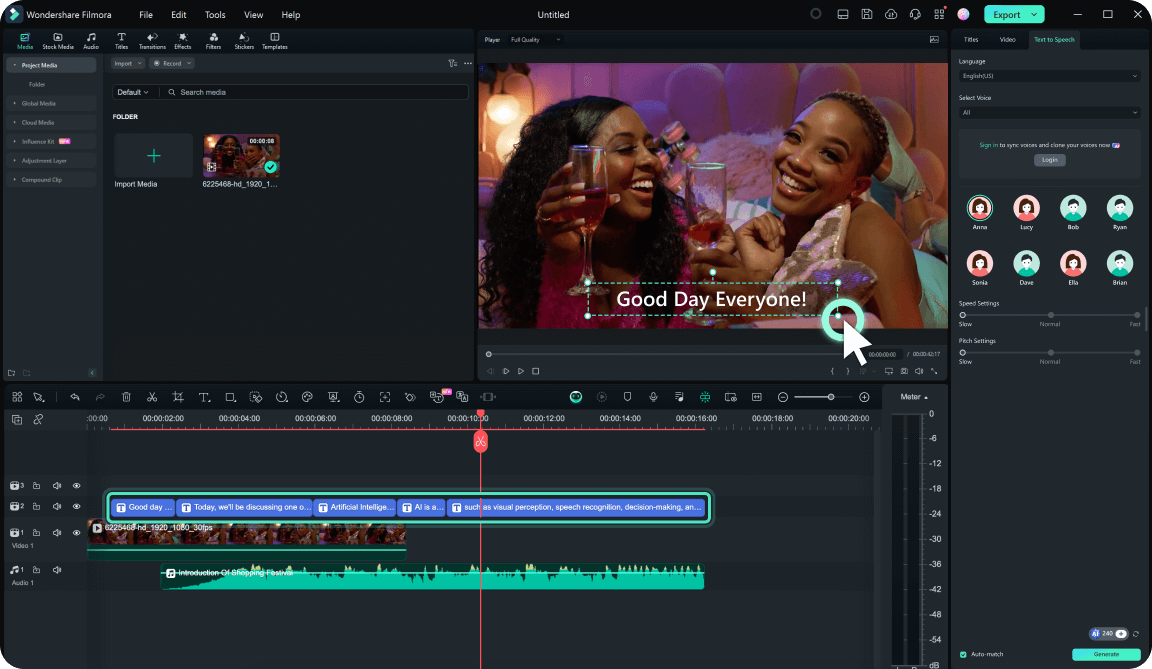
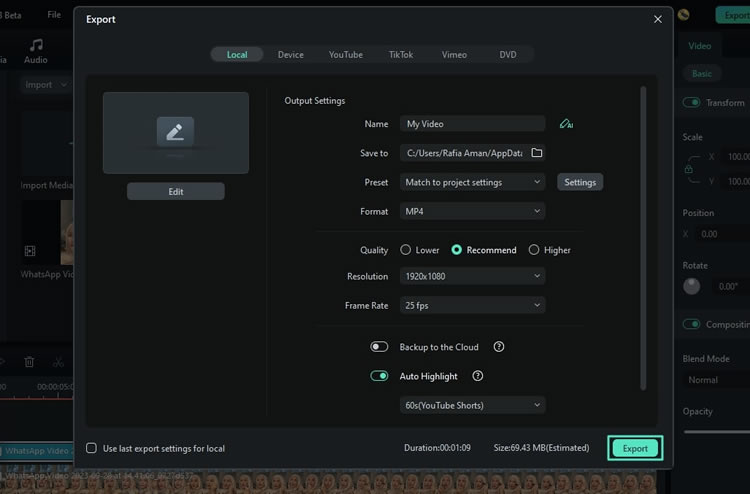
Once the voiceover has been generated, you can continue using Filmora to edit both the captions and the voiceovers however you see fit. When you’re done, click Export and save your video locally or upload it directly to your TikTok account.
Bonus: How to Edit TikTok Videos Using Text
If you need help generating and editing your videos for TikTok, Filmora offers many tools to help you out. Here’s how you can use this tool to perfect your video content before publishing by editing nothing but the text it contains:
Step 1: Launch Filmora and register your account;
Step 2: Go to Create Project > AI Text Based Editing;
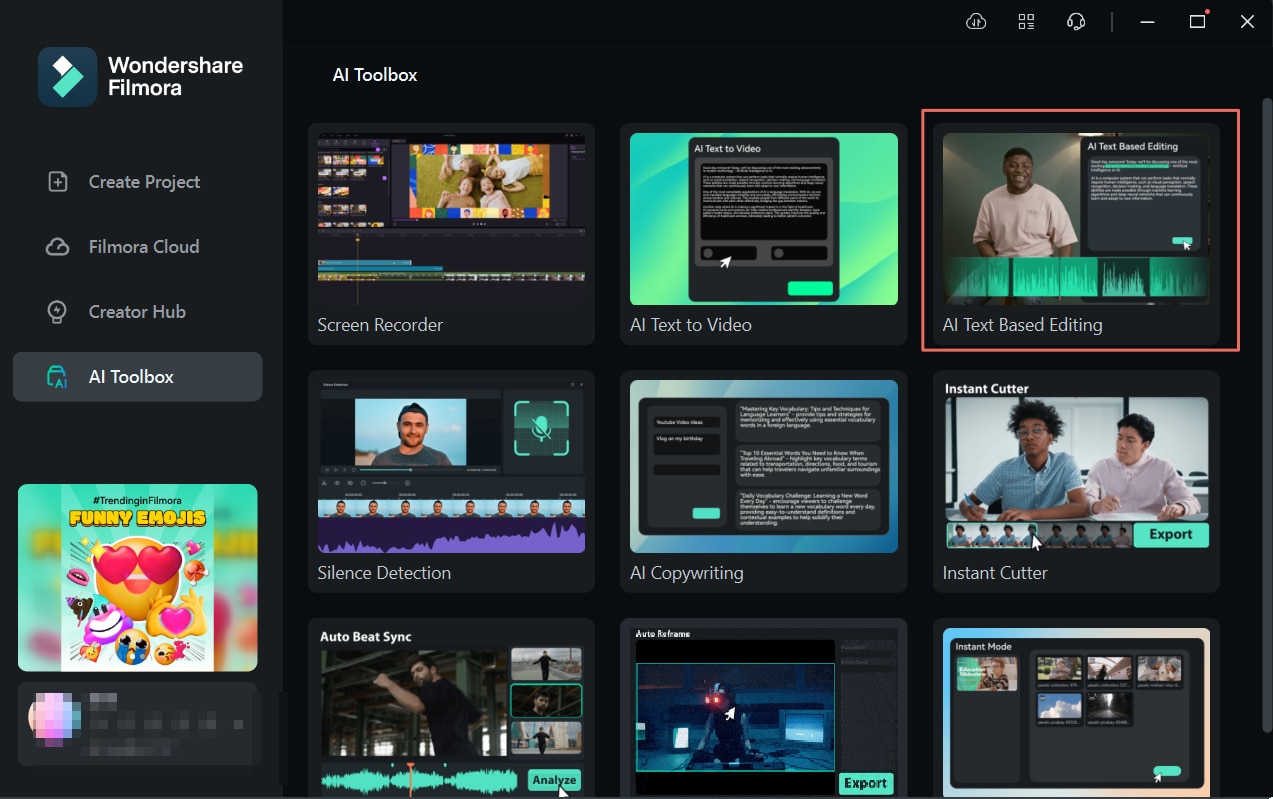
Step 3: In the new window that opens, select the video you want to edit, then click Text-based editing > Ok;
Step 4: Wait for your video to transcribe;
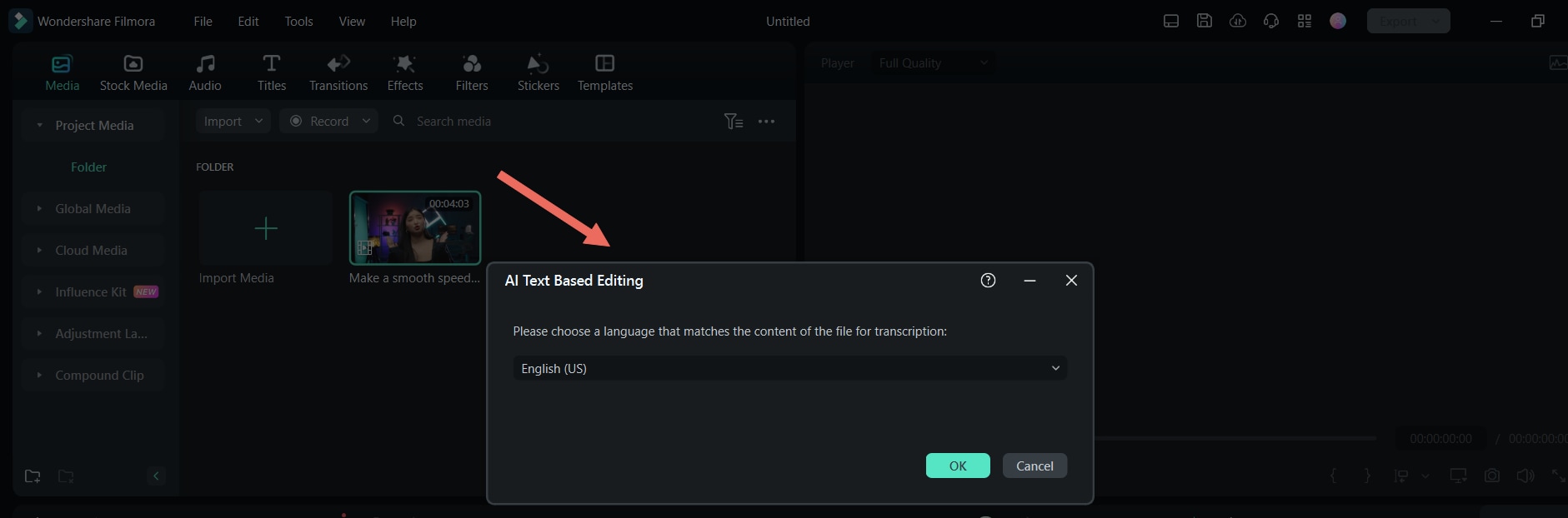
Step 5: Start editing your video by deleting the text you don’t want to be included in your content;
Step 6: If needed, select Delete all silent clips to remove parts of your video where you aren’t speaking;
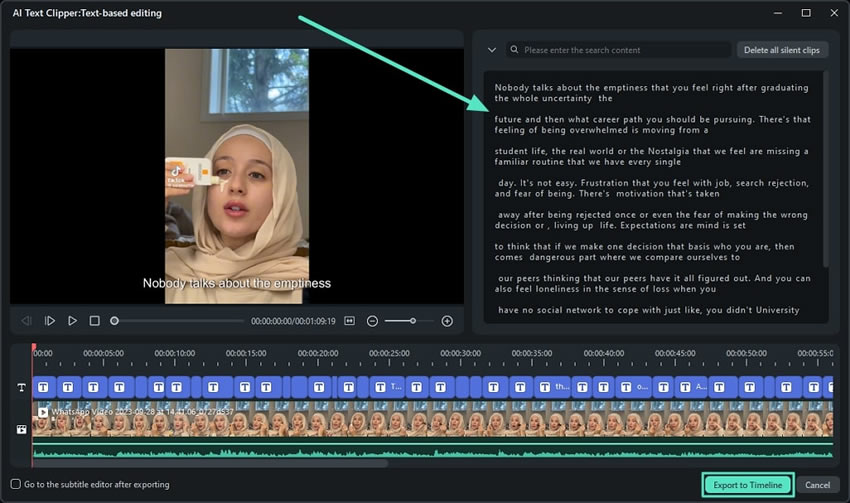
Step 7: Click Export to Timeline;
Step 8: If needed, make additional edits to the clip, then click Export to save or share it.
Popular Trends on TikTok That Use Voice Generators
Voice generators exist in virtually all types of TikTok content. Some of the hottest voiceover trends at the moment include:
- Cooking video voiceovers
- Reddit story voiceovers
- POV voiceovers
- Pet thought voiceovers
- Brat summer voiceovers
- Makeup tutorial voiceovers
- DIY project voiceovers
- Renovation voiceovers
- Book excerpt voiceovers
- Training voiceovers
These are just some of the examples that are trending at the moment. As mentioned, there’s virtually no TikTok video that doesn’t include voiceovers. The only exception is reused audio from popular clips like “Very demure. Very mindful”, “Barbara’s Rhubarb Bar”, “Nobody knows me like you do”, and the like.
Conclusion
Using the TikTok voice generator is a must if you want your content to grab attention. It’s convenient, fun, and engaging – and your audience will love it.
If you aren’t satisfied with the voiceover options available directly on TikTok, you can always use third-party tools like Wondershare Filmora, Speechify, or PlayHT to add more of your personal touch to your content and enjoy more flexibility and versatility with TTS.
